Join us at FabCon Atlanta from March 16 - 20, 2026, for the ultimate Fabric, Power BI, AI and SQL community-led event. Save $200 with code FABCOMM.
Register now!The Power BI Data Visualization World Championships is back! Get ahead of the game and start preparing now! Learn more
Hi Guys,
I would like to seek for help on issue below:
My dataset is breakdown to daily, PIC, Stores and Item of Qty Sold.
| Date | PIC ID | Store ID | Item | Qty Sold |
| 1-Jan | 7001A | A01 | Apple Pie | 75 |
| 2-Jan | 7001A | A01 | Apple Pie | 64 |
| 3-Jan | 7001A | A01 | Apple Pie | 10 |
| 4-Jan | 7001A | A01 | Apple Pie | 46 |
| 1-Jan | 7001A | A02 | Apple Pie | 28 |
| 2-Jan | 7001A | A02 | Apple Pie | 17 |
| 3-Jan | 7001A | A02 | Apple Pie | 92 |
| 4-Jan | 7001A | A02 | Apple Pie | 61 |
| 5-Jan | 7001A | A02 | Apple Pie | 61 |
| 17-Jan | 7002E | A03 | Apple Pie | 93 |
| 18-Jan | 7002E | A03 | Apple Pie | 19 |
| 19-Jan | 7002E | A03 | Apple Pie | 79 |
| 20-Jan | 7002E | A03 | Apple Pie | 67 |
| 1-Jan | 7001A | A01 | Banana Cake | 92 |
| 3-Jan | 7001A | A01 | Banana Cake | 91 |
| 1-Jan | 7001A | A02 | Banana Cake | 49 |
| 2-Jan | 7001A | A02 | Banana Cake | 27 |
| 3-Jan | 7001A | A02 | Banana Cake | 57 |
| 4-Jan | 7001A | A02 | Banana Cake | 71 |
| 5-Jan | 7001A | A02 | Banana Cake | 25 |
| 31-Jan | 7002E | A03 | Banana Cake | 29 |
Currently the requirement is to get the average of qty sold by Item per day. For example, on 1st Jan, Apple Pie is sold in 2 stores, however calculate by item per day is should count as 1 day. Therefore average of qty sold by Apple Pie per day is Total Qty Sold of Apple Pie divided by 9 days (1st Jan-5th Jan & 17th Jan-20th Jan).
In Power Query Editor > "Group by" table for column Item and Date and count Sum of Qty Sold, I am able to get the calculation i wanted by using AVERAGE in Dax in Summarize Table. However my Report have Filters to select Store and PIC. Since Summarize Table no longer breakdown to Store and PIC mean the table relationship is unable to detect and the filter interaction does not works.
Kindly provide some ideas or workaround for this issue.
Thank you. I am greatly appreciate on your help.
Regards,
Yit_Lim
Solved! Go to Solution.
Hi @Anonymous ,
Based on your descrition, you can create this measure:
Average =
VAR s1 =
CALCULATE (
SUM ( 'Table'[Qty Sold] ),
FILTER ( ALL ( 'Table' ), 'Table'[Item] IN DISTINCT ( 'Table'[Item] ) )
)
VAR s2 =
CALCULATE (
DISTINCTCOUNT ( 'Table'[Date] ),
FILTER ( ALL ( 'Table' ), 'Table'[Item] IN DISTINCT ( 'Table'[Item] ) )
)
RETURN
s1 / s2
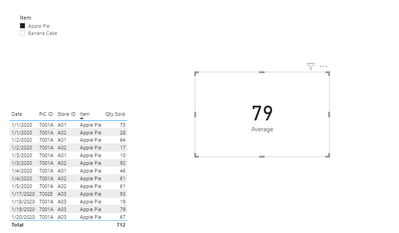
Show it in the card visual and use the Item slicer to filter it:
Attached a sample file in the below, hopes to help you.
Best Regards,
Yingjie Li
If this post helps then please consider Accept it as the solution to help the other members find it more quickly.
Hi @Anonymous ,
Based on your descrition, you can create this measure:
Average =
VAR s1 =
CALCULATE (
SUM ( 'Table'[Qty Sold] ),
FILTER ( ALL ( 'Table' ), 'Table'[Item] IN DISTINCT ( 'Table'[Item] ) )
)
VAR s2 =
CALCULATE (
DISTINCTCOUNT ( 'Table'[Date] ),
FILTER ( ALL ( 'Table' ), 'Table'[Item] IN DISTINCT ( 'Table'[Item] ) )
)
RETURN
s1 / s2
Show it in the card visual and use the Item slicer to filter it:
Attached a sample file in the below, hopes to help you.
Best Regards,
Yingjie Li
If this post helps then please consider Accept it as the solution to help the other members find it more quickly.
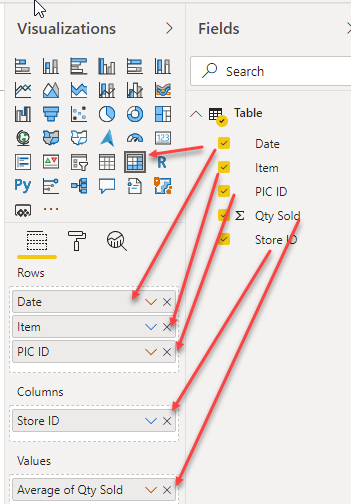
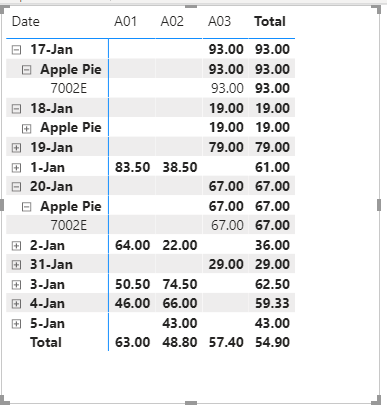
Did you try to use a Matrix
Where you can have the Date as the first Items in Rows, followed by Item, and PIC ID and you can have the Store ID in Columns and choose Average of Qty Sold for Values.
The Power BI Data Visualization World Championships is back! Get ahead of the game and start preparing now!
Check out the November 2025 Power BI update to learn about new features.
| User | Count |
|---|---|
| 59 | |
| 46 | |
| 42 | |
| 23 | |
| 18 |
| User | Count |
|---|---|
| 193 | |
| 123 | |
| 99 | |
| 67 | |
| 49 |