Don't miss your chance to take the Fabric Data Engineer (DP-700) exam on us!
Learn moreNext up in the FabCon + SQLCon recap series: The roadmap for Microsoft SQL and Maximizing Developer experiences in Fabric. All sessions are available on-demand after the live show. Register now
Hi,
How do you get the same formula "product" from excel on power bi?
I have this measure that calculates the ratio of two dates and then I took a few different averages from this ratio measure like AVG 3, AVG 6.
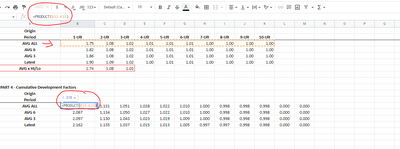
My question is: How can I get the product of the average row?
here is my excel and power bi link: https://drive.google.com/drive/folders/1tw2kxHBZ93OjckLULVxbonYXQaWjPDld?usp=sharing
Thanks in advance for the help.
Michelle
Hi @mluanacruz ,
In DAX, there is the same PRODUCT function as in Excel. But it returns the product of the numbers in a column not a row.
PRODUCT function (DAX) - DAX | Microsoft Learn
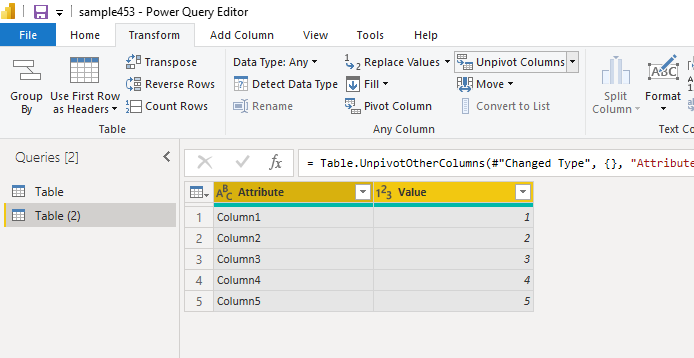
You may first unpivot the columns to make rows convert to one column.
Best Regards,
Stephen Tao
If this post helps, then please consider Accept it as the solution to help the other members find it more quickly.
Hi @mluanacruz,
You can use:
Product = IF('Table'[Period]="AVG 3", 'Table'[1-Ult],0) * IF('Table'[Period]="AVG 6", 'Table'[1-Ult],0)
Works for you? Mark this post as a solution if it does!
Check out this blog of mine: How to Export Telemetry Data from Azure IoT Central into Power BI
Hi @Shaurya ,
Thanks for the help.
I am trying to understand your measure. Did you have time to take a look at my Power BI one drive?
Product = IF('Table'[Period]="AVG 3", 'Table'[1-Ult],0) * IF('Table'[Period]="AVG 6", 'Table'[1-Ult],0)1) Are you multiplying the AVG 3 * AVG 6? Because my end goal is to get the product of the whole Average 3 row, like the picture, I attached below:
2) Table[period] and Table[1-Ult] - Will the period be the date I am using? but what is Table[1-Ult]?
I am trying to understand a little bit better what you did.
Thanks again for the help.
If you have recently started exploring Fabric, we'd love to hear how it's going. Your feedback can help with product improvements.
A new Power BI DataViz World Championship is coming this June! Don't miss out on submitting your entry.
Share feedback directly with Fabric product managers, participate in targeted research studies and influence the Fabric roadmap.
| User | Count |
|---|---|
| 50 | |
| 44 | |
| 41 | |
| 18 | |
| 18 |
| User | Count |
|---|---|
| 69 | |
| 68 | |
| 32 | |
| 32 | |
| 32 |