Join us at FabCon Atlanta from March 16 - 20, 2026, for the ultimate Fabric, Power BI, AI and SQL community-led event. Save $200 with code FABCOMM.
Register now!View all the Fabric Data Days sessions on demand. View schedule
Hi all - I'm having some difficulty figuring this one out.
I need to calculate how many patients a doctor see's per day which is easy enough in a matrix visual. But with that data, I then need to find out how many days a doctor worked each month based on the number of patients they saw in a day. And, to make things more difficult, that is different for each doctor.
For Dr 1, we only count a day as worked if the doctor saw 3 or more patients. For Dr 2 and Dr 3, we only count a day as worked if they saw 2 or more patients.
Here is a table with sample data. I have a seperate date table that is linked on Appointment Date:
| AppointmentDate | AppointmentResource | Patient Name |
| 10/02/20 | Dr 1 | Pt 26 |
| 10/02/20 | Dr 2 | Pt 43 |
| 10/02/20 | Dr 2 | Pt 44 |
| 10/02/20 | Dr 3 | Pt 25 |
| 10/02/20 | Dr 3 | Pt 37 |
| 10/02/20 | Dr 1 | Pt 38 |
| 10/02/20 | Dr 1 | Pt 30 |
| 10/09/20 | Dr 3 | Pt 48 |
| 10/10/20 | Dr 2 | Pt 39 |
| 10/10/20 | Dr 1 | Pt 40 |
| 10/10/20 | Dr 3 | Pt 46 |
| 10/10/20 | Dr 1 | Pt 35 |
| 10/10/20 | Dr 1 | Pt 36 |
| 10/10/20 | Dr 3 | Pt 47 |
| 10/13/20 | Dr 3 | Pt 33 |
| 10/13/20 | Dr 3 | Pt 49 |
| 10/16/20 | Dr 1 | Pt 27 |
| 10/23/20 | Dr 2 | Pt 31 |
| 10/23/20 | Dr 2 | Pt 45 |
| 10/23/20 | Dr 2 | Pt 34 |
| 10/23/20 | Dr 2 | Pt 50 |
| 10/23/20 | Dr 1 | Pt 29 |
| 10/23/20 | Dr 1 | Pt 32 |
| 10/23/20 | Dr 2 | Pt 41 |
| 10/23/20 | Dr 3 | Pt 42 |
| 10/23/20 | Dr 3 | Pt 28 |
| 11/02/20 | Dr 1 | Pt 12 |
| 11/02/20 | Dr 2 | Pt 18 |
| 11/02/20 | Dr 1 | Pt 16 |
| 11/02/20 | Dr 3 | Pt 23 |
| 11/02/20 | Dr 2 | Pt 6 |
| 11/02/20 | Dr 2 | Pt 9 |
| 11/02/20 | Dr 1 | Pt 22 |
| 11/05/20 | Dr 3 | Pt 9 |
| 11/10/20 | Dr 1 | Pt 22 |
| 11/10/20 | Dr 2 | Pt 14 |
| 11/10/20 | Dr 2 | Pt 1 |
| 11/10/20 | Dr 1 | Pt 7 |
| 11/10/20 | Dr 3 | Pt 21 |
| 11/10/20 | Dr 2 | Pt 24 |
| 11/11/20 | Dr 2 | Pt 11 |
| 11/11/20 | Dr 3 | Pt 2 |
| 11/11/20 | Dr 3 | Pt 4 |
| 11/11/20 | Dr 3 | Pt 20 |
| 11/11/20 | Dr 1 | Pt 15 |
| 11/11/20 | Dr 2 | Pt 5 |
| 11/17/20 | Dr 2 | Pt 11 |
| 11/17/20 | Dr 2 | Pt 13 |
| 11/17/20 | Dr 1 | Pt 3 |
| 11/17/20 | Dr 1 | Pt 17 |
| 11/17/20 | Dr 2 | Pt 14 |
| 11/17/20 | Dr 3 | Pt 10 |
| 11/17/20 | Dr 1 | Pt 19 |
| 11/17/20 | Dr 2 | Pt 8 |
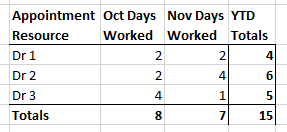
The results I am looking for are:
I have a measure that calculates the days worked, but can't figure out how to make it filter out days that have less than 3 appointments for Dr 1, and less than 2 appointments for Dr 2 and Dr 3:
Solved! Go to Solution.
Hi @Reine ,
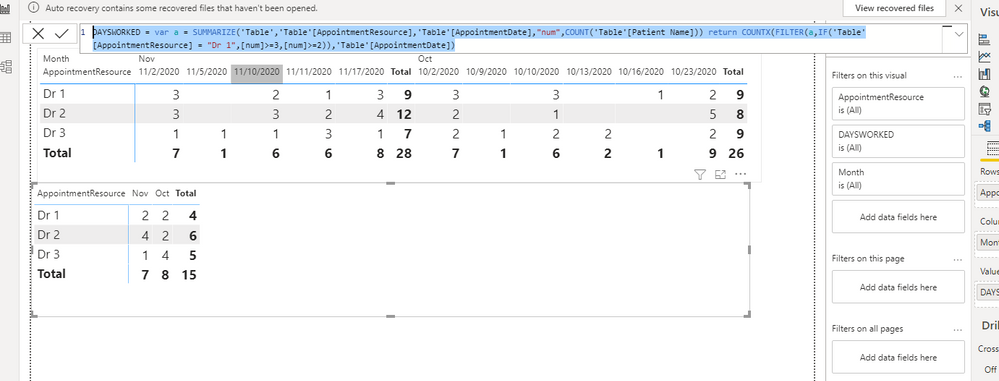
Would you please try to use the following measure :
DAYSWORKED =
VAR a =
SUMMARIZE (
'Table',
'Table'[AppointmentResource],
'Table'[AppointmentDate],
"num", COUNT ( 'Table'[Patient Name] )
)
RETURN
COUNTX (
FILTER (
a,
IF ( 'Table'[AppointmentResource] = "Dr 1", [num] >= 3, [num] >= 2 )
),
'Table'[AppointmentDate]
)
For more details, please refer to the sample pbix :https://qiuyunus-my.sharepoint.com/:u:/g/personal/pbipro_qiuyunus_onmicrosoft_com/EXjEkwY5GtxPn-kgsZ...
If this post helps, then please consider Accept it as the solution to help the other members find it more quickly.
Best Regards,
Dedmon Dai
@v-deddai1-msft thank you so much! This works perfectly.
Both replies are so helpful to my learning and understanding of PBI and DAX. I greatly appreciate your time!
May the new year bring you much joy 🙂
Hi @Reine ,
Would you please try to use the following measure :
DAYSWORKED =
VAR a =
SUMMARIZE (
'Table',
'Table'[AppointmentResource],
'Table'[AppointmentDate],
"num", COUNT ( 'Table'[Patient Name] )
)
RETURN
COUNTX (
FILTER (
a,
IF ( 'Table'[AppointmentResource] = "Dr 1", [num] >= 3, [num] >= 2 )
),
'Table'[AppointmentDate]
)
For more details, please refer to the sample pbix :https://qiuyunus-my.sharepoint.com/:u:/g/personal/pbipro_qiuyunus_onmicrosoft_com/EXjEkwY5GtxPn-kgsZ...
If this post helps, then please consider Accept it as the solution to help the other members find it more quickly.
Best Regards,
Dedmon Dai
@Reine Well, first I would create a table with the doctor's ID and the number of patients per day that constitutes a "work day". You should then be able to more or less replicate your matrix display as a table by using GENERATE to create a Cartesian product (as a table VAR) of your doctors and your dates. Use ADDCOLUMNS to add a column for the number of patients seen by that doctor on that day. Then you can use LOOKUPVALUE to grab the number of patients in a day that count as a work day. FILTER your table by that number <= and COUNTROWS.
@Greg_Deckler
Thank you Greg. I'm afraid my PBI and DAX knowledge is pretty basic so I only understand part of this 🙂 I created the separate table "Doctor Count as Day" with 2 columns: doctor's ID and the number of patients per day that constitutes a "work day". If I understand correctly, I should now create a new table using GENERATE to combine my Date table and the new "Doctor Count as Day" table, is that right?
Check out the November 2025 Power BI update to learn about new features.
Advance your Data & AI career with 50 days of live learning, contests, hands-on challenges, study groups & certifications and more!