I am having trouble with interpreting an audit trail. The ultimate goal is to have a time slicer that allows the report user to see what the data looked like at any point in the past. Because I'm struggling, I'm taking a staged approach:
- reproduce the live report by referring to the last record of every category, but from the audit trail (done)
- reproduce the report at a fixed point in time (trouble with this)
- create a dynamic timeline on one page (future ambition, a different issue to solve with 'calculate' and 'allexcept')
The real table has dozens of columns, but I hope that the information here will be adequate. I started with creating a new table with a summarize command. Then I improved the code a bit to be more accurate and flexible, and used CalculateTable:
2022Q2 =
VAR _filter = Filter(View, TRUE())
//VAR _filter = Filter(View, value(View[Date]) < Value(DATE(2022,07,01)))
RETURN
CalculateTable(View,
    _filter,
    filter(View,
        View[Version] = MaxX(
           Filter(_filter, (View[Key] = Earlier(View[Key]))),
           View[Version]
        )
    )
)
Because the date is in the future, I can interchange the commented code with the VAR line and get the same, expected, result.
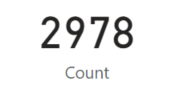
When I change the date to something in the past, I am dropping records incorrectly.
2021Q4 =
VAR _filter = filter(View, value(View[Date]) < Value(DATE(2022,01,01)))
RETURN
CalculateTable(View,
    _filter,
    filter(View,
       View[Version] = MaxX(
           filter(_filter, (View[Key] = earlier(View[Key]))),
           View[Version]
        )
    )
)
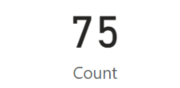
The expected number should be over 1000 records. This count of 75 shows the records that were not updated this year - the records which have a max version before the filter date.
I would appreciate assistance in fixing the formula for creating tables at a fixed point in time.


