cancel
Showing results for 
Search instead for 
Did you mean: 

The Power BI Data Visualization World Championships is back! Get ahead of the game and start preparing now! Learn more

Reply
Shakeerm
Helper II
Helper II

How to get the Total Sum of Time to Y Axis

Hey Guys

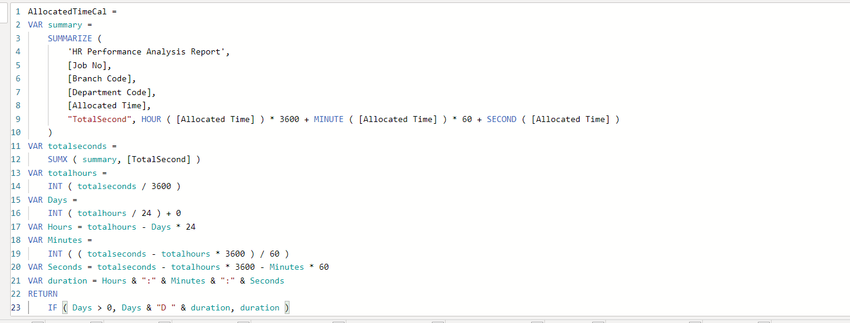
i have a Measure which Summarizes the time as below and it shows the Total Time for a User


Allocated Time.png


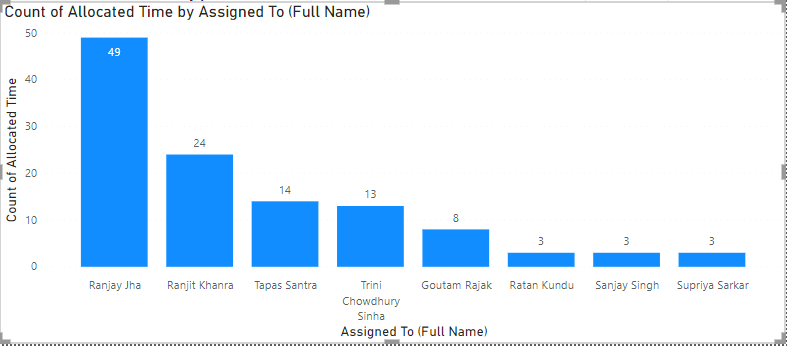
i need to show the same Total TIme on the Y Axis of a Bar Chart. Anyone can help me on this please. 

Tried a few DAX Measures but i'm only getting the Count. Instead i need to show the sum of Time in HH:MM:SS. on the Y Axis against each User.


Allocated Time - Bar Chart.png

2 REPLIES 2
Anonymous
Not applicable

Hi @Shakeerm,

The Y axis of the bar chart only supports Numeric type values, and the data type of returned measure "AllocatedTimeCal" value is Text type...  So when you put that measure in the "Values" field of bar chart, the system automatically converts it to Count (AllocatedTimeCal) to make display as numeric type due to the limitation of numeric type values. As @mahoneypat suggested, you can update the formula of measure "AllocatedTimeCal", so that it eventually returns a decimal value based on hour or day. Then it can display on the Y axis of bar chart directly.

Currently Power BI does not yet support Duration type displayed on the Y axis. You can vote here and write down your comments to make it come true in the future.

Best Regards

Rena

mahoneypat
Microsoft Employee
Microsoft Employee

I think you might have to convert your totalseconds variable to Days and show that as a decimal (not intuitive for your viewers, but would show the values on Y axis).  You could have an adjacent summary table with your original measure to show them the actual values, so they don't have to do the conversion in their heads.


If this works for you, please mark it as solution.  Kudos are appreciated too.  Please let me know if not.

Regards,

Pat


Did I answer your question? Mark my post as a solution! Kudos are also appreciated!

To learn more about Power BI, follow me on Twitter or subscribe on YouTube.


@mahoneypa HoosierBI on YouTube


Helpful resources

Announcements
Power BI DataViz World Championships

Power BI Dataviz World Championships

The Power BI Data Visualization World Championships is back! Get ahead of the game and start preparing now!

December 2025 Power BI Update Carousel

Power BI Monthly Update - December 2025

Check out the December 2025 Power BI Holiday Recap!

FabCon Atlanta 2026 carousel

FabCon Atlanta 2026

Join us at FabCon Atlanta, March 16-20, for the ultimate Fabric, Power BI, AI and SQL community-led event. Save $200 with code FABCOMM.