




Join us at FabCon Atlanta from March 16 - 20, 2026, for the ultimate Fabric, Power BI, AI and SQL community-led event. Save $200 with code FABCOMM.
Register now!The Power BI Data Visualization World Championships is back! Get ahead of the game and start preparing now! Learn more
Hi All,
I have a dataset which is in "Year Month" column combination such as “2017-07”.
I have created 2 calculated columns and used Year and Month DAX functions. It works fine.
But when I use Month Name and use Format function the date I get same information ("2017-07") for that new column as shown.
How could I get a Month Name using DAX?
Any help would be highly appreciated.
Solved! Go to Solution.
Thanks @thiagopinho for your reply ...
My issue was this actually
Dataset has string value “Year-Month”
So I used CONCATENATE, YEAR, MONTH and DATEVALUE DAX functions to achieve this
Thanks!
Hey Sandy, 🙂
What did you use to create that "Month Name" column??
to get the month names you may do something like this,
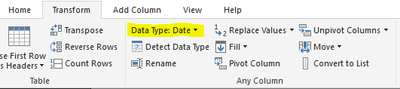
Transform that "Month Name" column to Date type,
To transform to Date type
and then extract the month name of it.
Date>Month>Name of Month
Thanks @thiagopinho for your reply ...
My issue was this actually
Dataset has string value “Year-Month”
So I used CONCATENATE, YEAR, MONTH and DATEVALUE DAX functions to achieve this
Thanks!
@Anonymous,
You have solved this issue, right? If so, you can accept your reply as answer to close this thread. You can also create Month Name column using DAX below.
MonthName = SWITCH(Table[Month], 1,"Jan", 2,"Feb", 3,"Mar", 4,"Apr", 5,"May", 6,"Jun", 7,"Jul", 8,"Aug", 9,"Sep", 10,"Oct", 11,"Nov", 12,"Dec" )
Regards,
Lydia
@Anonymous Thanks for suggestion.
The Power BI Data Visualization World Championships is back! Get ahead of the game and start preparing now!
Check out the November 2025 Power BI update to learn about new features.
| User | Count |
|---|---|
| 59 | |
| 43 | |
| 42 | |
| 23 | |
| 17 |
| User | Count |
|---|---|
| 190 | |
| 122 | |
| 96 | |
| 66 | |
| 47 |