cancel
Showing results for 
Search instead for 
Did you mean: 

The Power BI Data Visualization World Championships is back! Get ahead of the game and start preparing now! Learn more

Reply
frame242
Microsoft Employee
Microsoft Employee

How to get schedule data from MS Project Online to PowerBI

Hello,


I created a new MS Project Online and I connected that to my MS Project (Desktop).


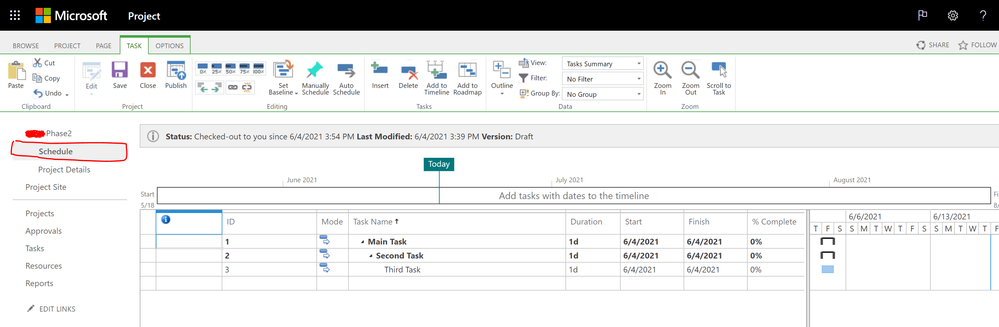
Now, I see the schedule data in MS Project Online but I cannot get the schedule data to PowerBI through the API.


Can someone let me know how I can get my schedule data from Project Online to PowerBI?


Thanks!

1 ACCEPTED SOLUTION
v-easonf-msft
Community Support
Community Support

Hi,  @frame242 

You can try to use the Project Power BI template to import and analyze data from Project for the web and Project Online into Power BI.The template is designed to help you quickly connect to your Dataverse instance in Dynamics 365 where your Project for the web data is stored, as well as connect to your Project Web App tenant in Office 365. You will be able to download a variety of data to visually explore and monitor all the key aspects of your PPM deployment. There are multiple visually rich report pages for the portfolio, resource, and project overview.


Please refer to  this document for more details.

connect-to-project-for-the-web-data-through-powerbi-desktop 


You can also try to connect to Project Online with OData.

desktop-project-online-connect-to-data 


Project Online Power BI Template App:

project Online template file


Best Regards,
Community Support Team _ Eason

View solution in original post

2 REPLIES 2
v-easonf-msft
Community Support
Community Support

Hi,  @frame242 

You can try to use the Project Power BI template to import and analyze data from Project for the web and Project Online into Power BI.The template is designed to help you quickly connect to your Dataverse instance in Dynamics 365 where your Project for the web data is stored, as well as connect to your Project Web App tenant in Office 365. You will be able to download a variety of data to visually explore and monitor all the key aspects of your PPM deployment. There are multiple visually rich report pages for the portfolio, resource, and project overview.


Please refer to  this document for more details.

connect-to-project-for-the-web-data-through-powerbi-desktop 


You can also try to connect to Project Online with OData.

desktop-project-online-connect-to-data 


Project Online Power BI Template App:

project Online template file


Best Regards,
Community Support Team _ Eason

Hi Community Support,

Thanks for sharing this information.


I am trying to get the schedule data from Project Online using the API connection. Unfortunately I am unable to see this data there.


Do you know how I can get access to this data from PowerBI? (refer to image below)


Thanks!


Schedule Data example1.PNG

Helpful resources

Announcements
Power BI DataViz World Championships

Power BI Dataviz World Championships

The Power BI Data Visualization World Championships is back! Get ahead of the game and start preparing now!

December 2025 Power BI Update Carousel

Power BI Monthly Update - December 2025

Check out the December 2025 Power BI Holiday Recap!

FabCon Atlanta 2026 carousel

FabCon Atlanta 2026

Join us at FabCon Atlanta, March 16-20, for the ultimate Fabric, Power BI, AI and SQL community-led event. Save $200 with code FABCOMM.