cancel
Showing results for 
Search instead for 
Did you mean: 

Get Fabric Certified for FREE during Fabric Data Days. Don't miss your chance! Request now

Reply
Anonymous
Not applicable

How to get ranks based on power BI report views

Hi,

Im trying to get ranks based on the views count on reports in workspaces.I tried so many ways and can someone help me to get the ranks based on the view count.I got views,

viewS = IF(Usage[Activity]="ViewReport"|| Usage[Activity]="ViewDashboard",1,0)
View count= 
CALCULATE(COUNT(Usage[viewS]))
I want to get ranks based on the view count. Can someone correct me if my view count KPI is wrong? and also help me to get the ranks.
Thanks


1 ACCEPTED SOLUTION
Anonymous
Not applicable

Hi @Anonymous ,

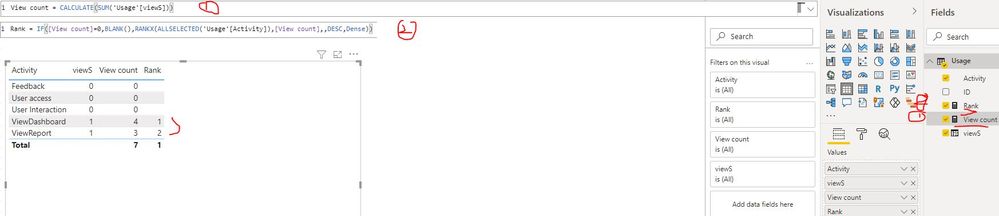
First, please update the formula of your measure [View count] as below:

View count= CALCULATE(SUM(Usage[viewS]))

Then create a measure as below:

Rank = IF([View count]=0,BLANK(),RANKX(ALLSELECTED('Usage'[Activity]),[View count],,DESC,Dense))​

How to get ranks based on power BI report views.JPG

If the above one is not what you want, please provide some sample and your expected result with sample or screenshot. Thank you.

Best Regards


View solution in original post

2 REPLIES 2
Anonymous
Not applicable

Hi @Anonymous ,

First, please update the formula of your measure [View count] as below:

View count= CALCULATE(SUM(Usage[viewS]))

Then create a measure as below:

Rank = IF([View count]=0,BLANK(),RANKX(ALLSELECTED('Usage'[Activity]),[View count],,DESC,Dense))​

How to get ranks based on power BI report views.JPG

If the above one is not what you want, please provide some sample and your expected result with sample or screenshot. Thank you.

Best Regards


amitchandak
Super User
Super User

@Anonymous , First you have return blank, as 0 will also count 1


viewS = IF(Usage[Activity]="ViewReport"|| Usage[Activity]="ViewDashboard",1,blank)


This should count correct  now

View count=
CALCULATE(COUNT(Usage[viewS]))


for rank

rankx(Allselected(Usage), [View count])


or refer

For Rank Refer to these links
https://radacad.com/how-to-use-rankx-in-dax-part-2-of-3-calculated-measures
My Video : https://www.youtube.com/watch?v=DZb_6j6WuZ0

Share with Power BI Enthusiasts: Full Power BI Video (20 Hours) YouTube
Microsoft Fabric Series 60+ Videos YouTube
Microsoft Fabric Hindi End to End YouTube

Helpful resources

Announcements
November Power BI Update Carousel

Power BI Monthly Update - November 2025

Check out the November 2025 Power BI update to learn about new features.

Fabric Data Days Carousel

Fabric Data Days

Advance your Data & AI career with 50 days of live learning, contests, hands-on challenges, study groups & certifications and more!

FabCon Atlanta 2026 carousel

FabCon Atlanta 2026

Join us at FabCon Atlanta, March 16-20, for the ultimate Fabric, Power BI, AI and SQL community-led event. Save $200 with code FABCOMM.

Top Solution Authors
Top Kudoed Authors