cancel
Showing results for 
Search instead for 
Did you mean: 

View all the Fabric Data Days sessions on demand. View schedule

Reply
M_OConnor
Helper I
Helper I

How to 'get' rank data to show a user's performance rank.

Hi there, I am trying to get something that works a bit like following picture below (I have a more complex table). I swear I am so close.


So far I have successfully:

1. Ranked all my users based on their performance (in my example below I'm using apples to show this)

... 

I want to:

2. Get the value of the rank from the user who is logged in and concatinate that to a string that says something like 'rank x'.


I'm just finding it VERY hard to say "Get the rank value of this specific person when they are logged in.":
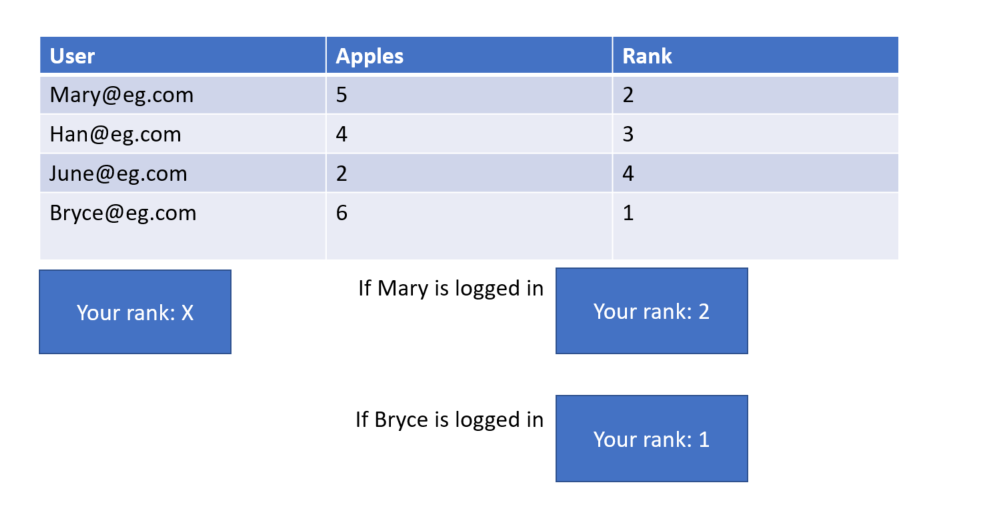
image.png


Without going into too much detail, I cannot rely on SQL to rank these values because month, day and year filters also come into the equation (in the larger picture), which complicates the hell out of things. I also cannot use a report level filter upon each of these roles because thten the RANX won't work properly (as none of the other users would then exist).


Here's what I'm doing in DAX. The result of the following just gives me 1/4 no matter who is viewing: 


AppleCount = MIN('Users'[Apples])


Apple_Ranking = RANKX(all('Users'[User_Email]),[AppleCount],,DESC)
FormattedRank = FORMAT(Users[Apple_Ranking], Users[Apple_Ranking])


UsersRank = CONCATENATE(CALCULATE(VALUE('Users'[Apple_Ranking]), FILTER(Users, Users[User_Email] = USERNAME())),"/4")


2 ACCEPTED SOLUTIONS
Zubair_Muhammad
Community Champion
Community Champion

Hi @M_OConnor


Give this a shot please


UsersRank =
CONCATENATE (
    CALCULATE ( VALUE ( Users[Apple_Ranking] ), Users[User Email] = USERNAME () ),
    "/4"
)

View solution in original post

@Zubair_Muhammad thanks for the suggestion. I will test this out tomorrow when I'm in front of my environment and let you know as soon as I try this.


Take care

M

View solution in original post

3 REPLIES 3
Zubair_Muhammad
Community Champion
Community Champion

Hi @M_OConnor


Give this a shot please


UsersRank =
CONCATENATE (
    CALCULATE ( VALUE ( Users[Apple_Ranking] ), Users[User Email] = USERNAME () ),
    "/4"
)

@Zubair_Muhammad you just solved an issue that was going on for quite some time! Thank you.

@Zubair_Muhammad thanks for the suggestion. I will test this out tomorrow when I'm in front of my environment and let you know as soon as I try this.


Take care

M

Helpful resources

Announcements
November Power BI Update Carousel

Power BI Monthly Update - November 2025

Check out the November 2025 Power BI update to learn about new features.

Fabric Data Days Carousel

Fabric Data Days

Advance your Data & AI career with 50 days of live learning, contests, hands-on challenges, study groups & certifications and more!

FabCon Atlanta 2026 carousel

FabCon Atlanta 2026

Join us at FabCon Atlanta, March 16-20, for the ultimate Fabric, Power BI, AI and SQL community-led event. Save $200 with code FABCOMM.

Top Solution Authors
Top Kudoed Authors