
cancel
Showing results for 
Search instead for 
Did you mean: 

The Power BI Data Visualization World Championships is back! Get ahead of the game and start preparing now! Learn more

Reply
siroopm2020
Helper I
Helper I

How to get price comparison report

Dear All,


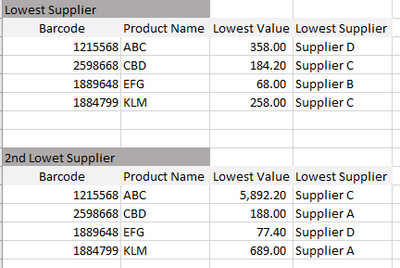
I have a price list from 4 suppliers. 


siroopm2020_0-1658735926106.png


I want to get the minimum unit price and respective supplier name and the second minimum unit price and respective supplier name as below.


siroopm2020_1-1658735926103.png


1 ACCEPTED SOLUTION

hello ! 


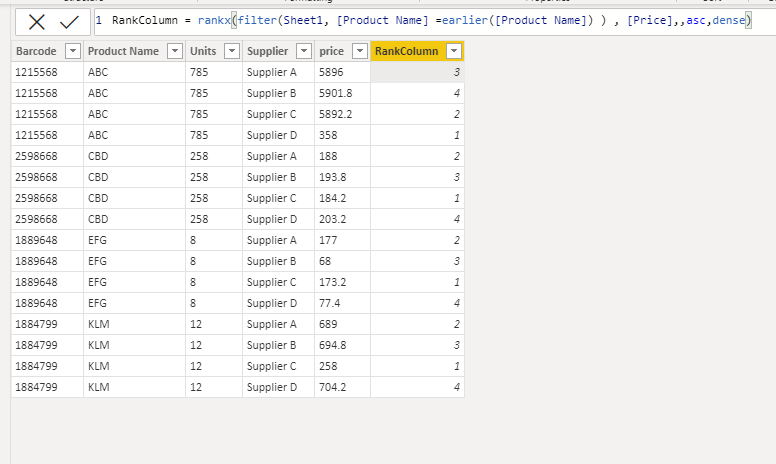
you should create calculation column 

SolomonovAnton_0-1658740255041.png


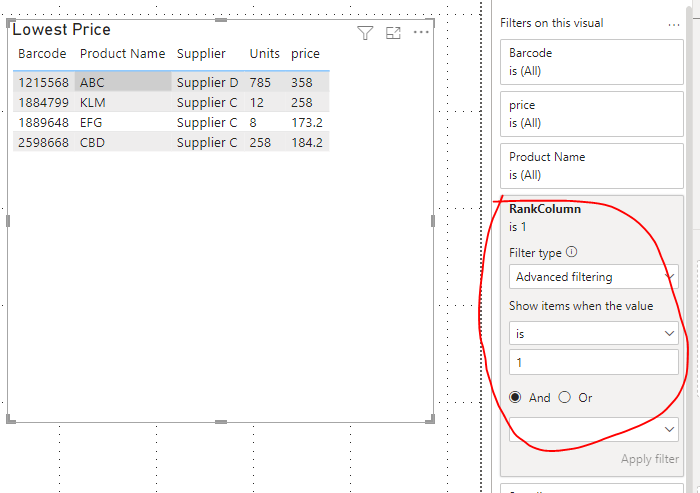
in visual table you should in Filter Panel  apply filter RanlColumn = 1 for get Lowest Price 

SolomonovAnton_1-1658740374390.png

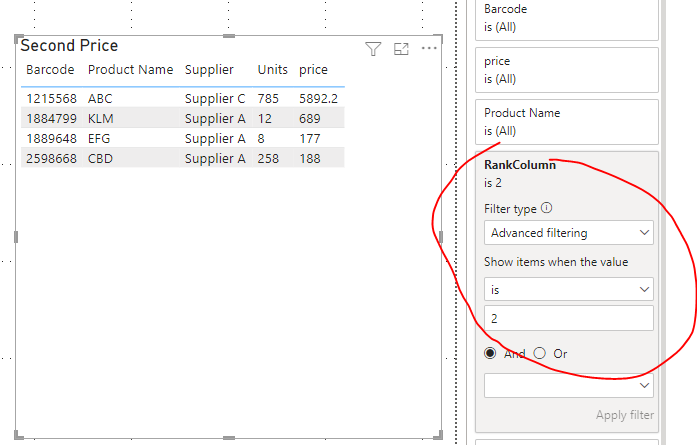
in visual table you should in Filter Panel  apply filter RanlColumn = 2 for get Second Price 

SolomonovAnton_2-1658740427677.png


if I answered at your question please mark topic as resolved 🙂


View solution in original post

6 REPLIES 6
amitchandak
Super User
Super User

@siroopm2020 ,

Unpivot the table in the power query, and then you can create rank for price.

You will have two columns, rename them as Supplier and price


Then create a rank like this


Rank = rankx(filter(Table, [supplier] =earlier([supplier]) && [Product Name] =earlier([Product Name]) ) , [Price],,asc,dense)


If this does not help
Can you share sample data and sample output in table format? Or a sample pbix after removing sensitive data.

Share with Power BI Enthusiasts: Full Power BI Video (20 Hours) YouTube
Microsoft Fabric Series 60+ Videos YouTube
Microsoft Fabric Hindi End to End YouTube

hello ! 


you should create calculation column 

SolomonovAnton_0-1658740255041.png


in visual table you should in Filter Panel  apply filter RanlColumn = 1 for get Lowest Price 

SolomonovAnton_1-1658740374390.png

in visual table you should in Filter Panel  apply filter RanlColumn = 2 for get Second Price 

SolomonovAnton_2-1658740427677.png


if I answered at your question please mark topic as resolved 🙂


how to avoid zero values columns while ranking?


Some results are wrong. Barcode 1889648 lowest must be 68, and second lowest 77.40


i corrected it, caz Data Type was text. Now its okey. Thank you. 

Helpful resources

Announcements
Power BI DataViz World Championships

Power BI Dataviz World Championships

The Power BI Data Visualization World Championships is back! Get ahead of the game and start preparing now!

December 2025 Power BI Update Carousel

Power BI Monthly Update - December 2025

Check out the December 2025 Power BI Holiday Recap!

FabCon Atlanta 2026 carousel

FabCon Atlanta 2026

Join us at FabCon Atlanta, March 16-20, for the ultimate Fabric, Power BI, AI and SQL community-led event. Save $200 with code FABCOMM.