Join us at FabCon Atlanta from March 16 - 20, 2026, for the ultimate Fabric, Power BI, AI and SQL community-led event. Save $200 with code FABCOMM.
Register now!Get Fabric Certified for FREE during Fabric Data Days. Don't miss your chance! Request now
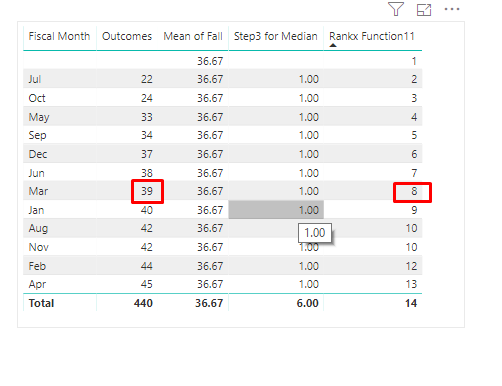
Above image 2 measure are there. I want 39 value which has Rank 8 highlighted with red color. Both Rank and Outcomes are measure according to Fiscal Month. I want only 39 value which has rank 8. I want it using measure.
Solved! Go to Solution.
Hi @mohittimpus ,
To create a measure as below.
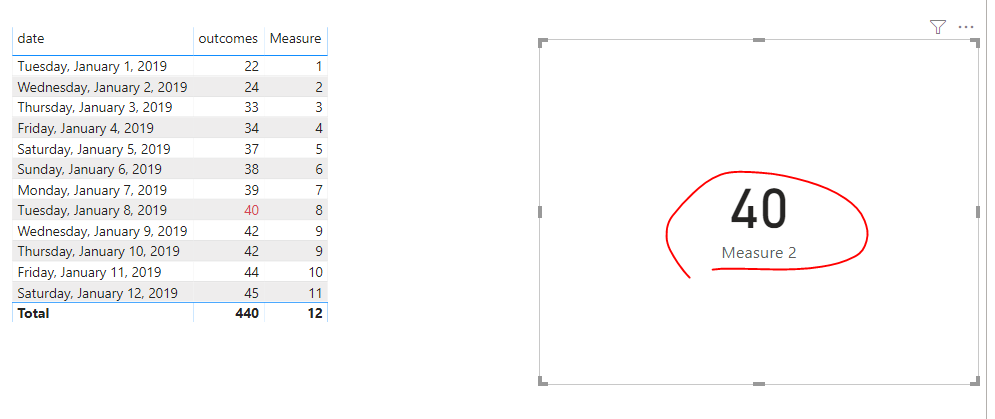
Measure 2 = CALCULATE(SUM('Table'[outcomes]),FILTER(ALL('Table'[date]),[Measure]=8))
Pbix as attached.
Hi @mohittimpus ,
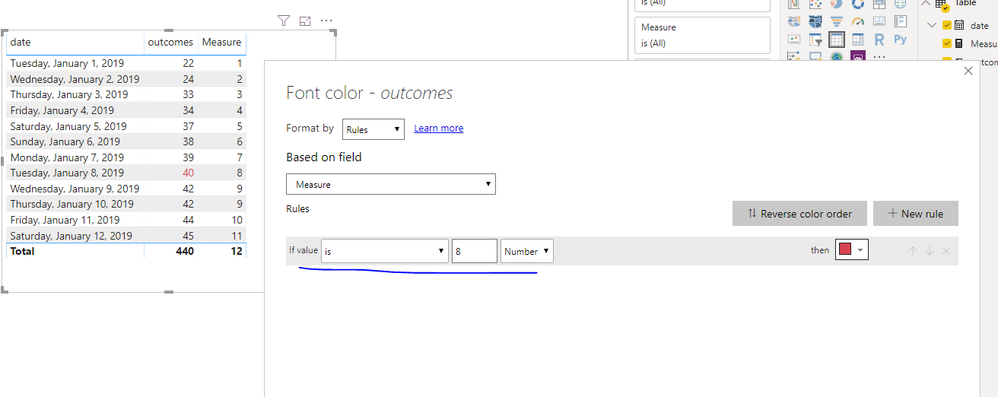
We can set conditional formamting of the outcomes column based on the rank measure as below.
Measure = RANKX(ALL('Table'),CALCULATE(SUM('Table'[outcomes])),,ASC,Dense)
Pbix as attached.
Thanks for Reply. I want 40 in card visualization. I don't want conditional formatting. I want measure, Which will get only 40 value. i will put that measure inside card visualization it will show 40 value in the card visualization.
Hi @mohittimpus ,
To create a measure as below.
Measure 2 = CALCULATE(SUM('Table'[outcomes]),FILTER(ALL('Table'[date]),[Measure]=8))
Pbix as attached.
Check out the November 2025 Power BI update to learn about new features.
Advance your Data & AI career with 50 days of live learning, contests, hands-on challenges, study groups & certifications and more!