FabCon is coming to Atlanta
Join us at FabCon Atlanta from March 16 - 20, 2026, for the ultimate Fabric, Power BI, AI and SQL community-led event. Save $200 with code FABCOMM.
Register now!- Power BI forums
- Get Help with Power BI
- Desktop
- Service
- Report Server
- Power Query
- Mobile Apps
- Developer
- DAX Commands and Tips
- Custom Visuals Development Discussion
- Health and Life Sciences
- Power BI Spanish forums
- Translated Spanish Desktop
- Training and Consulting
- Instructor Led Training
- Dashboard in a Day for Women, by Women
- Galleries
- Data Stories Gallery
- Themes Gallery
- Contests Gallery
- QuickViz Gallery
- Quick Measures Gallery
- Visual Calculations Gallery
- Notebook Gallery
- Translytical Task Flow Gallery
- TMDL Gallery
- R Script Showcase
- Webinars and Video Gallery
- Ideas
- Custom Visuals Ideas (read-only)
- Issues
- Issues
- Events
- Upcoming Events
The Power BI Data Visualization World Championships is back! Get ahead of the game and start preparing now! Learn more
- Power BI forums
- Forums
- Get Help with Power BI
- Desktop
- Re: How to get maximum salary, name of employee wi...
- Subscribe to RSS Feed
- Mark Topic as New
- Mark Topic as Read
- Float this Topic for Current User
- Bookmark
- Subscribe
- Printer Friendly Page

- Mark as New
- Bookmark
- Subscribe
- Mute
- Subscribe to RSS Feed
- Permalink
- Report Inappropriate Content
How to get maximum salary, name of employee with maximum salary and department in power bi
Hey, I am new to power bi, and still learning. I want to know how to get maximum salary, name of employee with maximum salary and department in power bi? I want to show the data in tabular form.
Solved! Go to Solution.

- Mark as New
- Bookmark
- Subscribe
- Mute
- Subscribe to RSS Feed
- Permalink
- Report Inappropriate Content
Hi Have corrected the measure try this one:
here is my output hope this should work
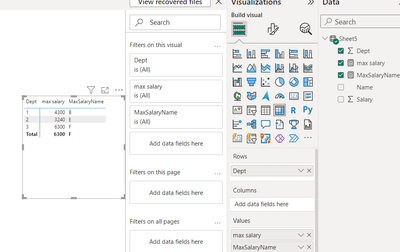
Regards

- Mark as New
- Bookmark
- Subscribe
- Mute
- Subscribe to RSS Feed
- Permalink
- Report Inappropriate Content
Hi, when I tried the same only for the name & max salary...it's getting me the max of name, means in sorted order ex name starting with Z***** against the salary
- Mark as New
- Bookmark
- Subscribe
- Mute
- Subscribe to RSS Feed
- Permalink
- Report Inappropriate Content
Hi @malay1803
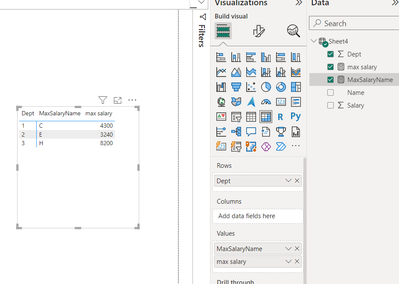
Based on input data here is my approach to finding max salary and name for a given department
you need to create two measure:
1. max salary = MAX(Sheet4[Salary])
this is my output
Did I answer your question? Mark my post as a solution! Appreciate your Kudos!!
Check for more intersing solution here: www.youtube.com/@Howtosolveprobem
Regards
- Mark as New
- Bookmark
- Subscribe
- Mute
- Subscribe to RSS Feed
- Permalink
- Report Inappropriate Content
Hey, thanks for replying.
I tried this code, but the name which is being returned is the last name available for that dept.
So if the data goes like this:
| Name | Dept | Salary |
| A | 1 | 3500 |
| B | 1 | 4300 |
| C | 1 | 2200 |
| D | 2 | 1200 |
| E | 2 | 3240 |
| F | 3 | 6300 |
| G | 3 | 2319 |
| H | 3 | 1200 |
then the output should be
| Name | Dept | Salary |
| B | 1 | 4300 |
| E | 2 | 3240 |
| F | 3 | 6300 |
But using the measure/query provided by you. It is returning
| Name | Dept | Salary |
| C | 1 | 4300 |
| E | 2 | 3240 |
| H | 3 | 8200 |
- Mark as New
- Bookmark
- Subscribe
- Mute
- Subscribe to RSS Feed
- Permalink
- Report Inappropriate Content
Hi Have corrected the measure try this one:
here is my output hope this should work
Regards
- Mark as New
- Bookmark
- Subscribe
- Mute
- Subscribe to RSS Feed
- Permalink
- Report Inappropriate Content
Heyy, This WORKED! Thanks alot! Big Help!

- Mark as New
- Bookmark
- Subscribe
- Mute
- Subscribe to RSS Feed
- Permalink
- Report Inappropriate Content
Hi @malay1803
How to Get Your Question Answered Quickly - Microsoft Fabric Community
Please supply some data and an example of the desired result.
Phil
Did I answer your question? Then please mark my post as the solution.
If I helped you, click on the Thumbs Up to give Kudos.
Blog :: YouTube Channel :: Connect on Linkedin
Proud to be a Super User!
- Mark as New
- Bookmark
- Subscribe
- Mute
- Subscribe to RSS Feed
- Permalink
- Report Inappropriate Content
Hey Phil, Thanks for replying. As the data is quite huge, below is a dummy data.
| Name | Dept | Salary |
| A | 1 | 3500 |
| B | 1 | 2200 |
| C | 1 | 4300 |
| D | 2 | 1200 |
| E | 2 | 3240 |
| F | 3 | 6300 |
| G | 3 | 2319 |
| H | 3 | 8200 |
I want the below desired output.
| Name | Dept | Salary |
| C | 1 | 4300 |
| E | 2 | 3240 |
| H | 3 | 8200 |

- Mark as New
- Bookmark
- Subscribe
- Mute
- Subscribe to RSS Feed
- Permalink
- Report Inappropriate Content
Hi,
These measures work
Max salary = MAX(Data[Salary])Highest earner = CALCULATE(MAX(Data[Name]),FILTER(Data,Data[Salary]=[Max salary]))Hope this helps.
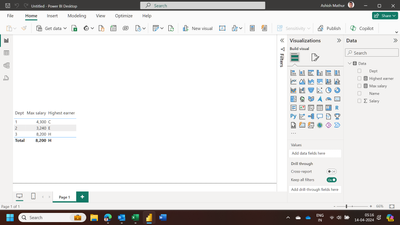
Regards,
Ashish Mathur
http://www.ashishmathur.com
https://www.linkedin.com/in/excelenthusiasts/

Helpful resources

Power BI Dataviz World Championships
The Power BI Data Visualization World Championships is back! Get ahead of the game and start preparing now!

Power BI Monthly Update - November 2025
Check out the November 2025 Power BI update to learn about new features.

FabCon Atlanta 2026
Join us at FabCon Atlanta, March 16-20, for the ultimate Fabric, Power BI, AI and SQL community-led event. Save $200 with code FABCOMM.

| User | Count |
|---|---|
| 59 | |
| 46 | |
| 42 | |
| 23 | |
| 18 |


| User | Count |
|---|---|
| 190 | |
| 122 | |
| 96 | |
| 66 | |
| 47 |


