Join us at FabCon Atlanta from March 16 - 20, 2026, for the ultimate Fabric, Power BI, AI and SQL community-led event. Save $200 with code FABCOMM.
Register now!The Power BI Data Visualization World Championships is back! Get ahead of the game and start preparing now! Learn more
HI I have a table with column as Color as below:
Color
Red
Green
Yellow
Pink
What I need is to create a measure like this:
Color Measure
Red 1
green 2
Yellow 3
Pink 4
I hope this is simple and can be easily done, I am trying if else but unable to get the result.
Thanks
Solved! Go to Solution.
Hi @Anonymous,
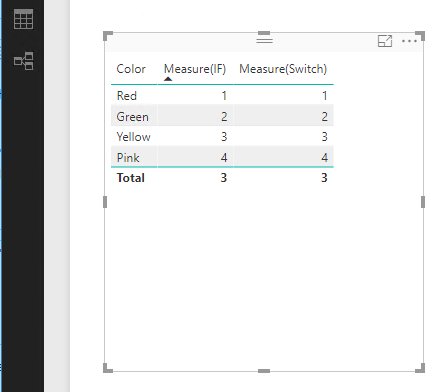
You can create a measure with If() function or Switch() function, see:
Measure(IF) = IF(MAX('Table3'[Color])="Red",1,IF(MAX('Table3'[Color])="green",2,IF(MAX('Table3'[Color])="Yellow",3,IF(MAX('Table3'[Color])="Pink",4,BLANK()))))
Measure(Switch) = SWITCH(TRUE(),MAX('Table3'[Color])="Red",1,MAX('Table3'[Color])="green",2,MAX('Table3'[Color])="Yellow",3,MAX('Table3'[Color])="Pink",4,BLANK())
Best Regards,
Qiuyun Yu
Hi @Anonymous,
You can create a measure with If() function or Switch() function, see:
Measure(IF) = IF(MAX('Table3'[Color])="Red",1,IF(MAX('Table3'[Color])="green",2,IF(MAX('Table3'[Color])="Yellow",3,IF(MAX('Table3'[Color])="Pink",4,BLANK()))))
Measure(Switch) = SWITCH(TRUE(),MAX('Table3'[Color])="Red",1,MAX('Table3'[Color])="green",2,MAX('Table3'[Color])="Yellow",3,MAX('Table3'[Color])="Pink",4,BLANK())
Best Regards,
Qiuyun Yu
Hi, i´m new with P.BI, i used your formula for my problem and it worked, but i don´t understand why you use MAX with text values, ¿Could you explain it?
thanks!
The Power BI Data Visualization World Championships is back! Get ahead of the game and start preparing now!
Check out the November 2025 Power BI update to learn about new features.
| User | Count |
|---|---|
| 65 | |
| 44 | |
| 40 | |
| 29 | |
| 19 |
| User | Count |
|---|---|
| 202 | |
| 130 | |
| 102 | |
| 72 | |
| 55 |