cancel
Showing results for 
Search instead for 
Did you mean: 

We've captured the moments from FabCon & SQLCon that everyone is talking about, and we are bringing them to the community, live and on-demand. Starts on April 14th. Register now

Reply
admin_xlsior
Post Prodigy
Post Prodigy

How to get data from multiple folder

Hi all,


How to get data from mutiple folder ? Normally in most of YouTube video, what I can find is to get data from 1 (one) folder contains multiple files, and then we can combine in Power BI.


But this time I need to get data from multiple subfolder as well. So lets say in 1 folder contains many subfolder and inside of eah of this subfolder have 1 CSV file. I don't need to combine these CSV file, but I need to get those files inside separate subfolder into Power BI at one go. The result in Power BI will be still those separates CSV one by one.


Thanks,


1 ACCEPTED SOLUTION

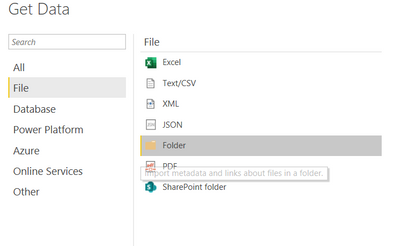
@admin_xlsior  You can import files from folder and subfolder using the below option


negi007_0-1604317373407.png


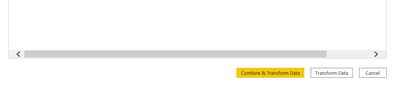
2. When you get the details of all file in the power query, you have to select the option transform data instead of Combine and transform data


negi007_1-1604317454524.png


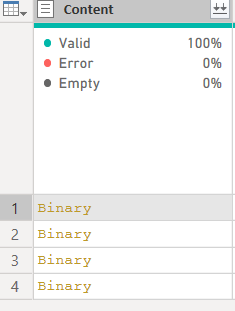
3.  now you will see below option on your powequery window. Right click on the binary option and select add as a new query against all your file names. This way you will have seperate table for each file.


negi007_2-1604317559946.png


I hope you follow above steps to reach the solution you are looking for. 


Did I answer your question? Mark my post as a solution!
Appreciate your Kudos


Proud to be a Super User!


Follow me on linkedin

View solution in original post

5 REPLIES 5
amitchandak
Super User
Super User

@admin_xlsior, refer if these two can be a bit of a help

https://trumpexcel.com/list-file-names-power-query/

https://radacad.com/get-the-list-of-folders-only-in-power-bi-using-power-query

Share with Power BI Enthusiasts: Full Power BI Video (20 Hours) YouTube
Microsoft Fabric Series 60+ Videos YouTube
Microsoft Fabric Hindi End to End YouTube

Hi,


Thanks, but my intention is not to get the list only, as described in those blogs. Sorry I probably not described this clearly. 


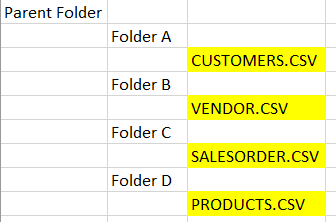
So, in each subfolder there is CSV files which contain a formatted data. During Get Data - From folder, I can see the subfolder and the filename inside, but that is not what I want to achive, instead all the CSVs on those separated folder can be imported as tables in Power BI. And I don;t want to combine those CSV, because each has different purpose.


So lets say, something like this:

admin_xlsior_0-1604036285047.png


Each of the CSV contain data as per its file name suggested. So the end result I expected is basically 4 different tables :

  • Customers
  • Vendors
  • SalesOrder
  • Products 

in my data model.


Thanks


@admin_xlsior  You can import files from folder and subfolder using the below option


negi007_0-1604317373407.png


2. When you get the details of all file in the power query, you have to select the option transform data instead of Combine and transform data


negi007_1-1604317454524.png


3.  now you will see below option on your powequery window. Right click on the binary option and select add as a new query against all your file names. This way you will have seperate table for each file.


negi007_2-1604317559946.png


I hope you follow above steps to reach the solution you are looking for. 


Did I answer your question? Mark my post as a solution!
Appreciate your Kudos


Proud to be a Super User!


Follow me on linkedin

Hi @negi007 


Yes, this is what I'm looking for. At least, I don't need to connect again. Many thanks.


rgds,


Hi, @admin_xlsior 

A query represents a table.If you need to get 4 separate and independent tables via folder connector, you  still need to filter them one by one and separate them into four queries.Not taking into account  the query created by connecting fold for the first time, you have to copy three additional queries then  modify them  which require manual operations.


Since you don’t need to integrate them, why not connect these csv file one by one?


Best Regards,
Community Support Team _ Eason


Helpful resources

Announcements
New to Fabric survey Carousel

New to Fabric Survey

If you have recently started exploring Fabric, we'd love to hear how it's going. Your feedback can help with product improvements.

Power BI DataViz World Championships carousel

Power BI DataViz World Championships - June 2026

A new Power BI DataViz World Championship is coming this June! Don't miss out on submitting your entry.

Join our Fabric User Panel

Join our Fabric User Panel

Share feedback directly with Fabric product managers, participate in targeted research studies and influence the Fabric roadmap.

March Power BI Update Carousel

Power BI Community Update - March 2026

Check out the March 2026 Power BI update to learn about new features.