This time we’re going bigger than ever. Fabric, Power BI, SQL, AI and more. We're covering it all. You won't want to miss it.
Learn moreLevel up your Power BI skills this month - build one visual each week and tell better stories with data! Get started
I'm evaluating Power BI for possible purchase- not liking it all so far.
I need to get LOTS of data from a SQL Server column that is datatype of XML. In a SQL statememt this looks like this:
select Data.value('/Section1[1]/eStudy[1]/eClientNumber[1]', 'nvarchar(15)')
Where/how do I do this?
I have hundreds of SQL queries already written, I just want to paste them in somewhere and then visulize from the results. Can I do that??
Solved! Go to Solution.
@DisclosureUser There are couple of ways,
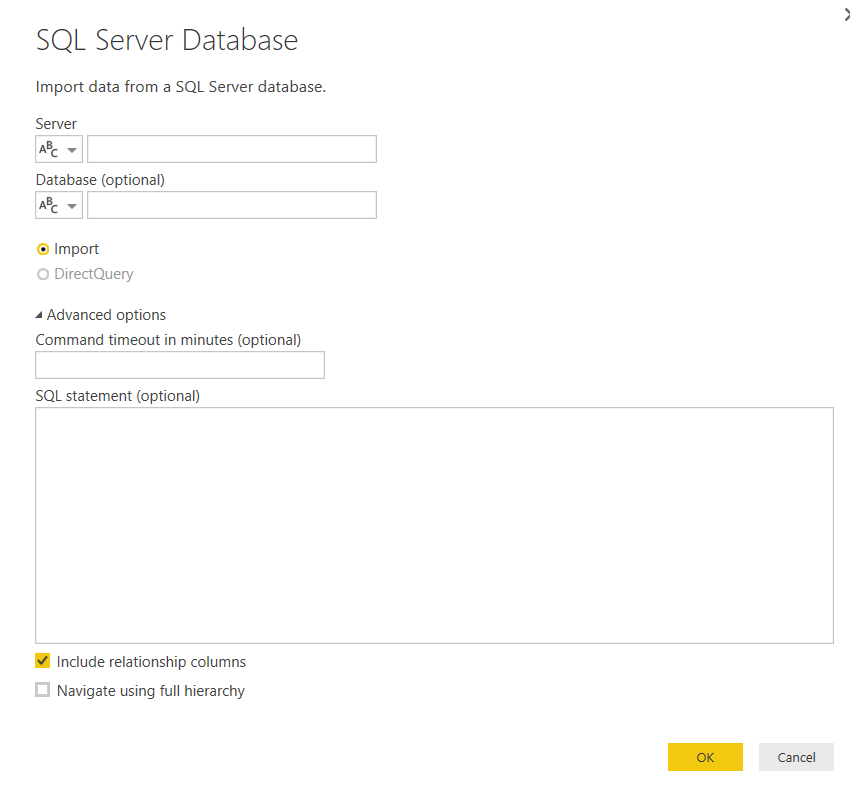
1. When connecting to sql server from power bi desktop you have option to execute sql statement.
2. Export table out as XML from sql server and then import that xml file into power bi.
@DisclosureUser There are couple of ways,
1. When connecting to sql server from power bi desktop you have option to execute sql statement.
2. Export table out as XML from sql server and then import that xml file into power bi.
Any chance you could provide more details on how to export a result of an SQL statement into an xml file?
Check out the April 2026 Power BI update to learn about new features.
Sign up to receive a private message when registration opens and key events begin.
If you have recently started exploring Fabric, we'd love to hear how it's going. Your feedback can help with product improvements.
| User | Count |
|---|---|
| 36 | |
| 28 | |
| 28 | |
| 21 | |
| 18 |
| User | Count |
|---|---|
| 68 | |
| 39 | |
| 33 | |
| 24 | |
| 23 |