cancel
Showing results for 
Search instead for 
Did you mean: 

Get Fabric Certified for FREE during Fabric Data Days. Don't miss your chance! Request now

Reply
jrmax
Frequent Visitor

How to get and COUNT items tested excluding only the first test.

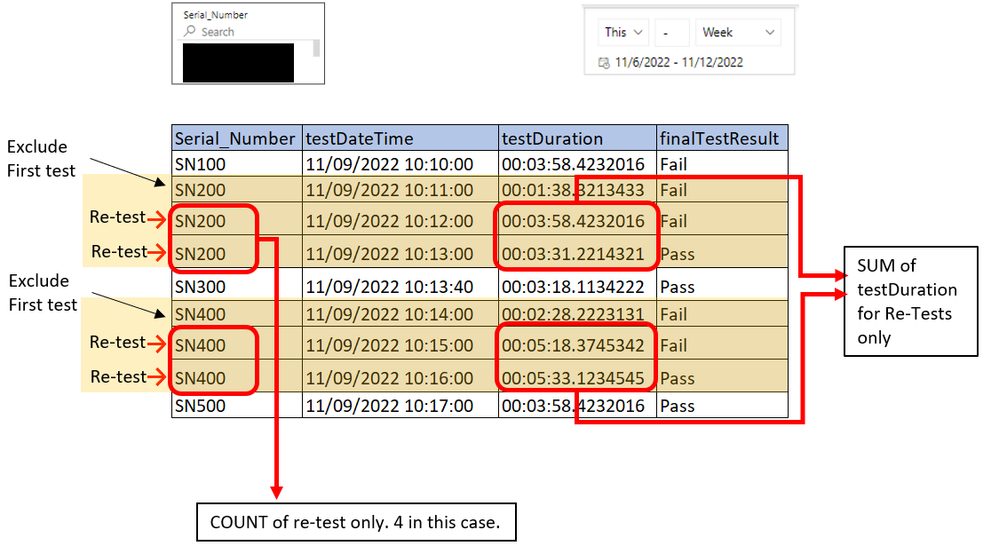
Hi guys, we have a table like the one below with multiple serials tested. We want to know how to create a measure for:
- All serial_numbers re-tested
- Count of Serial_numbers re-tested
- SUM of the column -TestDuration- for re-rest only

We got the First/Last items tested and -First Pass Yield- calculation, but we are now stuck on these new measures for re-tests.


Any advice will be appreciated.


Thank you!

JR

restest3.PNG

1 ACCEPTED SOLUTION
Anonymous
Not applicable

Hi @jrmax,

I think you can add a variable to get the first date from your table based on current category, then you can and add an if statement to compare current date and the first date and use this as condition in calculation formula.

If you confused about coding formula, please share some dummy data to test.

How to Get Your Question Answered Quickly  

Regards,

Xiaoxin Sheng

View solution in original post

5 REPLIES 5
Anonymous
Not applicable

Hi @jrmax,

I think you can add a variable to get the first date from your table based on current category, then you can and add an if statement to compare current date and the first date and use this as condition in calculation formula.

If you confused about coding formula, please share some dummy data to test.

How to Get Your Question Answered Quickly  

Regards,

Xiaoxin Sheng

I found it !!, thank you @Anonymous, for the tip; a small piece of advice makes a huge difference. 


Here is the code that worked for me:


First Test Date In Timeframe =
// Returns the first test date in
// the current context.
IF( HASONEFILTER( 'Logs'[Serial_Number] ),
      var __serialN = SELECTEDVALUE( 'Logs'[Serial_Number] )
      var __firstTestDate =
                          MINX(
                               CALCULATETABLE(
                                               'Logs',
                                               'Logs'[Serial_Number] = __serialN,
                                               ALLSELECTED('Logs')
                                              ),
                                              'Logs'[testDateTime]
                              )
return
__firstTestDate


Retest Count In Timeframe =
// Returns the count of SNs retested
// in the current timeframe.
var __retestCountResult =
                          SUMX(
                               VALUES('Logs'[testDateTime]),
                               IF('Logs'[testDateTime]>[First Test Date In Timeframe],
                                  1,
                                  0
                                   )
                                )
return
       IF( __retestCountResult > 0, __retestCountResult )


Retest Time Duration in Timeframe =
// Returns the retest time duration of
// SNs.
var __retestDurationTime =
                          SUMX(
                                ALLSELECTED('Logs'),
                                IF('Logs'[testDateTime]>[First Test Date In Timeframe],
                                    VALUE('Logs'[testDuration]),
                                    0
                                   )
                                )
return
IF( __retestDurationTime > 0, FORMAT(__retestDurationTime,"HH:MM:SS" ))



Thank you, @Anonymous! Here is sample data; a formula will be helpful... thanks!!


CommentSerial_NumbertestDateTimetestDurationfinalTestResult
FirstTestSN089561111/11/2022 12:18:0302:19.1Fail
FirstTestSN073121411/11/2022 12:18:4802:19.4Fail
Re-testSN089561111/11/2022 12:21:2603:51.3Pass
Re-testSN073121411/11/2022 12:21:3605:02.5Fail
FirstTestSN044121211/11/2022 12:22:2903:50.9Fail
FirstTestSN042361211/11/2022 12:22:4003:50.9Fail
Re-testSN042361211/11/2022 12:23:4002:21.1Fail
Re-testSN042361211/11/2022 12:26:3403:51.8Pass
Re-testSN044121211/11/2022 12:27:0703:50.3Fail
Re-testSN073121411/11/2022 12:27:4703:54.7Pass


amitchandak
Super User
Super User

@jrmax ,The information you have provided is not making the problem clear to me. Can you please explain with an example.

Appreciate your Kudos.

Share with Power BI Enthusiasts: Full Power BI Video (20 Hours) YouTube
Microsoft Fabric Series 60+ Videos YouTube
Microsoft Fabric Hindi End to End YouTube

Thank you @amitchandak 


EDITED adding a more context and picture: 

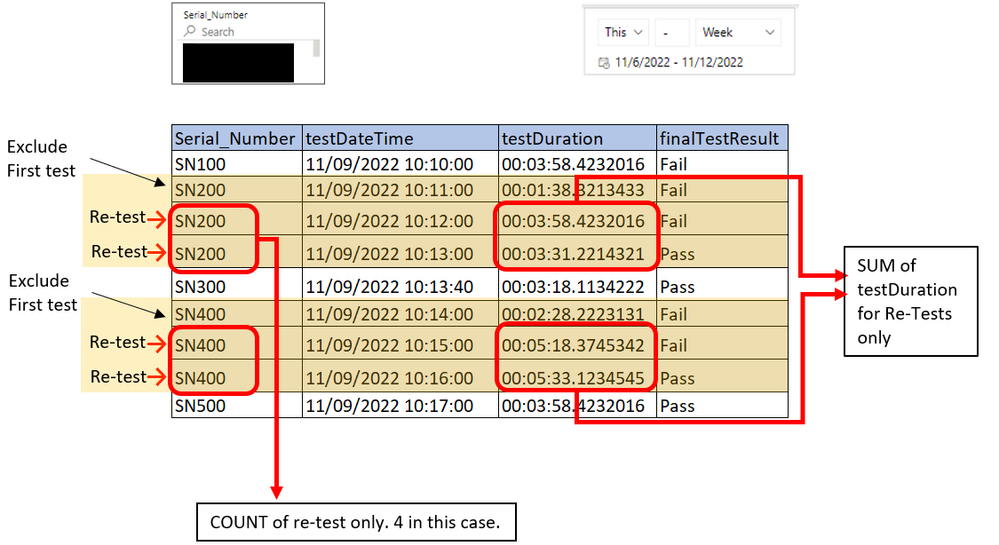
restest3.PNG

Given the previous table, a Retest is a SerialNo tested more than once, so in this case, SN200 and SN300 (with the red arrow) are considered retests.


We want to know how many retests were made, in this case it should be equal to: 4 and the SUM of column TestDuration

Thank you again!, we really appreciate any help on this.       


Helpful resources

Announcements
November Power BI Update Carousel

Power BI Monthly Update - November 2025

Check out the November 2025 Power BI update to learn about new features.

Fabric Data Days Carousel

Fabric Data Days

Advance your Data & AI career with 50 days of live learning, contests, hands-on challenges, study groups & certifications and more!

FabCon Atlanta 2026 carousel

FabCon Atlanta 2026

Join us at FabCon Atlanta, March 16-20, for the ultimate Fabric, Power BI, AI and SQL community-led event. Save $200 with code FABCOMM.

Top Solution Authors
Top Kudoed Authors