Join us at FabCon Atlanta from March 16 - 20, 2026, for the ultimate Fabric, Power BI, AI and SQL community-led event. Save $200 with code FABCOMM.
Register now!The Power BI Data Visualization World Championships is back! Get ahead of the game and start preparing now! Learn more
I want to get a % of filled rows vs blank rows.
This is to get a compliance check, where we need to be able to click on the total % blanks at the bottom and get them to filter on those rows,
I have a table with a lot of columns so ideally I'm looking for something that can be easily copied to other columns.
e.g.
| County | Transmission number |
| 5555 | |
| London | 4465 |
| Dublin | |
| 67% | 67% |
Solved! Go to Solution.
Hi @Anonymous
If you have many columns, for example
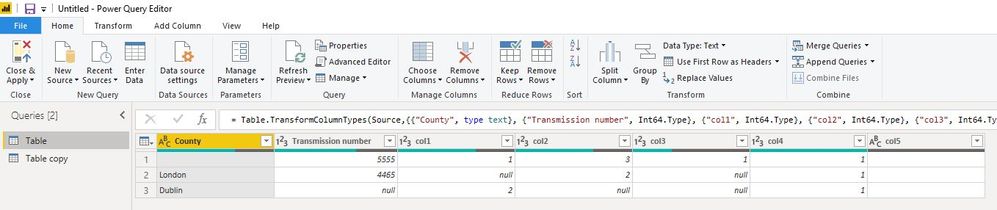
In my method,
i open Edit queries, copy the original table,
In the "Table copy",
add an index column from 1,
delete "change type" step from the right step pane,
then select "index" column, next select "Unpivot other columns",
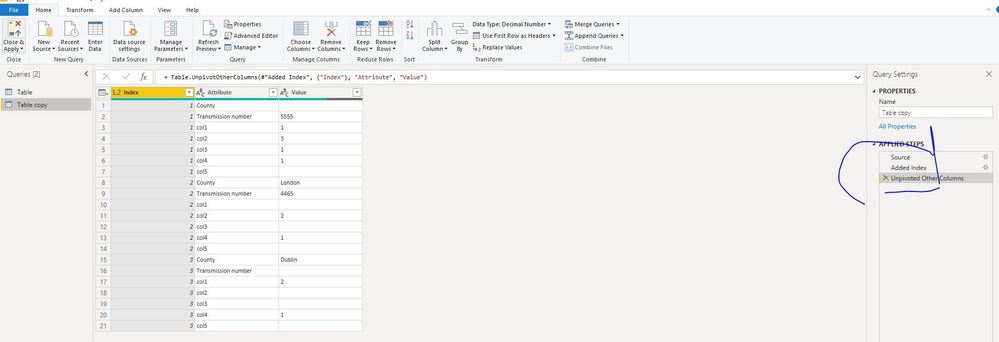
Close&&apply
Create measures in "Table copy"
all count = CALCULATE(COUNTA('Table copy'[Value]),ALLEXCEPT('Table copy','Table copy'[Attribute]))
blank count =
IF (
CALCULATE (
COUNTBLANK ( 'Table copy'[Value] ),
ALLEXCEPT ( 'Table copy', 'Table copy'[Attribute] )
)
= BLANK (),
0,
CALCULATE (
COUNTBLANK ( 'Table copy'[Value] ),
ALLEXCEPT ( 'Table copy', 'Table copy'[Attribute] )
)
)
blank% = [blank count]/[all count]
no blank% = ([all count]-[blank count])/[all count]
Measure = IF(ISINSCOPE('Table copy'[Index]),MAX('Table copy'[Value]),FORMAT([no blank%],"0.00%"))
Hi @Anonymous
If you have many columns, for example
In my method,
i open Edit queries, copy the original table,
In the "Table copy",
add an index column from 1,
delete "change type" step from the right step pane,
then select "index" column, next select "Unpivot other columns",
Close&&apply
Create measures in "Table copy"
all count = CALCULATE(COUNTA('Table copy'[Value]),ALLEXCEPT('Table copy','Table copy'[Attribute]))
blank count =
IF (
CALCULATE (
COUNTBLANK ( 'Table copy'[Value] ),
ALLEXCEPT ( 'Table copy', 'Table copy'[Attribute] )
)
= BLANK (),
0,
CALCULATE (
COUNTBLANK ( 'Table copy'[Value] ),
ALLEXCEPT ( 'Table copy', 'Table copy'[Attribute] )
)
)
blank% = [blank count]/[all count]
no blank% = ([all count]-[blank count])/[all count]
Measure = IF(ISINSCOPE('Table copy'[Index]),MAX('Table copy'[Value]),FORMAT([no blank%],"0.00%"))
Hi @Anonymous
If the columns are not too many, you could create measures to show each columns' blank row rate.
Create measures
Measure_country =
VAR val =
(
CALCULATE ( COUNTROWS ( 'Table' ), ALL ( 'Table' ) )
- CALCULATE ( COUNTBLANK ( 'Table'[County] ), ALL ( 'Table' ) )
)
/ CALCULATE ( COUNTROWS ( 'Table' ), ALL ( 'Table' ) )
RETURN
IF (
ISINSCOPE ( 'Table'[Index] ),
MAX ( 'Table'[County] ),
FORMAT ( val, "0.00%" )
)
Measure_number =
VAR val =
(
CALCULATE ( COUNTROWS ( 'Table' ), ALL ( 'Table' ) )
- CALCULATE ( COUNTBLANK ( 'Table'[Transmission number] ), ALL ( 'Table' ) )
)
/ CALCULATE ( COUNTROWS ( 'Table' ), ALL ( 'Table' ) )
RETURN
IF (
ISINSCOPE ( 'Table'[Index] ),
MAX ( 'Table'[Transmission number] ),
FORMAT ( val, "0.00%" )
)
Hi @Anonymous
It is not clear for me.
click on the total % blanks at the bottom and get them to filter on those rows?
something that can be easily copied to other columns?
The screenshot?
Could you clear me so to find a solution for you?
Hi Maggie,
I want to be able to drillthrough to underlying table data to see the blank cells.
The screenshot is hwat we expect to see but I dont get that at all,
I just get a table with no sums,
and I want to sum all the blanks in the column and get the % of the cells blank vs cells filled.
Is that more clear?
The Power BI Data Visualization World Championships is back! Get ahead of the game and start preparing now!
Check out the November 2025 Power BI update to learn about new features.
| User | Count |
|---|---|
| 59 | |
| 46 | |
| 42 | |
| 23 | |
| 18 |
| User | Count |
|---|---|
| 193 | |
| 124 | |
| 101 | |
| 67 | |
| 49 |