Join us at FabCon Atlanta from March 16 - 20, 2026, for the ultimate Fabric, Power BI, AI and SQL community-led event. Save $200 with code FABCOMM.
Register now!The Power BI Data Visualization World Championships is back! Get ahead of the game and start preparing now! Learn more
Hi everyone,
I have a little trick that I'm using to concat Year & Month with a leading zero for the month and the value still be a number.
Just do Year * 100 + Month.
Example:
2023 * 100 + 3
= 202300 + 3
= 202303
works also when you have months higher than 9:
2023 * 100 + 10
= 202300 + 10
= 202310
Have fun with this!
Thanks - neat trick and helped me solve my problem.
To add to that - if you need to make an 8 digit date from month-year data you can do:
YEAR *10000 + MONTH *100 +1
e.g. to get 20250401
Hi @Anonymous ,
Thanks for your nice sharing!
And there's another way to get year month number.
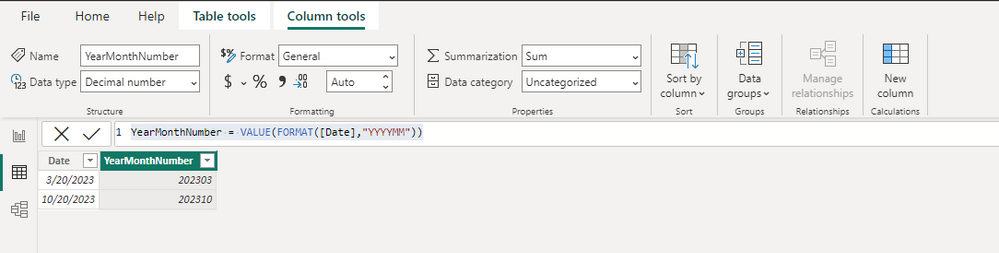
YearMonthNumber = VALUE(FORMAT([Date],"YYYYMM"))
If there is only the FORMAT function, it will return the text format, and you can manually modify it to a numeric type, or you can add another VALUE function to convert to a numeric type like me.
Best Regards,
Stephen Tao
If this post helps, then please consider Accept it as the solution to help the other members find it more quickly.
Hi,
I was wondering what the easiest way is to have the number first. Like 012020 or even something like 01/2020, this is much easier to read.
The Power BI Data Visualization World Championships is back! Get ahead of the game and start preparing now!
| User | Count |
|---|---|
| 38 | |
| 36 | |
| 33 | |
| 31 | |
| 28 |
| User | Count |
|---|---|
| 129 | |
| 88 | |
| 79 | |
| 68 | |
| 63 |