

cancel
Showing results for 
Search instead for 
Did you mean: 

The Power BI Data Visualization World Championships is back! Get ahead of the game and start preparing now! Learn more

Reply
Natygan
New Member

How to format a dynamic value in a text box ?

 Hello,

 I want to add the max value of a date as a dynamic value in a text box. It does work, but it is written in full length, I mean with the name of the day, then its number, then the name of the month, and the year :

Natygan_0-1675329007119.png

 I'd like to change the format of this dynamic value to MMMyy ; meaning in my example, I'd like to see "Flash report month : déc.22".

 Is it possible ?

Thanks for any help !


4 REPLIES 4
leathard
Advocate I
Advocate I

A common technique for this is to create a measure that returns text instead of a numeric value. The measure wraps the numeric value in a FORMAT function. The FORMAT function accepts a custom format template.

Idrissshatila
Super User
Super User

Hello @Natygan ,


You could format the date column to the format you want, you simply click on the date column and then look at the tab called column tools then format it the way you want.

Idrissshatila_0-1675329576961.png

Idrissshatila_1-1675329590411.png


If I answered your question, please mark my post as solution, Appreciate your Kudos 👍

Follow me on Linkedin


Did I answer your question? Mark my post as a solution! Appreciate your Kudos
Follow me on LinkedIn linkedIn
Vote for my Community Mobile App Idea

Proud to be a Super User!


Hello,

Thank you, but I'm talking of a dynamic value in a text box, so I'm not dealing with a column in a table.
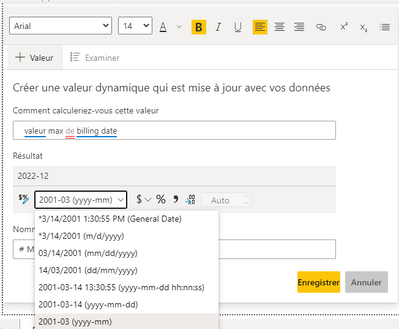
I found the way to format my dynamic value (see screenshot below), but is there a way to add a personalised date format ? Because the format I wish to apply does not exist in the list proposed.

Natygan_0-1675331477755.png

Thanks !

Hi @Natygan  - did you find a solution to this?


I'm having the same issue at the moment, my data is already formatted as a LongDate : 


powertron_0-1677855834464.png


But when calling it from a Value in a text box it autoformats to ShortDate and gives not option to keep the LongDate formatting : 

powertron_1-1677855881298.png

Can't see any way to provide a custom Formatting for this either.

Helpful resources

Announcements
Power BI DataViz World Championships

Power BI Dataviz World Championships

The Power BI Data Visualization World Championships is back! Get ahead of the game and start preparing now!

December 2025 Power BI Update Carousel

Power BI Monthly Update - December 2025

Check out the December 2025 Power BI Holiday Recap!

FabCon Atlanta 2026 carousel

FabCon Atlanta 2026

Join us at FabCon Atlanta, March 16-20, for the ultimate Fabric, Power BI, AI and SQL community-led event. Save $200 with code FABCOMM.