cancel
Showing results for 
Search instead for 
Did you mean: 

The Power BI Data Visualization World Championships is back! Get ahead of the game and start preparing now! Learn more

Reply
Anonymous
Not applicable

How to fix card information and compare vs dynamic cards

I want to compare, a section of cards that now provide me the whole picture of a measurement which I called national, I need this figures to be fixed, but dynamic so I can update them with new information. 

By using a slicer I need the region part to update the information accordingly but I expect a comparisson figure vs. national figures (fixed).

I believe the solution is fairly simply but I can't crack this on my own.


Thanks!


Capture.JPG


1 ACCEPTED SOLUTION
v-juanli-msft
Community Support
Community Support

Hi @Anonymous

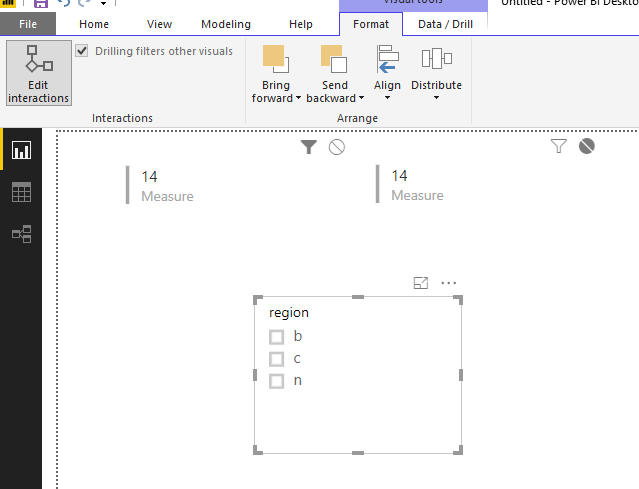
Go to Format->edit interaction

Select "none" for National card, "Filter" for "Region" card.

3.png


Best Regards

Maggie

View solution in original post

2 REPLIES 2
v-juanli-msft
Community Support
Community Support

Hi @Anonymous

Go to Format->edit interaction

Select "none" for National card, "Filter" for "Region" card.

3.png


Best Regards

Maggie

Anonymous
Not applicable

Maggie 


Thank you very much!

Helpful resources

Announcements
Power BI DataViz World Championships

Power BI Dataviz World Championships

The Power BI Data Visualization World Championships is back! Get ahead of the game and start preparing now!

November Power BI Update Carousel

Power BI Monthly Update - November 2025

Check out the November 2025 Power BI update to learn about new features.

FabCon Atlanta 2026 carousel

FabCon Atlanta 2026

Join us at FabCon Atlanta, March 16-20, for the ultimate Fabric, Power BI, AI and SQL community-led event. Save $200 with code FABCOMM.