FabCon is coming to Atlanta
Join us at FabCon Atlanta from March 16 - 20, 2026, for the ultimate Fabric, Power BI, AI and SQL community-led event. Save $200 with code FABCOMM.
Register now!- Power BI forums
- Get Help with Power BI
- Desktop
- Service
- Report Server
- Power Query
- Mobile Apps
- Developer
- DAX Commands and Tips
- Custom Visuals Development Discussion
- Health and Life Sciences
- Power BI Spanish forums
- Translated Spanish Desktop
- Training and Consulting
- Instructor Led Training
- Dashboard in a Day for Women, by Women
- Galleries
- Data Stories Gallery
- Themes Gallery
- Contests Gallery
- QuickViz Gallery
- Quick Measures Gallery
- Visual Calculations Gallery
- Notebook Gallery
- Translytical Task Flow Gallery
- TMDL Gallery
- R Script Showcase
- Webinars and Video Gallery
- Ideas
- Custom Visuals Ideas (read-only)
- Issues
- Issues
- Events
- Upcoming Events
The Power BI Data Visualization World Championships is back! Get ahead of the game and start preparing now! Learn more
- Power BI forums
- Forums
- Get Help with Power BI
- Desktop
- How to find valid values based on multiple tables
- Subscribe to RSS Feed
- Mark Topic as New
- Mark Topic as Read
- Float this Topic for Current User
- Bookmark
- Subscribe
- Printer Friendly Page


- Mark as New
- Bookmark
- Subscribe
- Mute
- Subscribe to RSS Feed
- Permalink
- Report Inappropriate Content
How to find valid values based on multiple tables
Hi guys,
I use this forum so much and I have almost found the answer I am after... Except for this one.
I have a table with:
- attributes name
- attributes values
- name of the valid-values reference table
- name of the specific valid-values column (if exists)
The first table below is basically my raw data:
| Attributes | Value | Data validation | Specific? |
| Num1 | 1 | TableNum | TN_C1 |
| Num2 | 2 | TableNum | TN_C1 |
| Num3 | 3 | TableNum | TN_C1 |
| Text1 | 4 | TableTxt | TT_C1 |
| Text2 | 5 | TableTxt | TT_C1 |
| Text3 | a | TableTxt | TT_C1 |
| Num4 | b | TableNum | |
| Num5 | 8 | TableNum | |
| Text4 | 9 | TableTxt |
The third column specifies another table name where to find the only possible valid values, being:
TableNum:
| TN_C1 | TN_C2 |
| 1 | one |
| 2 | two |
| 3 | three |
| 4 | four |
| 5 | five |
| 6 | six |
| 7 | seven |
| 8 | eight |
| 9 | nine |
| 10 | ten |
and
TableTxt:
| TT_C1 |
| a |
| b |
| c |
| d |
| e |
| f |
If we want to make it more complex, the fourth column in the raw data table specifies which column to look for in the valid values table.
I am trying to get a calculated column (I believe?) that reports TRUE if the values are present in the specific reference table/column, otherwise FALSE.
I managed to get close to what I want by creating a calculate column for:
| Attributes | Value | Data validation | Specific? | Valid |
| Num1 | 1 | TableNum | TN_C1 | TRUE |
| Num2 | 2 | TableNum | TN_C1 | TRUE |
| Num3 | 3 | TableNum | TN_C1 | TRUE |
| Text1 | 4 | TableTxt | TT_C1 | FALSE |
| Text2 | 5 | TableTxt | TT_C1 | FALSE |
| Text3 | a | TableTxt | TT_C1 | TRUE |
| Num4 | b | TableNum | FALSE | |
| Num5 | 8 | TableNum | TRUE | |
| Text4 | 9 | TableTxt | FALSE |


- Mark as New
- Bookmark
- Subscribe
- Mute
- Subscribe to RSS Feed
- Permalink
- Report Inappropriate Content
is this what you want?
Column = if(LEFT('Table'[attributes],3)="Num" && ISNUMBER('Table'[Value]),TRUE(),FALSE())Did I answer your question? Mark my post as a solution!
Proud to be a Super User!
- Mark as New
- Bookmark
- Subscribe
- Mute
- Subscribe to RSS Feed
- Permalink
- Report Inappropriate Content
Thank you for your quick answer @ryan_mayu . Unfortunately is not that easy. I am not only trying to find numbers but to associate the raw data with possibly many different tables containing a set of values, which make my data VALID or INVALID depending if the value on a specific row [Value] is found in the specified table [Data validation] (and, as next step, to be found in a specific column in that [Data validation] table, explicit in [Specific?] column.
Thank you for your go, really appreciated!
- Mark as New
- Bookmark
- Subscribe
- Mute
- Subscribe to RSS Feed
- Permalink
- Report Inappropriate Content
sry, not clear about your request. so your raw data only contains two columns? How you get the third column and forth column?
Did I answer your question? Mark my post as a solution!
Proud to be a Super User!
- Mark as New
- Bookmark
- Subscribe
- Mute
- Subscribe to RSS Feed
- Permalink
- Report Inappropriate Content
Nope,
My raw data (in the example provided) contains 4 columns (the formatting on the forum is not the best):
| Attributes | Value | Data validation | Specific? |
The Data validation column (and, if present, the Specific? one) defines the name of the table where the valid set of values are to be found for that specific attribute.
I hope this clarifies it.
Thanks
- Mark as New
- Bookmark
- Subscribe
- Mute
- Subscribe to RSS Feed
- Permalink
- Report Inappropriate Content
what do you want now? check if value exists in the data validation table?
| Attributes | Value | Data validation | Specific? | Valid |
| Num1 | 1 | TableNum | TN_C1 | TRUE |
| Num2 | 2 | TableNum | TN_C1 |
TRUE |
| Num3 | 3 | TableNum | TN_C1 | TRUE |
| Text1 | 4 | TableTxt | TT_C1 | FALSE |
| Text2 | 5 | TableTxt | TT_C1 | FALSE |
| Text3 | a | TableTxt | TT_C1 | TRUE |
| Num4 | b | TableNum | FALSE | |
| Num5 | 8 | TableNum | TRUE | |
| Text4 | 9 | TableTxt | FALSE |
value 1 from TableNum, then true? value 9 not from TableTxt then FALSE?
Did I answer your question? Mark my post as a solution!
Proud to be a Super User!
- Mark as New
- Bookmark
- Subscribe
- Mute
- Subscribe to RSS Feed
- Permalink
- Report Inappropriate Content
"value 1 from TableNum, then true? value 9 not from TableTxt then FALSE?"
Correct
- Mark as New
- Bookmark
- Subscribe
- Mute
- Subscribe to RSS Feed
- Permalink
- Report Inappropriate Content
@Anonymous @ecalzavara
pls see the attachment below
Did I answer your question? Mark my post as a solution!
Proud to be a Super User!
- Mark as New
- Bookmark
- Subscribe
- Mute
- Subscribe to RSS Feed
- Permalink
- Report Inappropriate Content
Thank you @ryan_mayu .
This relies on manually define the variables, right?
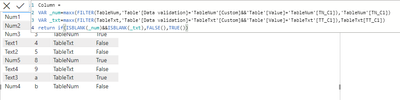
So, if I have 30 different Data Validation table I'd need to define the variables one by one?
What I am trying to get is that the definition of the validation tables are in the raw data (which I have) and that this specifies where to go and find the valid values. I am trying something like the IF(...IN DISTINCT()) approach, but that moves away from having to hard-code (variables or many different, possibly hundreads of tables) in the DAX. As I have already everything defined, either in the raw data or in the validation table, I would like to move away from the variables (unless they can be parametrised and created automatically from information in the raw data table).
Thank you

Helpful resources

Power BI Dataviz World Championships
The Power BI Data Visualization World Championships is back! Get ahead of the game and start preparing now!

Power BI Monthly Update - December 2025
Check out the December 2025 Power BI Holiday Recap!

FabCon Atlanta 2026
Join us at FabCon Atlanta, March 16-20, for the ultimate Fabric, Power BI, AI and SQL community-led event. Save $200 with code FABCOMM.

| User | Count |
|---|---|
| 39 | |
| 37 | |
| 33 | |
| 32 | |
| 29 |


| User | Count |
|---|---|
| 133 | |
| 88 | |
| 85 | |
| 68 | |
| 64 |


