Hi, I have records of Employees working in different Competencies and Practices. For each employee, I have Billed and Unbilled Hours.
The data looks something like this,
| Emp_ID | Emp_Name | Competency | Practice | Billed Hours | Unbilled Hours |
| 25 | Sam | Data & Integration | ML | 110 | 5 |
| 26 | Emma | Development | Python | 75 | 25 |
| 27 | Owen | Data & Integration | Data Engineering | 95 | 30 |
| 28 | Isabella | Design | UI/UX | 25 | 70 |
| 29 | Liam | Data & Integration | ETL | 85 | 40 |
| 30 | Nora | Development | Java | 0 | 125 |
| 31 | William | Data & Integration | BI | 45 | 60 |
| 32 | Ava | Development | .NET | 0 | 100 |
| 33 | Elijah | Design | Interaction Design | 35 | 50 |
| 34 | Sophia | Data & Integration | Cloud | 55 | 35 |
| 35 | Lucas | Development | JavaScript | 0 | 120 |
| 36 | Olivia | Design | Visual Design | 15 | 85 |
| 37 | Noah | Data & Integration | ML | 125 | 15 |
| 38 | Grace | Development | Ruby | 0 | 110 |
| 39 | Henry | Design | Usability Testing | 5 | 95 |
| 40 | Mia | Data & Integration | ETL | 65 | 45 |
| 41 | Aiden | Development | C++ | 0 | 130 |
| 42 | Ella | Design | UI/UX | 30 | 60 |
| 43 | Jacob | Data & Integration | BI | 80 | 20 |
| 44 | Chloe | Development | Python | 0 | 130 |
My aim is to find Unbilled Hours Ratio. Formula of Unbilled Hours Ratio is,
Unbilled Hours Ratio = Unbilled Hours / (Billed Hours + Unbilled Hours)
This, I have already implemented using following DAX,
Unbilled Hours Ratio =

var _UnbilledHours = SUM(Employees[Unbilled Hours])
var _BilledHours = SUM(Employees[Billed Hours])
var _TotalHours = _UnbilledHours + _BilledHours

var _Result =
    DIVIDE(
        _UnbilledHours,
        _TotalHours
    )
return _Result
This is giving me the value of 61.5%.
Now, I want a Bar Chart that shows % values each "Competency" and each "Practice" is contributing towards this 61.5%.
For now, I have the following visual,
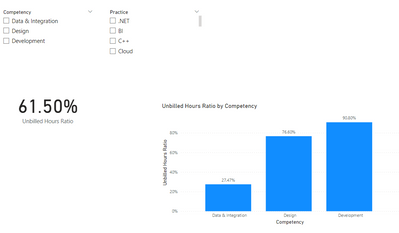
This basically shows me the Unbilled Hours Ratio for each Competency. I don't want that, I want to find the percentage value each Competency contributed towards the 61.5%.
The similar will be done for Practices as well (so if I drill down to all the Practices for one Competency, it will show me the % values each Practice contributed towards the total % percentage value of the Competency Unbilled Hours Ratio)
Can anyone help in creating a DAX for this scenario?
If you would like to download the Sample Power BI File, you may do so from here: https://drive.google.com/file/d/1CM918As9DGGt3daOtHaGpYYVkc8IjmZi/view?usp=sharing


