The data behind is as below (MasterTable):
| Member Number | Date Added | Product Description Before | Product Description After |
| MN0001 | 01/10/2022 | AAA | BBB |
| MN0001 | 30/09/2022 | AAA | BBB |
| MN0002 | 20/09/2022 | CCC | DDD |
| MN0003 | 21/09/2022 | AAA | AAA |
I want to create a visual that describes the change of product distribution i.e. the distinct count of member number by product description before, compared to the distinct count of member number by product description after.
It is easy to create two bar chart visuals as below:
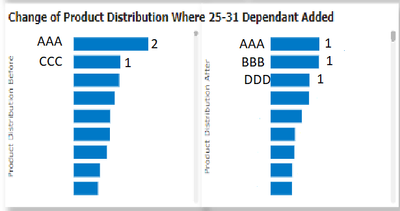
The left bar chart is the distinct count of member number by product description before while the bar chart on the right is the distinct count of member number by product description after. However this is not very user friendly as the user want to see the difference between the change i.e. like below:
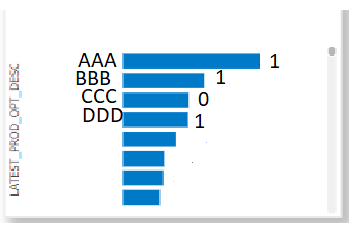
For example, product description AAA is the count of distinct member number group by product description after minus the count of distinct member number group by product description before where product description is AAA i.e. 2-1 = 1
I have tried creating a measure like this:
Difference test3 = SUMX(ADDCOLUMNS(SUMMARIZE('MasterTable','MasterTable'[Product Description After]), "Latest Qty", CALCULATE(DISTINCTCOUNT('MasterTable'[Member Number])), "Before Qty", LOOKUPVALUE('count previous product test1'[Before Qty],'count previous product test1'[Product Description Before],'MasterTable'[Product Description After])), [Latest Qty]-[Before Qty])
The 'count previous product test1' table is a calculated table as below:
count previous product test1 = calculatetable(ADDCOLUMNS( SUMMARIZE('MasterTable','MasterTable'[Product Description Before]),"Before Qty", DISTINCTCOUNT('MasterTable'[Member Number])))
When I create a bar chart of Difference test3 group by Product Description After, it's giving a result as below which is the total distinct member number difference bwteen before and after (3-3=0):
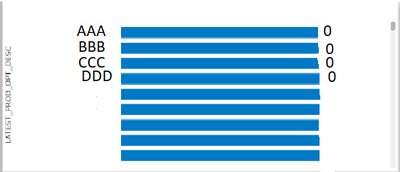
Note that the above data and visuals are mocked.
It would be great if someone can help me to solve this issue. Thank you in advance 🙂


