I have the following data.
| Emp Code | Month | Allocation | Overtime |
| 1 | Nov-22 | 1 | 1 |
| 1 | Oct-22 | 1 | 0 |
| 1 | Sep-22 | 1 | 1 |
| 1 | Aug-22 | 1 | 1 |
| 1 | Jul-22 | 0 | 0 |
| 1 | Jun-22 | 1 | 0 |
| 1 | May-22 | 0 | 0 |
| 2 | Nov-22 | 0 | 0 |
| 2 | Oct-22 | 0 | 1 |
| 2 | Sep-22 | 0 | 0 |
| 2 | Aug-22 | 1 | 1 |
| 2 | Jul-22 | 1 | 0 |
| 2 | Jun-22 | 1 | 0 |
| 2 | May-22 | 0 | 0 |
| 3 | Nov-22 | 0 | 0 |
| 3 | Oct-22 | 0 | 0 |
| 3 | Sep-22 | 0 | 0 |
| 3 | Aug-22 | 0 | 0 |
| 3 | Jul-22 | 0 | 0 |
| 3 | Jun-22 | 0 | 0 |
| 3 | May-22 | 0 | 0 |
| 4 | Nov-22 | 0 | 0 |
| 4 | Oct-22 | 0 | 0 |
| 4 | Sep-22 | 0 | 0 |
| 4 | Aug-22 | 0 | 0 |
What I need to know that for how many last consecutive months has the employees being inactive. Criteria of being inactive is their allocation + Overtime is 0.
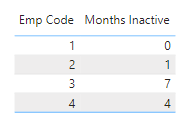
So, my expected result would be something similar to this,
| Emp No | Months Inactive |
| 1 | 0 |
| 2 | 1 (has overtime = 1, in 2nd last month) |
| 3 | 7 |
| 4 | 4 |
| | |
I made something like this as a measure to calculate the Inactive Months, but this is giving me wrong results,
Months Inactive =
MONTH(TODAY()) -
MAXX(
        FILTER(
            Employee,
            Employee[Allocation] = 0 && Employee[Overtime] = 0
        ),
        MONTH(Employee[Month])
    )
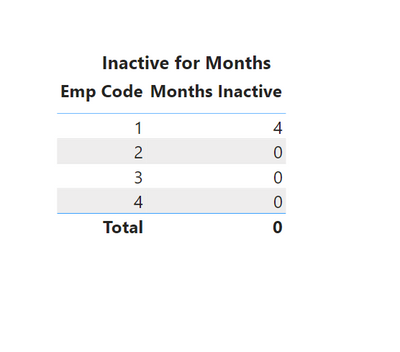
Results I am getting with this code is the following,
Can anyone help me out on this?
You can download the Example Workbook from here: https://drive.google.com/file/d/1weyjGYG6yZdGgB47FwkiVgfu36m7UzAR/view?usp=sharing