cancel
Showing results for 
Search instead for 
Did you mean: 

Get Fabric Certified for FREE during Fabric Data Days. Don't miss your chance! Request now

Reply
Anonymous
Not applicable

How to find a difference between two percentage columns in power bi

Hi All,


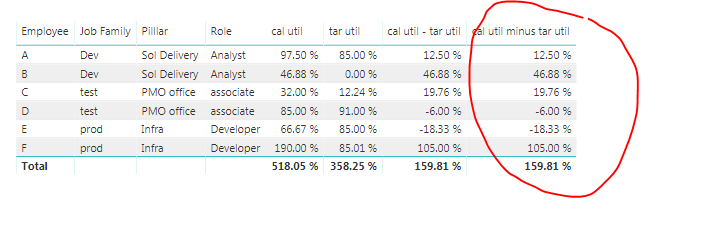
Kindly help me in getting the difference between two percentage columns (highlighted "cal util - tar util" )as mentioned in the attachment.


Attaching some junk file which i need to get differnce based on the file and it should not impact accuarcy even when i apply filters on the data.


https://drive.google.com/file/d/1XWB4cLAh6FYQe_c-t-Mlc61f03nGm9gi/view?usp=sharing


4 REPLIES 4
v-lili6-msft
Community Support
Community Support

hi, @Anonymous 

If [cal util] and [tar util] are measure, you could add a measure as below:

cal util - tar util = [cal util ] - [ tar util]

If  [cal util] and [tar util] are columns, you could add a measure as below:

 cal util - tar util =  SUM('Table'[cal util]) - SUM('Table'[tar util])

Best Regards,

Lin


Community Support Team _ Lin
If this post helps, then please consider Accept it as the solution to help the other members find it more quickly.
Anonymous
Not applicable

Hi @v-lili6-msft 


Cal util is a measure and tar util is a default column


Now suggest me how can i find the difference between them.


when i write above formula which you have provided it is not working correctly. Please find below the screenshots.Capture.PNGCapture.PNG

hi, @Anonymous 

Could you share your simple sample pbix for us have a test?


Best Regards,

Lin


Community Support Team _ Lin
If this post helps, then please consider Accept it as the solution to help the other members find it more quickly.
Anonymous
Not applicable

Hi @Anonymous ,


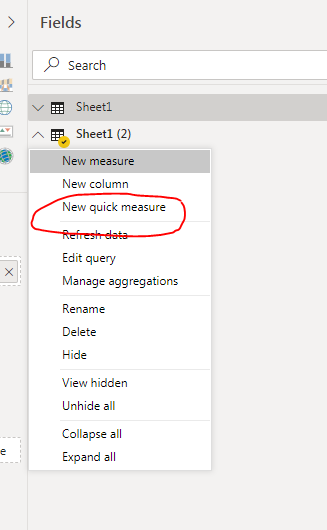
Did you try using Quick Measure? these steps below:


In the field panel, right click -> Hit on New quick measure->  pop up window appears, scroll down to the subtraction-> drag the values you want to use for your calculations


Capture 3.PNG

It should resolve your issue.


My output with quick measure:Capture2.PNG

Or

Measure to use:

Variance = 
SUM('Sheet1 (2)'[cal util]) - SUM('Sheet1 (2)'[tar util])

Let me know if this works.


Thanks,

Tejaswi


Helpful resources

Announcements
November Power BI Update Carousel

Power BI Monthly Update - November 2025

Check out the November 2025 Power BI update to learn about new features.

Fabric Data Days Carousel

Fabric Data Days

Advance your Data & AI career with 50 days of live learning, contests, hands-on challenges, study groups & certifications and more!

FabCon Atlanta 2026 carousel

FabCon Atlanta 2026

Join us at FabCon Atlanta, March 16-20, for the ultimate Fabric, Power BI, AI and SQL community-led event. Save $200 with code FABCOMM.

Top Solution Authors
Top Kudoed Authors