Join us at FabCon Atlanta from March 16 - 20, 2026, for the ultimate Fabric, Power BI, AI and SQL community-led event. Save $200 with code FABCOMM.
Register now!Get Fabric Certified for FREE during Fabric Data Days. Don't miss your chance! Request now
I want to create an area chart for monthly data of 3 years. I have a list of 10 companies. How can I filter the companies I want to see on the chart? X-axis contains months and Y-axix contains the values.
Appreciate your help!
Solved! Go to Solution.
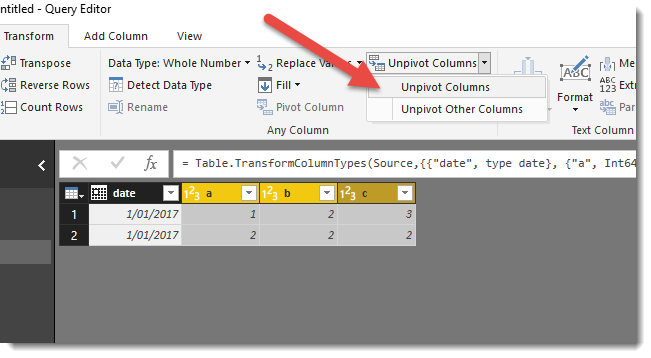
A quick way to achive this is to use the Unpivot feature in the Query Editor.
So before :
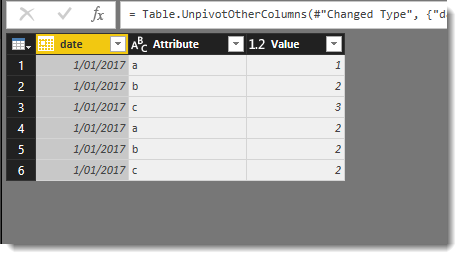
After :
Hi @Saloni
If you drag the column that contains the company name to the visual (perhaps the Legend box) you will see all your companies, but you will also be able to filter from there as well.
Data looks something like this. How can I apply a filter to the companies I want to see in the area chart?
I'd suggest pivoting your data so it's more in this format
Date , Company , Value 2/29/12 , A , 1 2/29/12 , B , 1.1 2/29/12 , C , 1.2 2/29/12 , D , 1.1 2/29/12 , E , 1.1 2/30/12 , A , 2 etc...
A quick way to achive this is to use the Unpivot feature in the Query Editor.
So before :
After :
The list of companies is not a single column. 10 columns contain 10 different companies! How can I apply a filter to them?
Check out the November 2025 Power BI update to learn about new features.
Advance your Data & AI career with 50 days of live learning, contests, hands-on challenges, study groups & certifications and more!