cancel
Showing results for 
Search instead for 
Did you mean: 

View all the Fabric Data Days sessions on demand. View schedule

Reply
Anonymous
Not applicable

How to filter a visual with > or < of the chosen value?

Hello all,


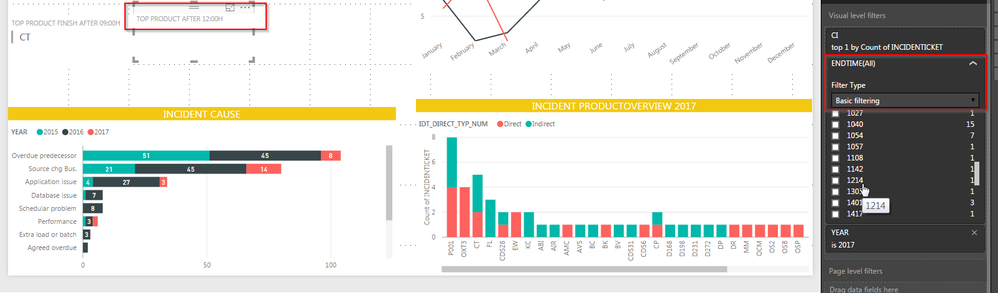
currently i have to create a kpi about the Top 1 of product that has the endtime after 12:00H. In the image bellow you can see (red boxes).


How can i filter a product that has the ENDTIME higher  or > 1200 in a object Multi-Row-Card ?


Thank you so much!


2017-03-03 11_35_45-Incident_Insight_v1 - Power BI Desktop.png


1 ACCEPTED SOLUTION
Anonymous
Not applicable

Hi @Anonymous,


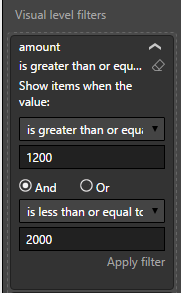
Based on your screenshots, it seems like your column not numeric type, you can try change the type to numeric then refer to below screenshot.


Capture.PNG


Regards,

Xiaoxin Sheng

View solution in original post

5 REPLIES 5
Anonymous
Not applicable

Hi @Anonymous,


You can switch the filter type to advanced filtering and modify the "Show items when the values:" option.


Regards,

Xiaoxin Sheng

Anonymous
Not applicable

Hello @Anonymous,


Thank you for your response.


I would like to filter all products that are finish from 1200 or later. Which one of the function should i choose?


2017-03-06 12_02_41-Incident_Insight_v1 - Power BI Desktop.png


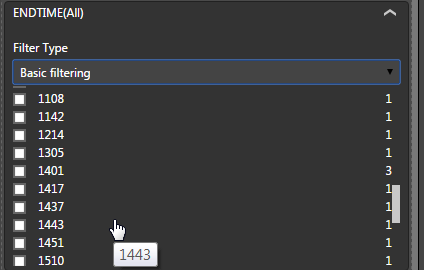
PS: so for your information this are the availale data that has the endtime from 1200


2017-03-06 12_04_52-Incident_Insight_v1 - Power BI Desktop.png


Thanks.

Anonymous
Not applicable

Hi @Anonymous,


The first one, the basic filter only filter the value which equal to your chosen.


Regards,

Xiaoxin Sheng

Anonymous
Not applicable

Yes i know, but can you give me an example how to filter the product end time between 1200 and 2000?

Anonymous
Not applicable

Hi @Anonymous,


Based on your screenshots, it seems like your column not numeric type, you can try change the type to numeric then refer to below screenshot.


Capture.PNG


Regards,

Xiaoxin Sheng

Helpful resources

Announcements
November Power BI Update Carousel

Power BI Monthly Update - November 2025

Check out the November 2025 Power BI update to learn about new features.

Fabric Data Days Carousel

Fabric Data Days

Advance your Data & AI career with 50 days of live learning, contests, hands-on challenges, study groups & certifications and more!

FabCon Atlanta 2026 carousel

FabCon Atlanta 2026

Join us at FabCon Atlanta, March 16-20, for the ultimate Fabric, Power BI, AI and SQL community-led event. Save $200 with code FABCOMM.

Top Solution Authors
Top Kudoed Authors