cancel
Showing results for 
Search instead for 
Did you mean: 

The Power BI Data Visualization World Championships is back! Get ahead of the game and start preparing now! Learn more

Reply
Lilylv
Helper I
Helper I

How to export data with original decimal value instead of the rounding numbers

Hello Everyone,


I want to display the rounding numbers in the visualizations in my report while in the data file exported the numbers can be shown with decimal numbers(the orginal calculated value, no rounding). That is because there is a difference between the rounding numbers and the original ones.


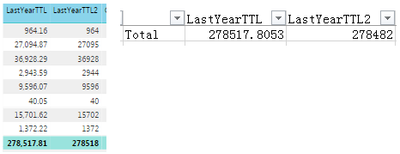
For example, I have two measures with the same value, "LastYearTTL" & "LastYearTTL2", if i get "LastYearTTL2" rounded off by changing the format and leave "LastYearTTL" the auto format, in the report there is no difference with the total value. But when i export the data to a csv. file, there is a gap, snapshot as below. Is there any soluction to avoid the gap??

Untitled.png


Any help on this would be very appreciated.Thanks!


1 ACCEPTED SOLUTION
v-ljerr-msft
Microsoft Employee
Microsoft Employee

Hi @Lilylv,


As there is no any option to change the format when export data for visualization currently, I don't think there is any solution to avoid the gap directly.


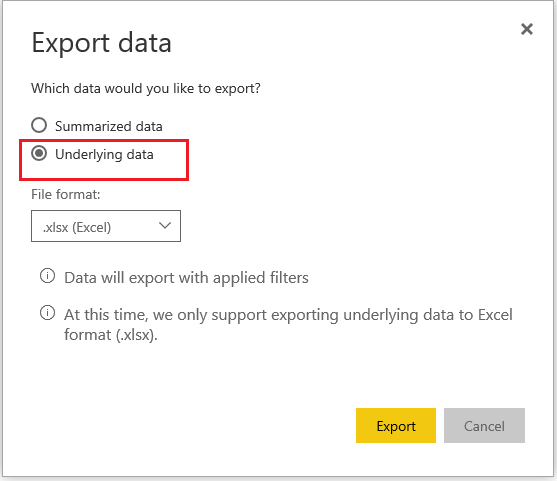
In addition, I'm wondering if exporting the underlying data instead of summarized data on Power BI Service could help in your scenario? Smiley Happy


export1.PNG


Regards

View solution in original post

2 REPLIES 2
v-ljerr-msft
Microsoft Employee
Microsoft Employee

Hi @Lilylv,


As there is no any option to change the format when export data for visualization currently, I don't think there is any solution to avoid the gap directly.


In addition, I'm wondering if exporting the underlying data instead of summarized data on Power BI Service could help in your scenario? Smiley Happy


export1.PNG


Regards

Thank you for the suggestion. But as the underlying data of this report is with a large volume, it's not very convenient to export the data on PBI Service and the summarized data is more appreciate.


Regarding this situation, maybe I can add a slicer to switch the columns displayed in the report or do the rounding off at underlying data level first as a planB.

Helpful resources

Announcements
Power BI DataViz World Championships

Power BI Dataviz World Championships

The Power BI Data Visualization World Championships is back! Get ahead of the game and start preparing now!

November Power BI Update Carousel

Power BI Monthly Update - November 2025

Check out the November 2025 Power BI update to learn about new features.

FabCon Atlanta 2026 carousel

FabCon Atlanta 2026

Join us at FabCon Atlanta, March 16-20, for the ultimate Fabric, Power BI, AI and SQL community-led event. Save $200 with code FABCOMM.