cancel
Showing results for 
Search instead for 
Did you mean: 

Get Fabric Certified for FREE during Fabric Data Days. Don't miss your chance! Request now

Reply
Anonymous
Not applicable

How to enter Targets in a Histogram

Hi, 


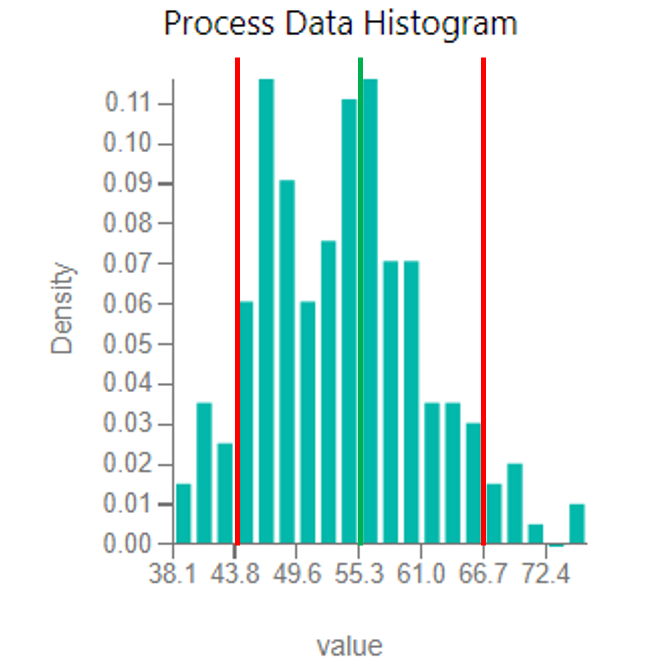
So I am trying to enter vertical lines into my histogram as seen in the image below. Basically I want a way to have the target (green line) and lower bounds (red lines) enter on my histogram without me having to draw a line on the graph manually like I did for this image.


It seems with the histogram addin this isn't possible, but is there a workaround to make histograms with just the regular bar graph? Using the grouping function?


Capture1.PNG

1 REPLY 1
v-yulgu-msft
Microsoft Employee
Microsoft Employee

Hi @Anonymous,


A vertical reference line is not available now. Please try the workaround I provided in this similar thread.


Best regards,

Yuliana Gu

Community Support Team _ Yuliana Gu
If this post helps, then please consider Accept it as the solution to help the other members find it more quickly.

Helpful resources

Announcements
November Power BI Update Carousel

Power BI Monthly Update - November 2025

Check out the November 2025 Power BI update to learn about new features.

Fabric Data Days Carousel

Fabric Data Days

Advance your Data & AI career with 50 days of live learning, contests, hands-on challenges, study groups & certifications and more!

FabCon Atlanta 2026 carousel

FabCon Atlanta 2026

Join us at FabCon Atlanta, March 16-20, for the ultimate Fabric, Power BI, AI and SQL community-led event. Save $200 with code FABCOMM.

Top Solution Authors
Top Kudoed Authors