
cancel
Showing results for 
Search instead for 
Did you mean: 

The Power BI Data Visualization World Championships is back! Get ahead of the game and start preparing now! Learn more

Reply
tracyhopaulson
Resolver I
Resolver I

How to dynamically group values

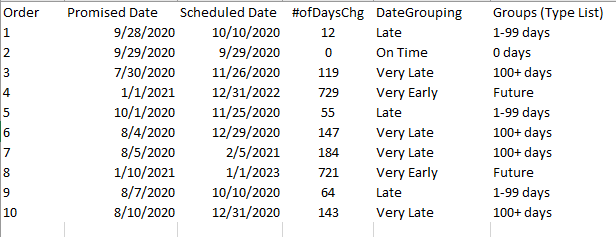
I've grouped a list below but each time the report is refreshed, the new data get thrown into the "other" bucket and I have to manually group them.  Is there another option to setup dynamic grouping in PowerBI?  Thanks in advance for your help!


Capture1.PNGCapture1.PNG

2 ACCEPTED SOLUTIONS

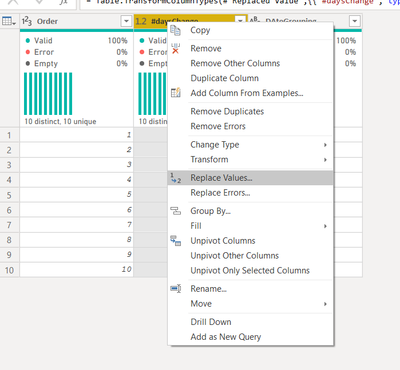
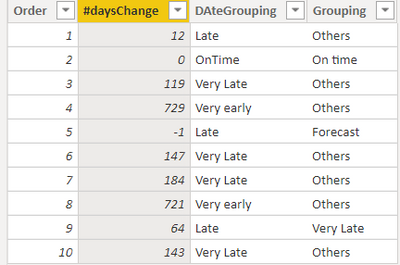
@tracyhopaulson You can do one thing, replace blank values in your data with a -1. You can make changes in the powerquery window like below and then change your dax as well. Performing calculation with blank values will not be possible, it is advisible to have numeric values in the data


replace value.png


Grouping =
Var day_chg = IF(ISBLANK('Order'[#daysChange]),-1,'Order'[#daysChange])
return
if(day_chg = -1,"Forecast",
if(day_chg=0,"On time",
if(AND(day_chg>20,day_chg<40), "Late",
if(AND(day_chg>40, day_chg<100), "Very Late","Others"
))))

negi007_0-1602207495170.png


Did I answer your question? Mark my post as a solution!
Appreciate your Kudos


Proud to be a Super User!


Follow me on linkedin

View solution in original post

@negi007  thanks again for your help! Yes this is exactly what I need. 


thank-you.gif

View solution in original post

5 REPLIES 5
negi007
Community Champion
Community Champion

@tracyhopaulson you can create a custom column like below. You can add more if conditions as per your requirements.


Grouping =
Var day_chg = 'Order'[#daysChange]
return
if(day_chg=0,"On time",
if(AND(day_chg>20,day_chg<40), "Late",
if(AND(day_chg>40, day_chg<100), "Very Late","Others"
)))


Did I answer your question? Mark my post as a solution!
Appreciate your Kudos


Proud to be a Super User!


Follow me on linkedin

@negi007  creating custom column with the formula you provided works.  Thanks so much!  However, I now noticed there are some orders with missing Promised Date and Scheduled Date so the #ofDaysChg is blank.  Somehow it groups these into the On Time bucket.  I would like to group them into different so I added condition if(day_chg=blank(),"Forecast", but it doesn't work.  What am I missing?

@tracyhopaulson You can do one thing, replace blank values in your data with a -1. You can make changes in the powerquery window like below and then change your dax as well. Performing calculation with blank values will not be possible, it is advisible to have numeric values in the data


replace value.png


Grouping =
Var day_chg = IF(ISBLANK('Order'[#daysChange]),-1,'Order'[#daysChange])
return
if(day_chg = -1,"Forecast",
if(day_chg=0,"On time",
if(AND(day_chg>20,day_chg<40), "Late",
if(AND(day_chg>40, day_chg<100), "Very Late","Others"
))))

negi007_0-1602207495170.png


Did I answer your question? Mark my post as a solution!
Appreciate your Kudos


Proud to be a Super User!


Follow me on linkedin

@negi007  thanks again for your help! Yes this is exactly what I need. 


thank-you.gif

Greg_Deckler
Community Champion
Community Champion

@tracyhopaulson Not sure about the issue you are having with the grouping/binning, but you could always just create a measure, like:

Measure = 
  VAR __DateGrouping = MAX([DateGrouping])
RETURN
  SWITCH(TRUE(),
    __DateGrouping = "Late","1-99 days",
    __DateGrouping = "On Time","0 days",
    __DateGrouping = "Very Late","100+ days",
    __DateGrouping = "Very Early","Future",
    "Other"
  )


Follow on LinkedIn
@ me in replies or I'll lose your thread!!!
Instead of a Kudo, please vote for this idea
Become an expert!: Enterprise DNA
External Tools: MSHGQM
YouTube Channel!: Microsoft Hates Greg
Latest book!:
DAX For Humans

DAX is easy, CALCULATE makes DAX hard...

Helpful resources

Announcements
Power BI DataViz World Championships

Power BI Dataviz World Championships

The Power BI Data Visualization World Championships is back! Get ahead of the game and start preparing now!

December 2025 Power BI Update Carousel

Power BI Monthly Update - December 2025

Check out the December 2025 Power BI Holiday Recap!

FabCon Atlanta 2026 carousel

FabCon Atlanta 2026

Join us at FabCon Atlanta, March 16-20, for the ultimate Fabric, Power BI, AI and SQL community-led event. Save $200 with code FABCOMM.