Fabric Data Days starts November 4th!
Advance your Data & AI career with 50 days of live learning, dataviz contests, hands-on challenges, study groups & certifications and more!
Get registered- Power BI forums
- Get Help with Power BI
- Desktop
- Service
- Report Server
- Power Query
- Mobile Apps
- Developer
- DAX Commands and Tips
- Custom Visuals Development Discussion
- Health and Life Sciences
- Power BI Spanish forums
- Translated Spanish Desktop
- Training and Consulting
- Instructor Led Training
- Dashboard in a Day for Women, by Women
- Galleries
- Data Stories Gallery
- Themes Gallery
- Contests Gallery
- Quick Measures Gallery
- Visual Calculations Gallery
- Notebook Gallery
- Translytical Task Flow Gallery
- TMDL Gallery
- R Script Showcase
- Webinars and Video Gallery
- Ideas
- Custom Visuals Ideas (read-only)
- Issues
- Issues
- Events
- Upcoming Events
Join us at FabCon Atlanta from March 16 - 20, 2026, for the ultimate Fabric, Power BI, AI and SQL community-led event. Save $200 with code FABCOMM. Register now.
- Power BI forums
- Forums
- Get Help with Power BI
- Desktop
- Re: How to display university name on map?
- Subscribe to RSS Feed
- Mark Topic as New
- Mark Topic as Read
- Float this Topic for Current User
- Bookmark
- Subscribe
- Printer Friendly Page

- Mark as New
- Bookmark
- Subscribe
- Mute
- Subscribe to RSS Feed
- Permalink
- Report Inappropriate Content
How to display university name on map?
Hi,
I am working on an interactive map on Power BI Desktop which comprises of colleges/universities across the state of Georgia. I am trying to display the University Name when I hover my cursor on the locations. I can see the city, county etc. but not the university name. I tried adding the university name column to visual level filters but that didn't help either. Any ideas or suggestions on how I can achieve the same?
Thanks!
Solved! Go to Solution.


- Mark as New
- Bookmark
- Subscribe
- Mute
- Subscribe to RSS Feed
- Permalink
- Report Inappropriate Content
Assuming you have the lat/lng for the universities, why not add name as the Legend, that way you will have the name pop up on hover-over. If the city and county are important, perhaps create a calculated column which concatenates those things with University&", "&City&", "&County.
//Please mark as solved if your question has been answered

- Mark as New
- Bookmark
- Subscribe
- Mute
- Subscribe to RSS Feed
- Permalink
- Report Inappropriate Content
Hi @tprasad1,
In your scenario, you can try to use the samdthompson's suggestion firstly.
If you already place a field in the Legend Property, I would suggest you place university name column in Location property. If there is another field in Location property, when you drill down the report, you can see the university name. See:
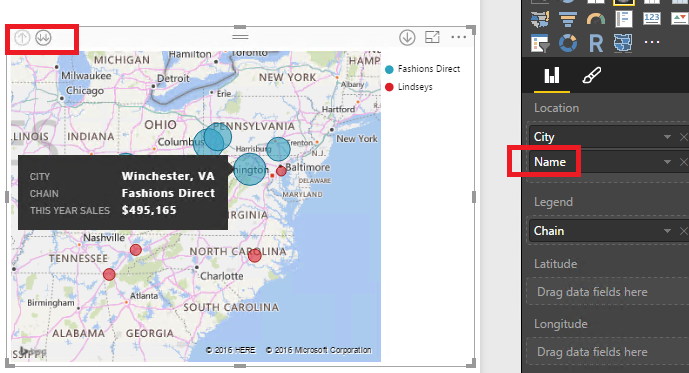
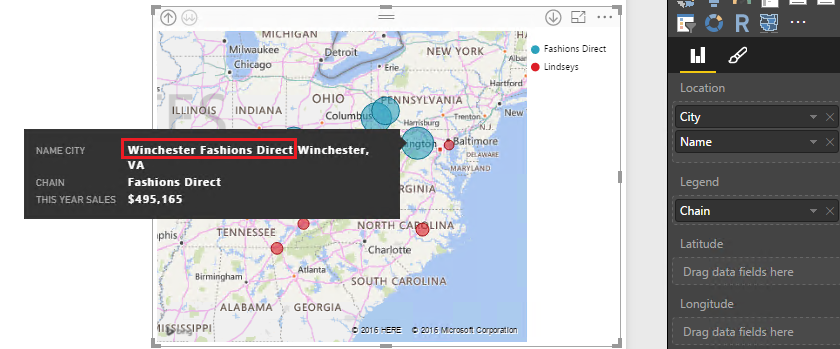
Also you can create a calculated column to concatenate university name column with another column like this ( Column = [Location] & [UniversityName] ), then place this new column in Location property.
If you have any question, please feel free to ask.
Best Regards,
Qiuyun Yu
If this post helps, then please consider Accept it as the solution to help the other members find it more quickly.
- Mark as New
- Bookmark
- Subscribe
- Mute
- Subscribe to RSS Feed
- Permalink
- Report Inappropriate Content
Hi @tprasad1,
In your scenario, you can try to use the samdthompson's suggestion firstly.
If you already place a field in the Legend Property, I would suggest you place university name column in Location property. If there is another field in Location property, when you drill down the report, you can see the university name. See:
Also you can create a calculated column to concatenate university name column with another column like this ( Column = [Location] & [UniversityName] ), then place this new column in Location property.
If you have any question, please feel free to ask.
Best Regards,
Qiuyun Yu
If this post helps, then please consider Accept it as the solution to help the other members find it more quickly.


- Mark as New
- Bookmark
- Subscribe
- Mute
- Subscribe to RSS Feed
- Permalink
- Report Inappropriate Content
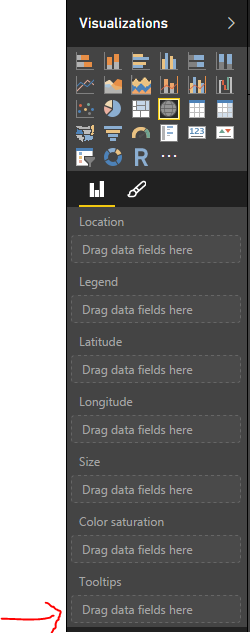
@tprasad1 On top of what @samdthompson said if you have university name column in your dataset just drop it into Tooltips area for the Map visual and it will start appearing.
- Mark as New
- Bookmark
- Subscribe
- Mute
- Subscribe to RSS Feed
- Permalink
- Report Inappropriate Content
Adding text fields to tool tips always results in a arithmetic count for me @ankipatira rather than a label on hover-over. Is there a trick to that?


- Mark as New
- Bookmark
- Subscribe
- Mute
- Subscribe to RSS Feed
- Permalink
- Report Inappropriate Content
The Tooltips are only for aggregated data, so it won't work. The Power BI Team does need to add a 'Text' Tooltip. It will be extremely useful.
I think the 2nd post is your best answer.
Later this year, you will be able to upload your own mapping layers which should hopefully allow you to add landmarks.
Cheers,
DJ

- Mark as New
- Bookmark
- Subscribe
- Mute
- Subscribe to RSS Feed
- Permalink
- Report Inappropriate Content
You can drop a measure that returns text into the tooltip.
University Name = FIRSTNONBLANK( TableName(UniversityName), 1)
Assuming whatever you're using as your data point on the map corresponds to one university that will work. If it's an area that contains multiple universities (I dunno, maybe you have a hierarchy where they can drill up to the state or province) it will show the first university name in your table for that region.
Did I answer your question? Mark my post as a solution!
Proud to be a Super User!


- Mark as New
- Bookmark
- Subscribe
- Mute
- Subscribe to RSS Feed
- Permalink
- Report Inappropriate Content
This solution was perfect for me. I was looking for a solution to add a text label to a map dot.
- Mark as New
- Bookmark
- Subscribe
- Mute
- Subscribe to RSS Feed
- Permalink
- Report Inappropriate Content
@KHorseman can you conactenate together the firstnonblank returns in the measure so you get the University, the City & the County?
- Mark as New
- Bookmark
- Subscribe
- Mute
- Subscribe to RSS Feed
- Permalink
- Report Inappropriate Content
@samdthompson I don't see why not. I'm sure it would work if you did something like
University = FIRSTNONBLANK(TableName[UniversityName], 1) & ", " & FIRSTNONBLANK(TableName[City], 1) & ", " & FIRSTNONBLANK(TableName[County], 1)
...though I haven't actually tested this exact case.
Did I answer your question? Mark my post as a solution!
Proud to be a Super User!
- Mark as New
- Bookmark
- Subscribe
- Mute
- Subscribe to RSS Feed
- Permalink
- Report Inappropriate Content
Assuming you have the lat/lng for the universities, why not add name as the Legend, that way you will have the name pop up on hover-over. If the city and county are important, perhaps create a calculated column which concatenates those things with University&", "&City&", "&County.
//Please mark as solved if your question has been answered

Helpful resources

Fabric Data Days
Advance your Data & AI career with 50 days of live learning, contests, hands-on challenges, study groups & certifications and more!

Power BI Monthly Update - October 2025
Check out the October 2025 Power BI update to learn about new features.

FabCon Atlanta 2026
Join us at FabCon Atlanta, March 16-20, for the ultimate Fabric, Power BI, AI and SQL community-led event. Save $200 with code FABCOMM.


| User | Count |
|---|---|
| 75 | |
| 36 | |
| 31 | |
| 29 | |
| 26 |


