Join us at FabCon Atlanta from March 16 - 20, 2026, for the ultimate Fabric, Power BI, AI and SQL community-led event. Save $200 with code FABCOMM.
Register now!The Power BI Data Visualization World Championships is back! Get ahead of the game and start preparing now! Learn more
Hi All,
I am trying to reproduce the bar chart below in power BI
The down arrow and the -36% represent the percentage variation with previous year
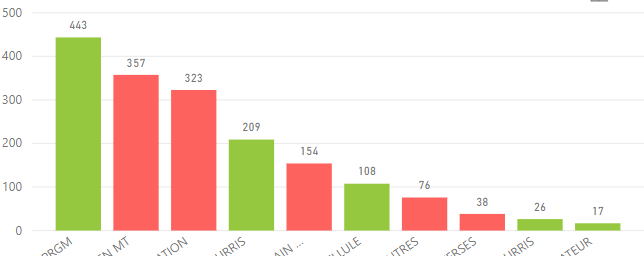
Below is my attempt in power BI
Now my challenge is how to display the down arrow and % variation just like on the first bar chart? How can I solve this?
Thanks. This definitely is one solution but i was able to get my solution from another user. Yours however is another version of it. Thanks!
Hi @Anonymous ,
Bar chart doesn't support it in Power BI currently.
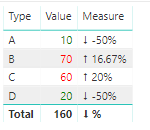
However you could use table or matrix visual to do it.
Here is my test file for your reference.
The Power BI Data Visualization World Championships is back! Get ahead of the game and start preparing now!
Check out the November 2025 Power BI update to learn about new features.
| User | Count |
|---|---|
| 66 | |
| 47 | |
| 43 | |
| 26 | |
| 19 |
| User | Count |
|---|---|
| 196 | |
| 127 | |
| 102 | |
| 67 | |
| 49 |