FabCon is coming to Atlanta
Join us at FabCon Atlanta from March 16 - 20, 2026, for the ultimate Fabric, Power BI, AI and SQL community-led event. Save $200 with code FABCOMM.
Register now!- Power BI forums
- Get Help with Power BI
- Desktop
- Service
- Report Server
- Power Query
- Mobile Apps
- Developer
- DAX Commands and Tips
- Custom Visuals Development Discussion
- Health and Life Sciences
- Power BI Spanish forums
- Translated Spanish Desktop
- Training and Consulting
- Instructor Led Training
- Dashboard in a Day for Women, by Women
- Galleries
- Data Stories Gallery
- Themes Gallery
- Contests Gallery
- QuickViz Gallery
- Quick Measures Gallery
- Visual Calculations Gallery
- Notebook Gallery
- Translytical Task Flow Gallery
- TMDL Gallery
- R Script Showcase
- Webinars and Video Gallery
- Ideas
- Custom Visuals Ideas (read-only)
- Issues
- Issues
- Events
- Upcoming Events
The Power BI Data Visualization World Championships is back! Get ahead of the game and start preparing now! Learn more
- Power BI forums
- Forums
- Get Help with Power BI
- Desktop
- Re: How to display 12 months data for current sele...
- Subscribe to RSS Feed
- Mark Topic as New
- Mark Topic as Read
- Float this Topic for Current User
- Bookmark
- Subscribe
- Printer Friendly Page

- Mark as New
- Bookmark
- Subscribe
- Mute
- Subscribe to RSS Feed
- Permalink
- Report Inappropriate Content
How to display 12 months data for current selected year and prior year
Hi, how to plot a line chart with stagnant Jan-Dec month and the lines shows the current year and prior year data like screenshot below? For example, when user selects year = 2022, then blue line displays % for each month in 2021 and red line blue line displays % for each month in 2021. If user selects year = 2023, then blue line displays % for each month in 2022 and red line blue line displays % for each month (up to latest month) in 2021, like below data we have data up to Apr 2023 only.

| Date | Sales Qty | Delivered Qty | % Delivered |
| 1/1/2021 | 289 | 37 | 13% |
| 1/2/2021 | 83 | 47 | 57% |
| 1/3/2021 | 412 | 71 | 17% |
| 1/4/2021 | 281 | 44 | 16% |
| 1/5/2021 | 165 | 22 | 13% |
| 1/6/2021 | 648 | 22 | 3% |
| 1/7/2021 | 221 | 63 | 29% |
| 1/8/2021 | 474 | 65 | 14% |
| 1/9/2021 | 660 | 13 | 2% |
| 1/10/2021 | 295 | 77 | 26% |
| 1/11/2021 | 68 | 6 | 9% |
| 1/12/2021 | 99 | 17 | 17% |
| 1/1/2022 | 979 | 92 | 9% |
| 1/2/2022 | 602 | 49 | 8% |
| 1/3/2022 | 300 | 48 | 16% |
| 1/4/2022 | 198 | 85 | 43% |
| 1/5/2022 | 555 | 75 | 13% |
| 1/6/2022 | 72 | 63 | 87% |
| 1/7/2022 | 835 | 95 | 11% |
| 1/8/2022 | 112 | 49 | 44% |
| 1/9/2022 | 791 | 77 | 10% |
| 1/10/2022 | 453 | 49 | 11% |
| 1/11/2022 | 647 | 78 | 12% |
| 1/12/2022 | 350 | 56 | 16% |
| 1/1/2023 | 886 | 700 | 79% |
| 1/2/2023 | 337 | 38 | 11% |
| 1/3/2023 | 779 | 95 | 12% |
| 1/4/2023 | 42 | 30 | 72% |
Solved! Go to Solution.


- Mark as New
- Bookmark
- Subscribe
- Mute
- Subscribe to RSS Feed
- Permalink
- Report Inappropriate Content
Hi,
You may download my PBI file from here.
Hope this helps.
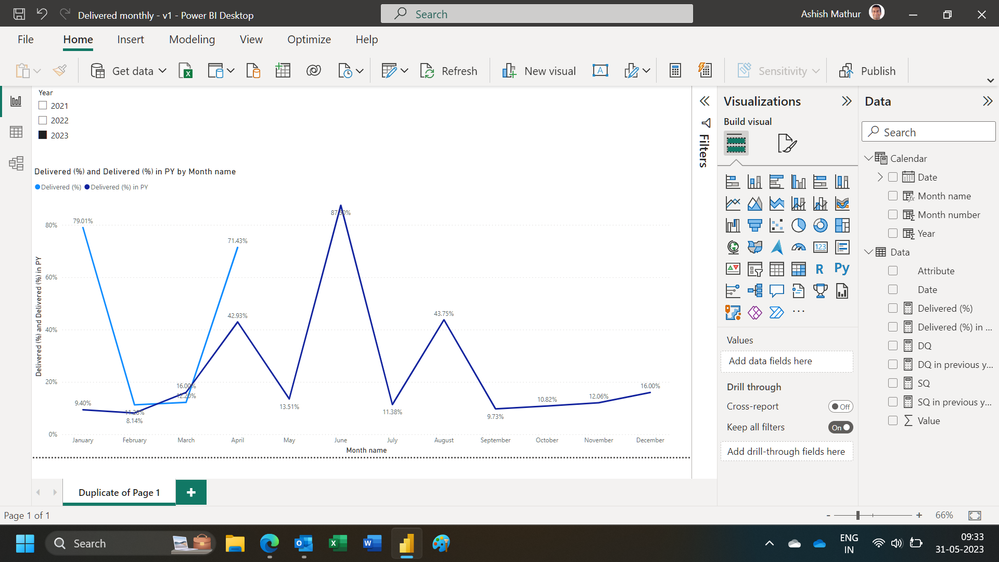
Regards,
Ashish Mathur
http://www.ashishmathur.com
https://www.linkedin.com/in/excelenthusiasts/
- Mark as New
- Bookmark
- Subscribe
- Mute
- Subscribe to RSS Feed
- Permalink
- Report Inappropriate Content
Hi,
You may download my PBI file from here.
Hope this helps.

Regards,
Ashish Mathur
http://www.ashishmathur.com
https://www.linkedin.com/in/excelenthusiasts/
- Mark as New
- Bookmark
- Subscribe
- Mute
- Subscribe to RSS Feed
- Permalink
- Report Inappropriate Content
Hi @Ashish_Mathur , how to display only current year (CY) and prior year (PY) based on the year selected? E.g user selects "2023" on "Year" slicer, the chart only shows 2022 and 2023 data from Jan to Dec.
- Mark as New
- Bookmark
- Subscribe
- Mute
- Subscribe to RSS Feed
- Permalink
- Report Inappropriate Content
Hi,
You may download my PBI file from here.
Hope this helps.
Regards,
Ashish Mathur
http://www.ashishmathur.com
https://www.linkedin.com/in/excelenthusiasts/
- Mark as New
- Bookmark
- Subscribe
- Mute
- Subscribe to RSS Feed
- Permalink
- Report Inappropriate Content
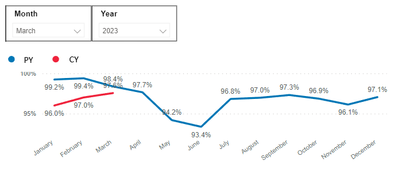
Hi @Ashish_Mathur , thanks for the solution. It works well but users would like to view the trend of current year and previous year when the month is selected. For example, when users select Month = March, they are still able to see the data from Jan to Dec for previous year and from Jan to Mar for current year. Is that possible? Thanks.
- Mark as New
- Bookmark
- Subscribe
- Mute
- Subscribe to RSS Feed
- Permalink
- Report Inappropriate Content
Why the complication??? For the current year, the line chart will only show upto the last month till which there is a date in the Calendar Table.
Regards,
Ashish Mathur
http://www.ashishmathur.com
https://www.linkedin.com/in/excelenthusiasts/
- Mark as New
- Bookmark
- Subscribe
- Mute
- Subscribe to RSS Feed
- Permalink
- Report Inappropriate Content
Yeah, that's the request from users and trying to see if that's possible. Anyway, thanks! 🙂

Helpful resources

Power BI Monthly Update - November 2025
Check out the November 2025 Power BI update to learn about new features.

Fabric Data Days
Advance your Data & AI career with 50 days of live learning, contests, hands-on challenges, study groups & certifications and more!

FabCon Atlanta 2026
Join us at FabCon Atlanta, March 16-20, for the ultimate Fabric, Power BI, AI and SQL community-led event. Save $200 with code FABCOMM.


