Don't miss your chance to take the Fabric Data Engineer (DP-700) exam on us!
Learn moreThe FabCon + SQLCon recap series starts April 14th at 8am Pacific. If you’re tracking where AI is going inside Fabric, this first session is a can't miss. Register now
Hi All,
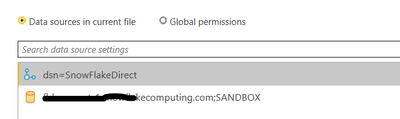
I want to delete a datasource from my desktop report. I have two and it always defaults to the first one, i followed the link below but still it is not working
Please see the attached image
Thanks
Solved! Go to Solution.
Hi @beaconfbb
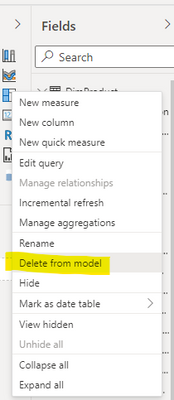
In desktop view , click … for the data model , and then click the “Delete from model” , you can directly delete the data model, including the records in the data source settings .
Best Regards
Community Support Team _ Ailsa Tao
If this post helps, then please consider Accept it as the solution to help the other members find it more quickly.
@Syndicate_Admin thank you very much, your advice helped, my problem was solved,
In my case, 2 folders were duplicated, and when I selected the same path, one was automatically deleted.
Hi @beaconfbb
In desktop view , click … for the data model , and then click the “Delete from model” , you can directly delete the data model, including the records in the data source settings .
Best Regards
Community Support Team _ Ailsa Tao
If this post helps, then please consider Accept it as the solution to help the other members find it more quickly.
I usually right-click and the data source, click on "change source" and provide the same information as the other data source and Power BI removes one of them.
Worked great for me as well.
Why the actual heck do they not have a 'Delete'? I realize why they may not want to have Delete, as it could permanantly break the entire model, but the option could be useful. Power BI could check if anything is using an outdated data source, and if not, allow the option to appear.
this worked for me!!
If you have recently started exploring Fabric, we'd love to hear how it's going. Your feedback can help with product improvements.
A new Power BI DataViz World Championship is coming this June! Don't miss out on submitting your entry.
Share feedback directly with Fabric product managers, participate in targeted research studies and influence the Fabric roadmap.
| User | Count |
|---|---|
| 53 | |
| 40 | |
| 38 | |
| 19 | |
| 18 |
| User | Count |
|---|---|
| 70 | |
| 69 | |
| 34 | |
| 33 | |
| 30 |