Join us at FabCon Atlanta from March 16 - 20, 2026, for the ultimate Fabric, Power BI, AI and SQL community-led event. Save $200 with code FABCOMM.
Register now!The Power BI Data Visualization World Championships is back! Get ahead of the game and start preparing now! Learn more
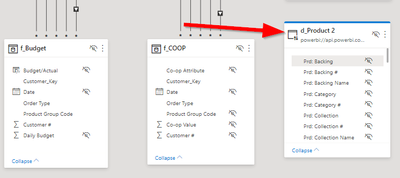
I tested out the new "DirectQuery for Power BI datasets" feature of the December update, but now I want to delete the table I brought in, and I can't seem to do that.
Does anyone know how to disconnect from a Power BI dataset?
Solved! Go to Solution.
No, I saw no option to delete. I reverted to an earlier version of my file to get around it. Thank you.
@justinh ,
You can righ click on the table name on the fields and delete the file.
Are you not getting delete option ?
Regards,
Manikumar
Proud to be a Super User!
No, I saw no option to delete. I reverted to an earlier version of my file to get around it. Thank you.
Yes, I have the same problem. Delete option is missing.
The Power BI Data Visualization World Championships is back! Get ahead of the game and start preparing now!
| User | Count |
|---|---|
| 61 | |
| 44 | |
| 41 | |
| 36 | |
| 21 |
| User | Count |
|---|---|
| 176 | |
| 120 | |
| 106 | |
| 77 | |
| 52 |