FabCon is coming to Atlanta
Join us at FabCon Atlanta from March 16 - 20, 2026, for the ultimate Fabric, Power BI, AI and SQL community-led event. Save $200 with code FABCOMM.
Register now!- Power BI forums
- Get Help with Power BI
- Desktop
- Service
- Report Server
- Power Query
- Mobile Apps
- Developer
- DAX Commands and Tips
- Custom Visuals Development Discussion
- Health and Life Sciences
- Power BI Spanish forums
- Translated Spanish Desktop
- Training and Consulting
- Instructor Led Training
- Dashboard in a Day for Women, by Women
- Galleries
- Data Stories Gallery
- Themes Gallery
- Contests Gallery
- QuickViz Gallery
- Quick Measures Gallery
- Visual Calculations Gallery
- Notebook Gallery
- Translytical Task Flow Gallery
- TMDL Gallery
- R Script Showcase
- Webinars and Video Gallery
- Ideas
- Custom Visuals Ideas (read-only)
- Issues
- Issues
- Events
- Upcoming Events
Get Fabric Certified for FREE during Fabric Data Days. Don't miss your chance! Request now
- Power BI forums
- Forums
- Get Help with Power BI
- Desktop
- Re: How to deal with balance calcuation with a dat...
- Subscribe to RSS Feed
- Mark Topic as New
- Mark Topic as Read
- Float this Topic for Current User
- Bookmark
- Subscribe
- Printer Friendly Page


- Mark as New
- Bookmark
- Subscribe
- Mute
- Subscribe to RSS Feed
- Permalink
- Report Inappropriate Content
How to deal with balance calcuation with a date slicer?
Hello power people!
I want to calculate balance, which is the amount sum of the first transaction to the last transaction.
But I have a date slicer on the page with both from date and to date.
The issue is if the user moved the from date ahead from the first transaction, the balance sum will be wrong.
how to deal with balance in this regard?
is there a "To date" only slicer? or I should fix my measure function?
Because the user needs to know the balance for exmaple of 2019 and the balance of 2020.
Thanks in advance!
Solved! Go to Solution.
- Mark as New
- Bookmark
- Subscribe
- Mute
- Subscribe to RSS Feed
- Permalink
- Report Inappropriate Content
Hi @I_NeedMorePower ,
Thanks for your explanation, it's very clear to me.
And I think the below measure is what you want, and I have try it on my desktop, and it works.
Measure = CALCULATE(your_measure,FILTER(ALL(your_date),your_date <= MAX(your_date)))
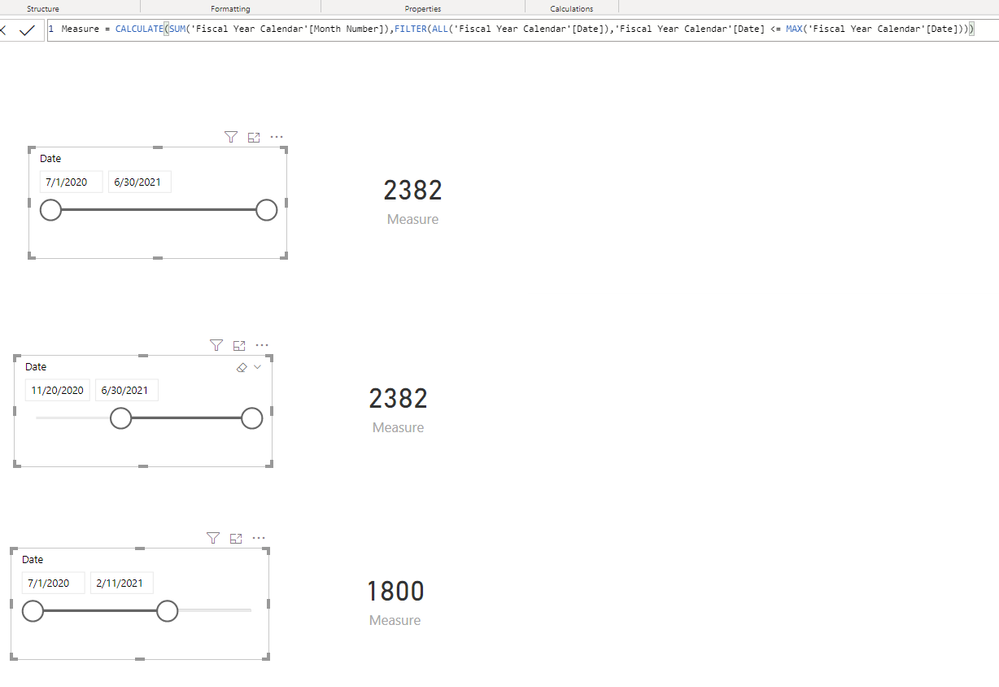
Please try.
Aiolos Zhao


- Mark as New
- Bookmark
- Subscribe
- Mute
- Subscribe to RSS Feed
- Permalink
- Report Inappropriate Content
Hi @I_NeedMorePower ,
You change your measure to
Measure = CALCULATE(your meaures,FILTER(ALL('SLICER_DATE_TABLE'),''SLICER_DATE_TABLE''[Date]<=MAX(''SLICER_DATE_TABLE''[Date]'[Date])))
If this post helps, then please consider Accept it as the solution to help the other members find it more quickly.
Best Regards,
Dedmon Dai

- Mark as New
- Bookmark
- Subscribe
- Mute
- Subscribe to RSS Feed
- Permalink
- Report Inappropriate Content
Hi @I_NeedMorePower ,
I'm a little confused about your request.
Do you want to ignore the slicer or something else?
Could you please give samples and the desired result?
Aiolos Zhao
- Mark as New
- Bookmark
- Subscribe
- Mute
- Subscribe to RSS Feed
- Permalink
- Report Inappropriate Content
Hi there AiolosZhao!
Sorry if I was not clear!
The situation is, I have transactions that start since 2018 till today (2020) and I have a date slicer on the report page that has a "From Date" & "To Date". I am calculating the balance of the transactions, which is the sum of the first transaction till the last transaction.
My issue is, when moving the "From Date" slicer ahead from the begining (for example moving it to 2019) will result in a wrong balance sum, because it will exclude the previous transactions (transactions of 2018).
And this is my issue.
Is there a way to make the balance measure NOT get affected by the "From Date" slicer? and only get affected with "To Date" slicer?
because if I needed to know the balance of previous year (2019) I will just move the "To Date" to 2019.
Thanks for the reply!
- Mark as New
- Bookmark
- Subscribe
- Mute
- Subscribe to RSS Feed
- Permalink
- Report Inappropriate Content
Hi @I_NeedMorePower ,
Thanks for your explanation, it's very clear to me.
And I think the below measure is what you want, and I have try it on my desktop, and it works.
Measure = CALCULATE(your_measure,FILTER(ALL(your_date),your_date <= MAX(your_date)))
Please try.
Aiolos Zhao
- Mark as New
- Bookmark
- Subscribe
- Mute
- Subscribe to RSS Feed
- Permalink
- Report Inappropriate Content
Hi @Anonymous !
The measure you provided only works if i'm using the Transactions table date for the slicer.
but what i'm using in the report for the slicer is a date table which is linked to different transaction tables.
The date table starts from 2019, while there are transactions previous to 2019.
How should I modify the measure you provided to make it able to work regarding a date table that is linked to the transaction table with a date key?
I'm sorry if i'm not clear enough. and i'm really glad for the solution you gave me but I tried modifying it to
Measure = CALCULATE(your_measure,FILTER(ALL(your_date),your_date <= MAX(SLICER_DATE_TABLE[Date])))but it didn't work, it still changes when i'm moving the "From date" slicer.
Thank you again for your kind help
- Mark as New
- Bookmark
- Subscribe
- Mute
- Subscribe to RSS Feed
- Permalink
- Report Inappropriate Content
Hi @I_NeedMorePower ,
You change your measure to
Measure = CALCULATE(your meaures,FILTER(ALL('SLICER_DATE_TABLE'),''SLICER_DATE_TABLE''[Date]<=MAX(''SLICER_DATE_TABLE''[Date]'[Date])))
If this post helps, then please consider Accept it as the solution to help the other members find it more quickly.
Best Regards,
Dedmon Dai
Helpful resources

Power BI Monthly Update - November 2025
Check out the November 2025 Power BI update to learn about new features.

Fabric Data Days
Advance your Data & AI career with 50 days of live learning, contests, hands-on challenges, study groups & certifications and more!

FabCon Atlanta 2026
Join us at FabCon Atlanta, March 16-20, for the ultimate Fabric, Power BI, AI and SQL community-led event. Save $200 with code FABCOMM.


