
Join us at FabCon Atlanta from March 16 - 20, 2026, for the ultimate Fabric, Power BI, AI and SQL community-led event. Save $200 with code FABCOMM.
Register now!The Power BI Data Visualization World Championships is back! Get ahead of the game and start preparing now! Learn more
I am sharing my Pbix file here.
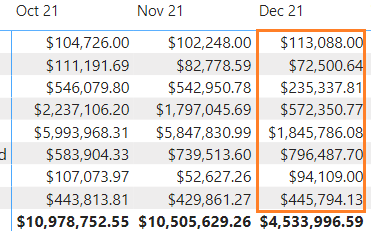
I am trying to show the values inside Dec. 2021 with a different color so that user could distinguish that this month is not complete.
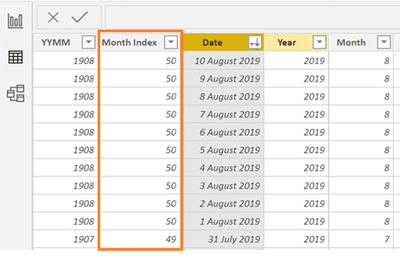
I Googled and found this site that explains how to do it, but I am stuck how I create Month Index:
It appears that I cannot pursue without getting some type of key value of each month to create logic further.
Bottom are two screenshots from the same site:
How do we create the value for Month Index?
Thanks for help.
Solved! Go to Solution.
@JustinDoh1 , Create one of the measure and use that in conditional formatting using files value option
if( max('Date'[Month]) = format(Today(), "MMM YY" ), "Yellow", "white")
or
if( eomonth(max('Date'[Date]),0) = eomonth(Today(), 0 ), "Yellow", "white")
refer
How to do conditional formatting by measure and apply it on pie?: https://youtu.be/RqBb5eBf_I4
@JustinDoh1 , Create one of the measure and use that in conditional formatting using files value option
if( max('Date'[Month]) = format(Today(), "MMM YY" ), "Yellow", "white")
or
if( eomonth(max('Date'[Date]),0) = eomonth(Today(), 0 ), "Yellow", "white")
refer
How to do conditional formatting by measure and apply it on pie?: https://youtu.be/RqBb5eBf_I4
@amitchandak Thank you so much for your prompt response and help.
I have a question.
So, what is logic here?
I think I got the first part, but I am not sure about the second part/logic.
format(Today(), "MMM YY" ) or eomonth(Today(), 0 )
Thanks.
The Power BI Data Visualization World Championships is back! Get ahead of the game and start preparing now!
| User | Count |
|---|---|
| 70 | |
| 45 | |
| 43 | |
| 36 | |
| 23 |
| User | Count |
|---|---|
| 196 | |
| 125 | |
| 105 | |
| 77 | |
| 56 |