Don't miss your chance to take the Fabric Data Engineer (DP-700) exam on us!
Learn moreThe FabCon + SQLCon recap series starts April 14th at 8am Pacific. If you’re tracking where AI is going inside Fabric, this first session is a can't miss. Register now
Hi,
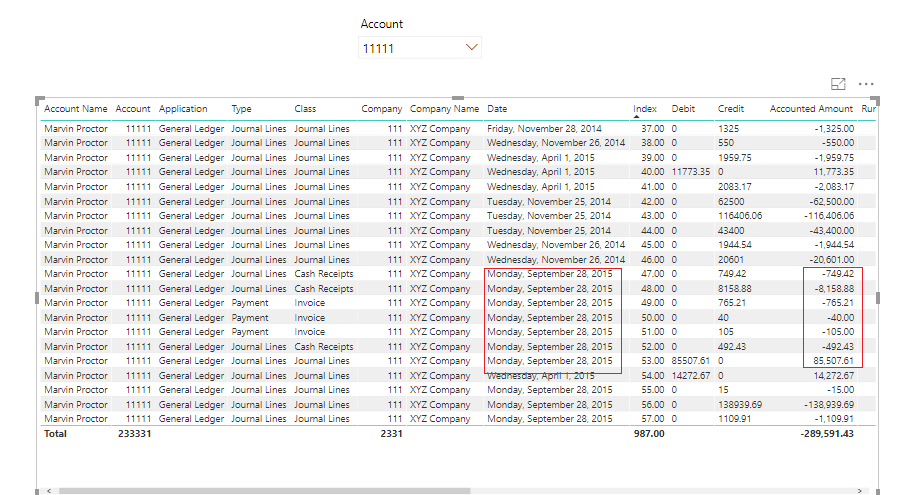
I am trying to create a tooltip for table visual but I am not getting how to write the measure for that. When the user could hover over any date(28 sep 2015 ) on a Date column, for example, under 11111 Account. The tooltip could show the subtotal (Sum of corresponding Accounted Amount column) for 11111 Account for the date (28 sep 2015). And so on. Similarly, hovering over the Type entries (e.g. Payment) would show the sum of all Payment type for Account 11111. Please tell me how to do that.
I am attaching the .pbix file please help.
https://drive.google.com/open?id=1bkWbZxO3gMdswWDEv0bDUcfFpWYrAqqB
Solved! Go to Solution.
Hi @kiranbchitari
You can try adding the following measure to be used in tooltip
ToolTip1 =CALCULATE(SUM(Sheet1[Accounted Amount]),ALLEXCEPT(Sheet1,Sheet1[Date],Sheet1[Account]))
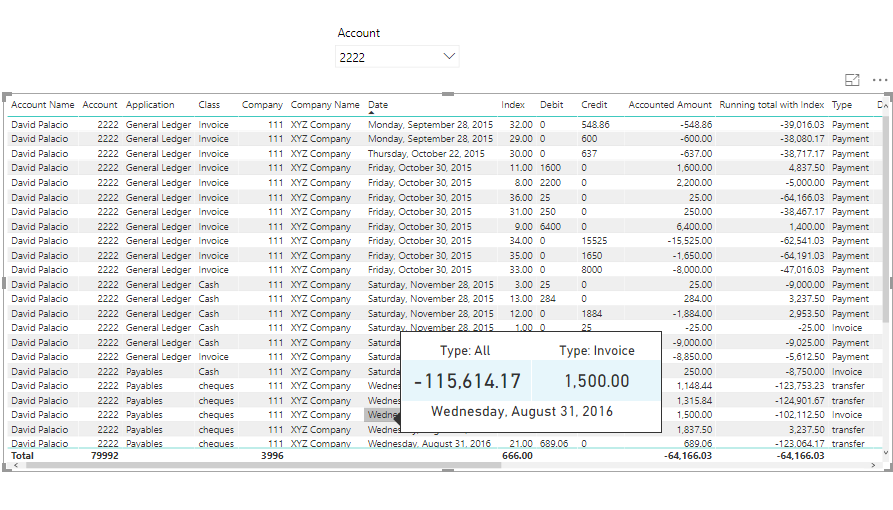
I have attached the pbix file in which I have created two measures to show the total with "All types" on a date and the total with the hovered line "type" and "date"
Here is the pbix, you can try
https://www.dropbox.com/s/jdv7tro4a4txc39/How%20to%20create%20tooltip%20for%20table%20visual.pbix?dl...
Please accept as a solution if this helps.
Regards
Affan
Hi @kiranbchitari
You can try adding the following measure to be used in tooltip
ToolTip1 =CALCULATE(SUM(Sheet1[Accounted Amount]),ALLEXCEPT(Sheet1,Sheet1[Date],Sheet1[Account]))
I have attached the pbix file in which I have created two measures to show the total with "All types" on a date and the total with the hovered line "type" and "date"
Here is the pbix, you can try
https://www.dropbox.com/s/jdv7tro4a4txc39/How%20to%20create%20tooltip%20for%20table%20visual.pbix?dl...
Please accept as a solution if this helps.
Regards
Affan
does this work when pinning the report into a dashboard? it seems it only works when interacting with the report item but not dashboard.
on hover the total tool tip shows wrong data (its showing first row data insted of total)
Same behavior here. This is a problem!
Select your table visual. Go to the paint roller icon (format). Scroll down and turn on Tool Tip.
If you have recently started exploring Fabric, we'd love to hear how it's going. Your feedback can help with product improvements.
A new Power BI DataViz World Championship is coming this June! Don't miss out on submitting your entry.
Share feedback directly with Fabric product managers, participate in targeted research studies and influence the Fabric roadmap.
| User | Count |
|---|---|
| 53 | |
| 40 | |
| 38 | |
| 19 | |
| 18 |
| User | Count |
|---|---|
| 69 | |
| 68 | |
| 34 | |
| 33 | |
| 30 |