Join us at FabCon Atlanta from March 16 - 20, 2026, for the ultimate Fabric, Power BI, AI and SQL community-led event. Save $200 with code FABCOMM.
Register now!The Power BI Data Visualization World Championships is back! Get ahead of the game and start preparing now! Learn more
I have a table 'Allocation' which looks like:
| Year | Week | Person | Project | HoursAllocated |
| 2021 | 27 | A | X | 2 |
| 2021 | 27 | A | Y | 3 |
| 2021 | 27 | B | Z | 5 |
| 2021 | 27 | C | Z | 6 |
| 2021 | 28 | A | X | 3 |
| 2021 | 28 | A | Y | 8 |
This table represents on a week-person-project level, how many hours are allocated.
I have another table 'TimeRegistered', which looks like:
| Date | Year | Week | Person | Project | HoursRegistered |
| 05-07-2021 | 2021 | 27 | A | X | 1 |
| 06-07-2021 | 2021 | 27 | A | X | 1 |
| 08-07-2021 | 2021 | 27 | A | Y | 2 |
| 09-07-2021 | 2021 | 27 | A | Y | 1 |
| 10-07-2021 | 2021 | 27 | B | Z | 3 |
This table represents on a daily-person-project level, how many hours were registered.
My goal is to add a column 'HoursRegistered' to the 'Allocation' table, which summarizes at the week-person-project level how many hours were registered.
How can I achieve this?
Solved! Go to Solution.
@Anonymous Try this:
Calc_column=var Current_Year='Allocation'[Year]
var Current_Week='Allocation'[Week]
var Current_Person='Allocation'[Person]
var Current_Project='Allocation'[Project]
var tempTable=FILTER('TimeRegistered','TimeRegistered'[Year]=Current_Year&&'TimeRegistered'[Week]=Current_Week&&'TimeRegistered'[Person]=Current_Person&&'TimeRegistered'[Project]=Current_Project)
return SUMX(tempTable,[HoursRegistered])
Hi, @Anonymous
In Power Query:
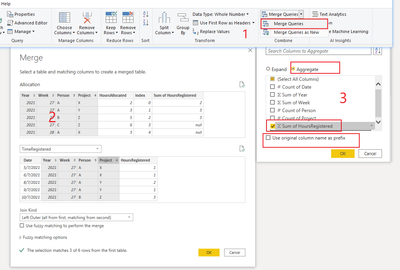
1. Merge Queries
2. Hold down the shift key to select multiple matching columns, and click OK
3. Aggregate
Result:
Please refer to the attachment below for details. Hope this helps.
Best Regards,
Community Support Team _ Zeon Zheng
If this post helps, then please consider Accept it as the solution to help the other members find it more quickly.
@Anonymous Try this:
Calc_column=var Current_Year='Allocation'[Year]
var Current_Week='Allocation'[Week]
var Current_Person='Allocation'[Person]
var Current_Project='Allocation'[Project]
var tempTable=FILTER('TimeRegistered','TimeRegistered'[Year]=Current_Year&&'TimeRegistered'[Week]=Current_Week&&'TimeRegistered'[Person]=Current_Person&&'TimeRegistered'[Project]=Current_Project)
return SUMX(tempTable,[HoursRegistered])
This works well! Thanks
I am wondering if its possible to do the same thing in Power Query? As I would like to filter the rows of this table using the new column created.
Hi, @Anonymous
In Power Query:
1. Merge Queries
2. Hold down the shift key to select multiple matching columns, and click OK
3. Aggregate
Result:
Please refer to the attachment below for details. Hope this helps.
Best Regards,
Community Support Team _ Zeon Zheng
If this post helps, then please consider Accept it as the solution to help the other members find it more quickly.
The Power BI Data Visualization World Championships is back! Get ahead of the game and start preparing now!
| User | Count |
|---|---|
| 56 | |
| 44 | |
| 35 | |
| 34 | |
| 21 |
| User | Count |
|---|---|
| 143 | |
| 123 | |
| 100 | |
| 80 | |
| 55 |