cancel
Showing results for 
Search instead for 
Did you mean: 

The Power BI Data Visualization World Championships is back! Get ahead of the game and start preparing now! Learn more

Reply
Anonymous
Not applicable

How to create this calculated column (Power Query)

I have a table 'Allocation' which looks like:


Year Week Person Project HoursAllocated
202127AX2
202127AY3
202127BZ5
202127CZ6
202128AX

3

202128AY

8


This table represents on a week-person-project level, how many hours are allocated.


I have another table 'TimeRegistered', which looks like:

Date Year Week Person Project HoursRegistered
05-07-2021202127AX1
06-07-2021202127AX1
08-07-2021202127AY2
09-07-2021202127AY1
10-07-2021202127BZ3


This table represents on a daily-person-project level, how many hours were registered.


My goal is to add a column 'HoursRegistered' to the 'Allocation' table, which summarizes at the week-person-project level how many hours were registered.


How can I achieve this?

2 ACCEPTED SOLUTIONS
Anonymous
Not applicable

@Anonymous Try this:

Calc_column=var Current_Year='Allocation'[Year]

var Current_Week='Allocation'[Week]

var Current_Person='Allocation'[Person]

var Current_Project='Allocation'[Project]

var tempTable=FILTER('TimeRegistered','TimeRegistered'[Year]=Current_Year&&'TimeRegistered'[Week]=Current_Week&&'TimeRegistered'[Person]=Current_Person&&'TimeRegistered'[Project]=Current_Project)

return SUMX(tempTable,[HoursRegistered])

View solution in original post

Hi, @Anonymous 


In Power Query:


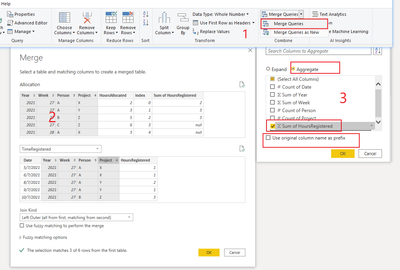
1. Merge Queries

2. Hold down the shift key to select multiple matching columns, and click OK

3. Aggregate

vangzhengmsft_0-1635128173513.png

Result:

vangzhengmsft_2-1635128572870.png

Please refer to the attachment below for details. Hope this helps.


Best Regards,
Community Support Team _ Zeon Zheng


If this post helps, then please consider Accept it as the solution to help the other members find it more quickly.

View solution in original post

3 REPLIES 3
Anonymous
Not applicable

@Anonymous Try this:

Calc_column=var Current_Year='Allocation'[Year]

var Current_Week='Allocation'[Week]

var Current_Person='Allocation'[Person]

var Current_Project='Allocation'[Project]

var tempTable=FILTER('TimeRegistered','TimeRegistered'[Year]=Current_Year&&'TimeRegistered'[Week]=Current_Week&&'TimeRegistered'[Person]=Current_Person&&'TimeRegistered'[Project]=Current_Project)

return SUMX(tempTable,[HoursRegistered])

Anonymous
Not applicable

This works well! Thanks


I am wondering if its possible to do the same thing in Power Query? As I would like to filter the rows of this table using the new column created.

Hi, @Anonymous 


In Power Query:


1. Merge Queries

2. Hold down the shift key to select multiple matching columns, and click OK

3. Aggregate

vangzhengmsft_0-1635128173513.png

Result:

vangzhengmsft_2-1635128572870.png

Please refer to the attachment below for details. Hope this helps.


Best Regards,
Community Support Team _ Zeon Zheng


If this post helps, then please consider Accept it as the solution to help the other members find it more quickly.

Helpful resources

Announcements
Power BI DataViz World Championships

Power BI Dataviz World Championships

The Power BI Data Visualization World Championships is back! Get ahead of the game and start preparing now!

December 2025 Power BI Update Carousel

Power BI Monthly Update - December 2025

Check out the December 2025 Power BI Holiday Recap!

FabCon Atlanta 2026 carousel

FabCon Atlanta 2026

Join us at FabCon Atlanta, March 16-20, for the ultimate Fabric, Power BI, AI and SQL community-led event. Save $200 with code FABCOMM.