
cancel
Showing results for 
Search instead for 
Did you mean: 

Get Fabric Certified for FREE during Fabric Data Days. Don't miss your chance! Request now

Reply
Anonymous
Not applicable

How to create the mutiple pie chart based on category type and coloured on cost ??

pic345.JPG

3 REPLIES 3
v-eachen-msft
Community Support
Community Support

Hi @Anonymous ,


You could create these tables based on category type. Then set the color in the data color. According to your image, I think you want to use Donut chart instead of Pie chart.


Community Support Team _ Eads
If this post helps, then please consider Accept it as the solution to help the other members find it.
Anonymous
Not applicable

Sorry my bad , yes i need to create donut chart. I dont want to use table matrix. is there any work around for this.

Hi @Anonymous ,


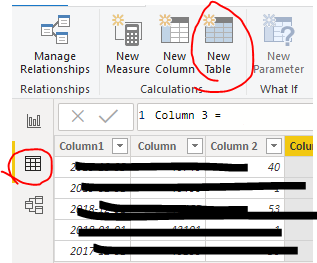
The "table" is not the table visual. You need to create tables in the data tab.

5-1.PNG


Community Support Team _ Eads
If this post helps, then please consider Accept it as the solution to help the other members find it.

Helpful resources

Announcements
November Power BI Update Carousel

Power BI Monthly Update - November 2025

Check out the November 2025 Power BI update to learn about new features.

Fabric Data Days Carousel

Fabric Data Days

Advance your Data & AI career with 50 days of live learning, contests, hands-on challenges, study groups & certifications and more!

FabCon Atlanta 2026 carousel

FabCon Atlanta 2026

Join us at FabCon Atlanta, March 16-20, for the ultimate Fabric, Power BI, AI and SQL community-led event. Save $200 with code FABCOMM.

Top Solution Authors
Top Kudoed Authors