Don't miss your chance to take exam DP-600 or DP-700 on us!
Request nowLearn from the best! Meet the four finalists headed to the FINALS of the Power BI Dataviz World Championships! Register now
I have a set of measures like Average Satisfaction, average Score, etc. which I want to map in a table. Column values are the different periods for these measures. I also want to add another column that shows % Changes in these measures.
Table below for example. (% Change = (Period2 - Period1)/Period 1
Parameters Period1 Period2 %Change
Param1 30 40 33%
Param2 78% 87% 12%
Param3 4.67 7.2 54%
I am not sure how to work out this table. Thank you for your help
Solved! Go to Solution.
Hi @RishabhS ,
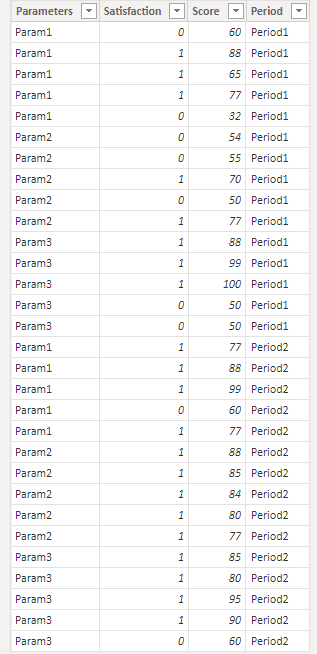
Suppose we have a table like this.
then please new these measures:
Period1 =
SWITCH(
MAX('Table'[Parameters]),
"Param1",[Period1 Average Score],
"Param2",[Period1 Average Satisfaction],
"Param3",[Period1 Average Score]
)Period2 =
SWITCH(
MAX('Table'[Parameters]),
"Param1",[Period2 Average Score],
"Param2",[Period2 Average Satisfaction],
"Param3",[Period2 Average Score]
)%Change = DIVIDE([Period2]-[Period1],[Period1])
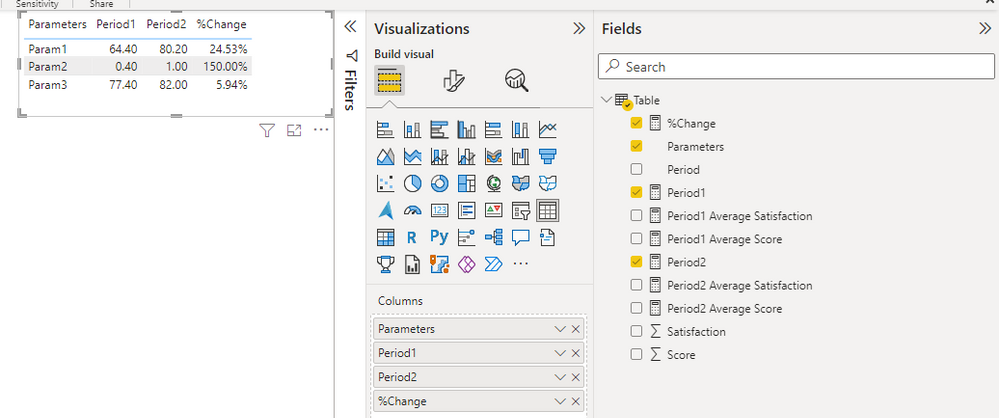
result:
Best Regards,
Gao
Community Support Team
If there is any post helps, then please consider Accept it as the solution to help the other members find it more quickly. If I misunderstand your needs or you still have problems on it, please feel free to let us know. Thanks a lot!
How to get your questions answered quickly -- How to provide sample data
Hi @RishabhS ,
Suppose we have a table like this.
then please new these measures:
Period1 =
SWITCH(
MAX('Table'[Parameters]),
"Param1",[Period1 Average Score],
"Param2",[Period1 Average Satisfaction],
"Param3",[Period1 Average Score]
)Period2 =
SWITCH(
MAX('Table'[Parameters]),
"Param1",[Period2 Average Score],
"Param2",[Period2 Average Satisfaction],
"Param3",[Period2 Average Score]
)%Change = DIVIDE([Period2]-[Period1],[Period1])
result:
Best Regards,
Gao
Community Support Team
If there is any post helps, then please consider Accept it as the solution to help the other members find it more quickly. If I misunderstand your needs or you still have problems on it, please feel free to let us know. Thanks a lot!
How to get your questions answered quickly -- How to provide sample data
Hi @RishabhS
Can you create one sample pbix file and share in Google Drive (any one can access the file), it will help
Also share the expected result screenshot based on your pbix file
Thanks
Proud to be a Super User! | |
I am working on office systems. Can't share any files. IS there any other way I can help you recreate this scenario?
Share feedback directly with Fabric product managers, participate in targeted research studies and influence the Fabric roadmap.
Check out the February 2026 Power BI update to learn about new features.
| User | Count |
|---|---|
| 50 | |
| 40 | |
| 37 | |
| 14 | |
| 14 |
| User | Count |
|---|---|
| 85 | |
| 69 | |
| 37 | |
| 29 | |
| 27 |