cancel
Showing results for 
Search instead for 
Did you mean: 

The Power BI Data Visualization World Championships is back! Get ahead of the game and start preparing now! Learn more

Reply
TomEluscious
Frequent Visitor

How to create relationship in an Email dashboard?

Hi all,


I'm currently working on an email dashboard and want to analyze if an email leads to an order. 

The order is assigned to the email if the customer placed an order in three days.

I have two tables the email table with al the emails send out to the customers and the order table with al the order details. Now I want to make a relationship between both tables, but this is not possible on send_date and order_date. The values are not the same. How can I make the relationship in such a way that it can take orders of three days into account?


Email_table:

email_campaign || Email                  || Send_date || Click

target_email         || piet@gmail.com || 21-5-2018  || 1


order_table:

Email                 || Ordernummer  || Order_date || order_value

piet@gmail.com|| X108                   || 22-5-2018    || 20


End result:

email_campaign || Email                  || Send_date || Click || order_date || order_value

target_email         || piet@gmail.com || 21-5-2018  || 1       || 22-5-2018    || 20


1 ACCEPTED SOLUTION

Hi,


@TomEluscious wrote:

Thank you for your explanation. In this example you are right, but what if I a customer received another target email. Then the email adress is not unique anymore?


Email_table:

email_campaign || Email                  || Send_date || Click

target_email_1      || piet@gmail.com || 21-5-2018  || 1

target_email_2      || piet@gmail.com || 24-5-2018  || 1


order_table:

Email                 || Ordernummer  || Order_date || order_value

piet@gmail.com|| X108                   || 22-5-2018    || 20

piet@gmail.com|| X120                   || 25-5-2018    || 26


End result:

email_campaign || Email                  || Send_date || Click || order_date || order_value

target_email_1      || piet@gmail.com || 21-5-2018  || 1       || 22-5-2018    || 20

target_email_2      || piet@gmail.com || 24-5-2018  || 1       || 25-5-2018    || 26


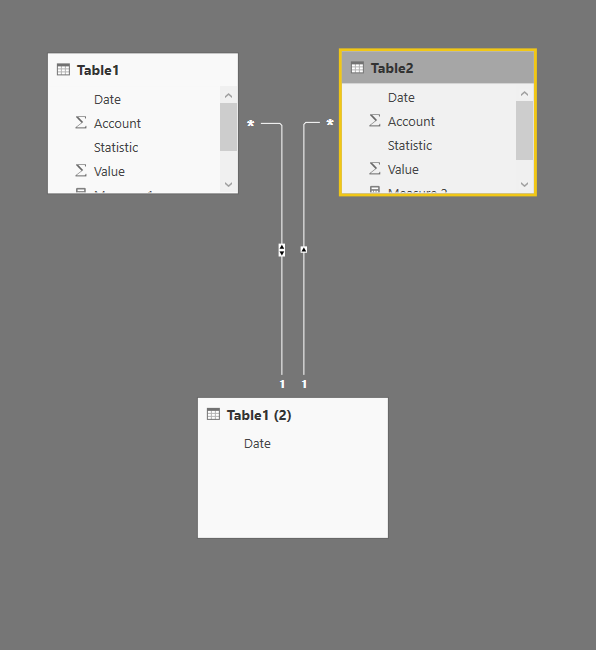
In this case where you will have multiple emails in both the tables, you can add a bridge table between these tables that will have all the unique Emails in it and join the Order and Email table using this bridge table. The Modle would look something like the one in the below screenshot

relationship.PNG


In the above screenshot, Date column in Table1(2) will have unique dates. In your case, this will be all unique email Ids

View solution in original post

4 REPLIES 4
jthomson
Solution Sage
Solution Sage

Is there actually anything unique within your data model that can be used to connect the two tables?

Thejeswar
Super User
Super User

Hi,

Join the tables based on Email Column


FYR, screenshot below

rela.PNG


Note: The Image shows a 1:1 relationship. It there is a many to one relationship, correspondingly the model has to be changes

Thank you for your explanation. In this example you are right, but what if I a customer received another target email. Then the email adress is not unique anymore?


Email_table:

email_campaign || Email                  || Send_date || Click

target_email_1      || piet@gmail.com || 21-5-2018  || 1

target_email_2      || piet@gmail.com || 24-5-2018  || 1


order_table:

Email                 || Ordernummer  || Order_date || order_value

piet@gmail.com|| X108                   || 22-5-2018    || 20

piet@gmail.com|| X120                   || 25-5-2018    || 26


End result:

email_campaign || Email                  || Send_date || Click || order_date || order_value

target_email_1      || piet@gmail.com || 21-5-2018  || 1       || 22-5-2018    || 20

target_email_2      || piet@gmail.com || 24-5-2018  || 1       || 25-5-2018    || 26

Hi,


@TomEluscious wrote:

Thank you for your explanation. In this example you are right, but what if I a customer received another target email. Then the email adress is not unique anymore?


Email_table:

email_campaign || Email                  || Send_date || Click

target_email_1      || piet@gmail.com || 21-5-2018  || 1

target_email_2      || piet@gmail.com || 24-5-2018  || 1


order_table:

Email                 || Ordernummer  || Order_date || order_value

piet@gmail.com|| X108                   || 22-5-2018    || 20

piet@gmail.com|| X120                   || 25-5-2018    || 26


End result:

email_campaign || Email                  || Send_date || Click || order_date || order_value

target_email_1      || piet@gmail.com || 21-5-2018  || 1       || 22-5-2018    || 20

target_email_2      || piet@gmail.com || 24-5-2018  || 1       || 25-5-2018    || 26


In this case where you will have multiple emails in both the tables, you can add a bridge table between these tables that will have all the unique Emails in it and join the Order and Email table using this bridge table. The Modle would look something like the one in the below screenshot

relationship.PNG


In the above screenshot, Date column in Table1(2) will have unique dates. In your case, this will be all unique email Ids

Helpful resources

Announcements
Power BI DataViz World Championships

Power BI Dataviz World Championships

The Power BI Data Visualization World Championships is back! Get ahead of the game and start preparing now!

December 2025 Power BI Update Carousel

Power BI Monthly Update - December 2025

Check out the December 2025 Power BI Holiday Recap!

FabCon Atlanta 2026 carousel

FabCon Atlanta 2026

Join us at FabCon Atlanta, March 16-20, for the ultimate Fabric, Power BI, AI and SQL community-led event. Save $200 with code FABCOMM.