Join us at FabCon Atlanta from March 16 - 20, 2026, for the ultimate Fabric, Power BI, AI and SQL community-led event. Save $200 with code FABCOMM.
Register now!The Power BI Data Visualization World Championships is back! Get ahead of the game and start preparing now! Learn more
Hi,
I have table of data , which contains, Item_ID, mail_type , weight, height and Postal code in Cloudera system.
I want to see the analysis in geo map using postal code ?
How to create Postal code geo dimension ?
Please guide me.
Thanks,
Syam.
Hi Syam,
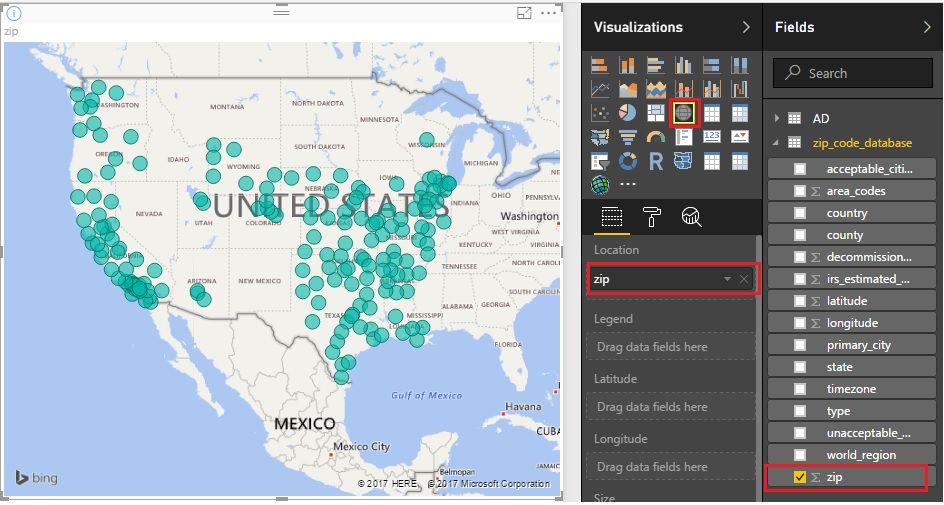
You can use map visualization. Just drag the zip code to the “Location”. Maybe some zips of some countries aren’t supported by now. You can have try. BTW, Cloudera isn’t officially supported by Power BI by now. You still can download data from Cloudera as “xlsx” format or some other formats Power BI can support.Please have a try.
Reference: https://powerbi.microsoft.com/en-us/guided-learning/powerbi-learning-3-5-create-map-visualizations/
Best Regards!
Dale
Hi @syam_srikanth,
Could you please mark the proper post as answer if it worked? More about this topic, please feel free to post here.
Best Regards!
Dale
Hi Friends,
I have table of data contains Iteam_id, mail_type, height, weight , date , time and Postal code.
Now we want to see the analysis :
How much weight carrying w.r.t postal code in geo map chart.
For this how to map postal code ?
how create postal code geo dimension ?
Please guide me.
Thanks.
Syam.
The Power BI Data Visualization World Championships is back! Get ahead of the game and start preparing now!
| User | Count |
|---|---|
| 44 | |
| 40 | |
| 33 | |
| 31 | |
| 23 |
| User | Count |
|---|---|
| 127 | |
| 116 | |
| 90 | |
| 73 | |
| 69 |