Share feedback directly with Fabric product managers, participate in targeted research studies and influence the Fabric roadmap.
Sign up nowGet Fabric certified for FREE! Don't miss your chance! Learn more
How to create except row value column?
I have a column with values
| Channel |
| A |
| B |
| C |
| D |
| E |
| F |
| G |
| H |
| I |
| J |
| K |
| L |
want to create a new column where I don't want(except) A, C, D, G, H
I need output like -
| Channel |
| B |
| E |
| F |
| I |
| J |
| K |
| L |
If you want it in another table, you can create a new calculated table:
NewTable = FILTER(Table1, NOT Table1[Channel] IN { "A", "C", "D", "G", "H"})
or alternatively:
NewTable2 = EXCEPT(ALL(Table1[Channel]),{ "A", "C", "D", "G", "H"})
If you want it in a table visual you can ust use the visual level filters and deselect the letters you don't want shown.
I don't want to create a new table. this is not working.
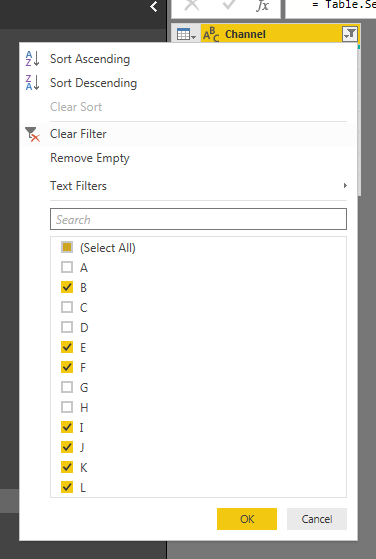
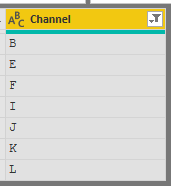
@adityavighne In that case, just filter the column in "Query Editor"
Proud to be a PBI Community Champion
Share feedback directly with Fabric product managers, participate in targeted research studies and influence the Fabric roadmap.
If you love stickers, then you will definitely want to check out our Community Sticker Challenge!
Check out the January 2026 Power BI update to learn about new features.
| User | Count |
|---|---|
| 63 | |
| 62 | |
| 42 | |
| 20 | |
| 18 |