Join us at FabCon Atlanta from March 16 - 20, 2026, for the ultimate Fabric, Power BI, AI and SQL community-led event. Save $200 with code FABCOMM.
Register now!The Power BI Data Visualization World Championships is back! Get ahead of the game and start preparing now! Learn more
Hi,
I have a table and using Power BI Desktop
Im trying to display this data
| ID | Case ID | EMP NAME |
| 1 | AAA | Joe |
| 1 | AAA | Mark |
| 2 | BBB | Joe |
| 3 | CCC | David |
| 3 | CCC | Joe |
| 3 | CCC | Mark |
and using Power BI Desktop
I want to display the same data like the below table
How can I do this using DAX
| ID | Case ID | EMP NAME | DIVIDE |
| 1 | AAA | Joe | 0.5 |
| Mark | 0.5 | ||
| 2 | BBB | Joe | 1 |
| 3 | CCC | David | 0.33 |
| Joe | 0.33 | ||
| Mark | 0.33 |
Thanks in advance
Solved! Go to Solution.
Hi @powerbi_bi,
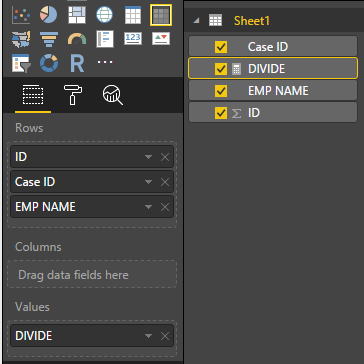
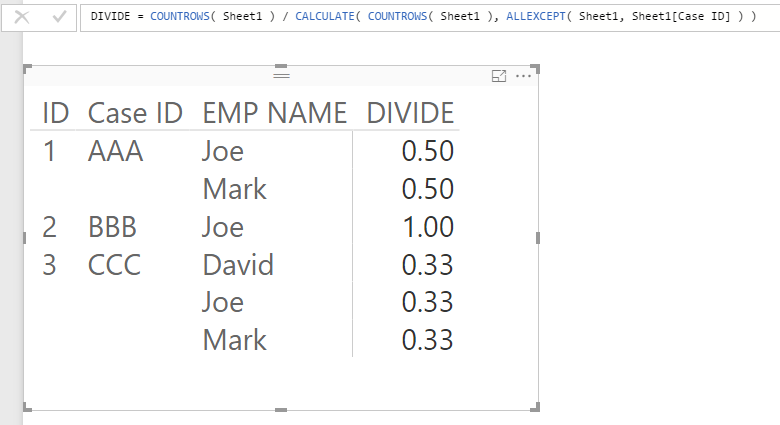
In your scenario, you can create a Matrix visual, and place ID, Case ID, EMP NAME columns in Rows property. Then create a measure like below and place it in Values property:
DIVIDE = COUNTROWS( Sheet1 ) / CALCULATE( COUNTROWS( Sheet1 ), ALLEXCEPT( Sheet1, Sheet1[Case ID] ) )
If you have any question, please feel free to ask.
Best Regards,
Qiuyun Yu
Hi @powerbi_bi,
In your scenario, you can create a Matrix visual, and place ID, Case ID, EMP NAME columns in Rows property. Then create a measure like below and place it in Values property:
DIVIDE = COUNTROWS( Sheet1 ) / CALCULATE( COUNTROWS( Sheet1 ), ALLEXCEPT( Sheet1, Sheet1[Case ID] ) )
If you have any question, please feel free to ask.
Best Regards,
Qiuyun Yu
One way is to create another table:
AAA
BBB
CCC
Create a relationship between the tables. Then, in this new table, create a column like so:
Column = 1 / COUNTROWS(RELATEDTABLE('Cases')) Create a matrix with ID, Case ID and EMP NAME and this column.
The Power BI Data Visualization World Championships is back! Get ahead of the game and start preparing now!
Check out the November 2025 Power BI update to learn about new features.
| User | Count |
|---|---|
| 66 | |
| 45 | |
| 41 | |
| 29 | |
| 19 |
| User | Count |
|---|---|
| 201 | |
| 126 | |
| 103 | |
| 72 | |
| 54 |