Join us at FabCon Atlanta from March 16 - 20, 2026, for the ultimate Fabric, Power BI, AI and SQL community-led event. Save $200 with code FABCOMM.
Register now!The Power BI Data Visualization World Championships is back! Get ahead of the game and start preparing now! Learn more
Hello Power BI Community,
I am having a trouble creating a filtered table from one big table.
In my big file, I have many columns of data, but I just would like to create
a new table with below three columns using DAX.
What is the right DAX expression to achieve this??
I would like to create a table with columns
1) Type, 2) Formula, and 3) Brand
From the big file, first I want to extract a data with "Type" A.
Now I have a data set with just Type A.
Then I want to distinct Formula, so I have a unique set of Formula for Type A.
Then I would like to have brand information associated with Formula.
My desired output should look like this dummy data.
Appreciate your help.
Many thanks,
H
Solved! Go to Solution.
Hi,
If I understand correctly you want a uique list for the columns Type, Formula and Brand?
I cannot reach your dataset because it is on your SharePoint.. also the url can be seen maybe good to know.
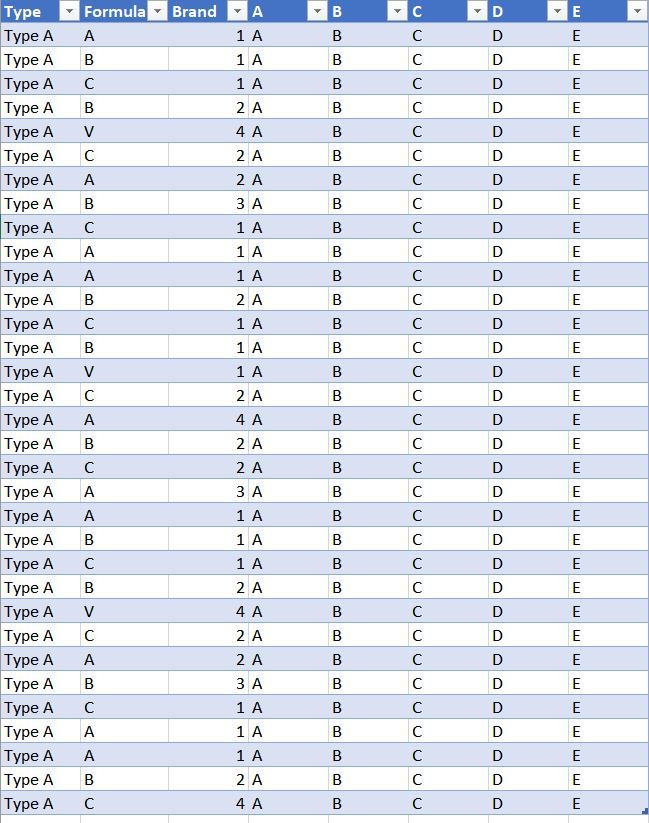
Based on this "Big table".
Try this formule:
SmallerBigTable = SUMMARIZE( BigTable; BigTable[Type]; BigTable[Formula]; BigTable[Brand] )
Result:
If your goal is to get the distinct columns you can also use Power Query, select the columns and choose "Remove duplicates".
My above example is a New Table based on a DAX expression. This comes handy when you also when to do a calculation for this table. Doing that it is suggested to use ADDCOLUMNS instread of doing the calculation in the SUMMARIZE function.
Example:
SmallerBigTable =
ADDCOLUMNS (
SUMMARIZE ( BigTable; BigTable[Type]; BigTable[Formula]; BigTable[Brand] );
"Count of rows"; COUNTA ( BigTable[A] )
)Hope this helps!
Try this:
SmallerBigTable = SUMMARIZE( FILTER( BigTable; BigTable[Type]="A" ); BigTable[Type]; BigTable[Formula]; BigTable[Brand] )
Hi,
If I understand correctly you want a uique list for the columns Type, Formula and Brand?
I cannot reach your dataset because it is on your SharePoint.. also the url can be seen maybe good to know.
Based on this "Big table".
Try this formule:
SmallerBigTable = SUMMARIZE( BigTable; BigTable[Type]; BigTable[Formula]; BigTable[Brand] )
Result:
If your goal is to get the distinct columns you can also use Power Query, select the columns and choose "Remove duplicates".
My above example is a New Table based on a DAX expression. This comes handy when you also when to do a calculation for this table. Doing that it is suggested to use ADDCOLUMNS instread of doing the calculation in the SUMMARIZE function.
Example:
SmallerBigTable =
ADDCOLUMNS (
SUMMARIZE ( BigTable; BigTable[Type]; BigTable[Formula]; BigTable[Brand] );
"Count of rows"; COUNTA ( BigTable[A] )
)Hope this helps!
@Anonymous
SmallerBigTable = SUMMARIZE( BigTable; BigTable[Type]; BigTable[Formula]; BigTable[Brand] )
Above formula works great, except for one problem.
When I put above DAX, it brings all Types. How can I reformat the DAX expression
so that it will extract just Type A?
Many thanks,
H
Try this:
SmallerBigTable = SUMMARIZE( FILTER( BigTable; BigTable[Type]="A" ); BigTable[Type]; BigTable[Formula]; BigTable[Brand] )
@Anonymous
Perfect!
Many thanks!
H
The Power BI Data Visualization World Championships is back! Get ahead of the game and start preparing now!
| User | Count |
|---|---|
| 61 | |
| 46 | |
| 40 | |
| 38 | |
| 22 |
| User | Count |
|---|---|
| 176 | |
| 131 | |
| 118 | |
| 82 | |
| 54 |