Join us at FabCon Atlanta from March 16 - 20, 2026, for the ultimate Fabric, Power BI, AI and SQL community-led event. Save $200 with code FABCOMM.
Register now!The Power BI Data Visualization World Championships is back! Get ahead of the game and start preparing now! Learn more
I am trying to create a filter that will allow me to
select a date range in which a customer hasn't made a purchase albeit two years, 6 months etc.(reading from the transaction date column)
select if the customer bought grapes and any other fruit or any combination in the last two years(last fruit buying date column)
select customers who haven't made any purchase in the last year.
Initially, I tried, the formulas as suggested by @lc_finance below but they end up as columns whilst I am trying to create filters that would allow me to select product and range as required.
var currentDate = LASTDATE('Date'[Date])
var past2Years = DATESBETWEEN('Date'[Date],DATEADD(currentDate,-2,YEAR),currentDate)
var datesInThePast2YearswithGrapes = CALCULATE(COUNTROWS('Sales table'), 'Date'[Date] IN past2Years , 'Sales table'[products] = "grapes")
RETURN IF(datesInThePast2YearswithGrapes= BLANK(), TRUE, BLANK())
Grapes and something else =
var currentDate = LASTDATE('Date'[Date])
var past2Years = DATESBETWEEN('Date'[Date],DATEADD(currentDate,-2,YEAR),currentDate)
var datesInThePast2YearswithGrapes = CALCULATE(COUNTROWS('Sales table'), 'Date'[Date] IN past2Years , 'Sales table'[products] = "grapes")
var datesInThePast2YearswithSomethingElse = CALCULATE(COUNTROWS('Sales table'), 'Date'[Date] IN past2Years , NOT 'Sales table'[products] = "grapes")
RETURN IF(NOT datesInThePast2YearswithGrapes= BLANK() && NOT datesInThePast2YearswithSomethingElse= BLANK(), TRUE, BLANK())
No fruit past year =
var currentDate = LASTDATE('Date'[Date])
var past2Years = DATESBETWEEN('Date'[Date],DATEADD(currentDate,-1,YEAR),currentDate)
var datesInThePast2YearswithFruits = CALCULATE(COUNTROWS('Sales table'), 'Date'[Date] IN past2Years)
RETURN IF(datesInThePast2YearswithFruits= BLANK(), TRUE, BLANK())```
below is my sample data
customerid products transactiondate lastfruitbuyingdate
1001 grapes 1/1/2017 1/1/2017
1002 Oranges 2/1/2017 1/1/2017
1001 melon 3/1/2017 1/1/2017
1003 grapes 1/1/2017 2/3/2018
1004 citrus 1/1/2017 1/4/2017
1005 grapes 4/1/2017 2/4/2017
1003 grapes 1/1/2018 5/4/2018
1006 grapes 1/1/2017 6/7/2018
1007 mangoes 1/1/2017 7/7/2018
1008 grapes 1/1/2019 7/8/2019
1002 grapes 1/5/2019 7/9/2019
Any help would be highly apprciated.
Solved! Go to Solution.
Hi @Dee
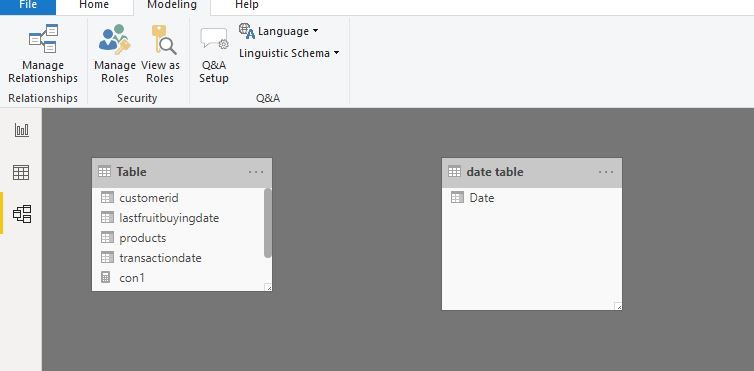
Leave two tables no relationship
Create measures
min selected = MIN('date table'[Date])
max each id = CALCULATE(MAX('Table'[transactiondate]),ALLEXCEPT('Table','Table'[customerid]))
con1 = CALCULATE(DISTINCTCOUNT('Table'[customerid]),FILTER('Table',[max each id]<[min selected]))
con 2 = CALCULATE(DISTINCTCOUNT('Table'[customerid]),FILTER('Table','Table'[lastfruitbuyingdate]>=[min selected]&&'Table'[lastfruitbuyingdate]<=TODAY()))
con3 = CALCULATE(DISTINCTCOUNT('Table'[customerid]),FILTER('Table',[max each id]<[min selected]))
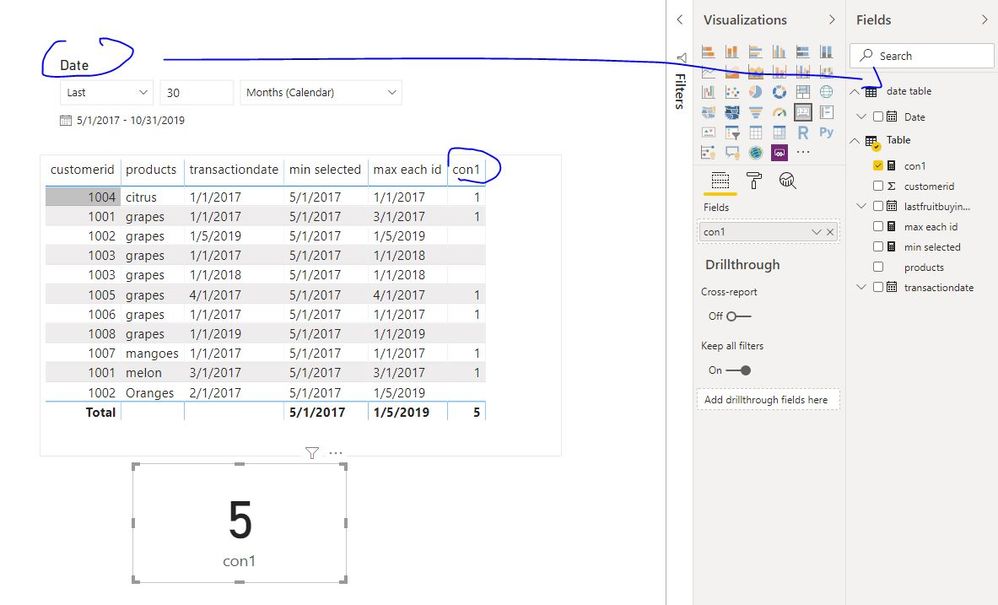
result 1
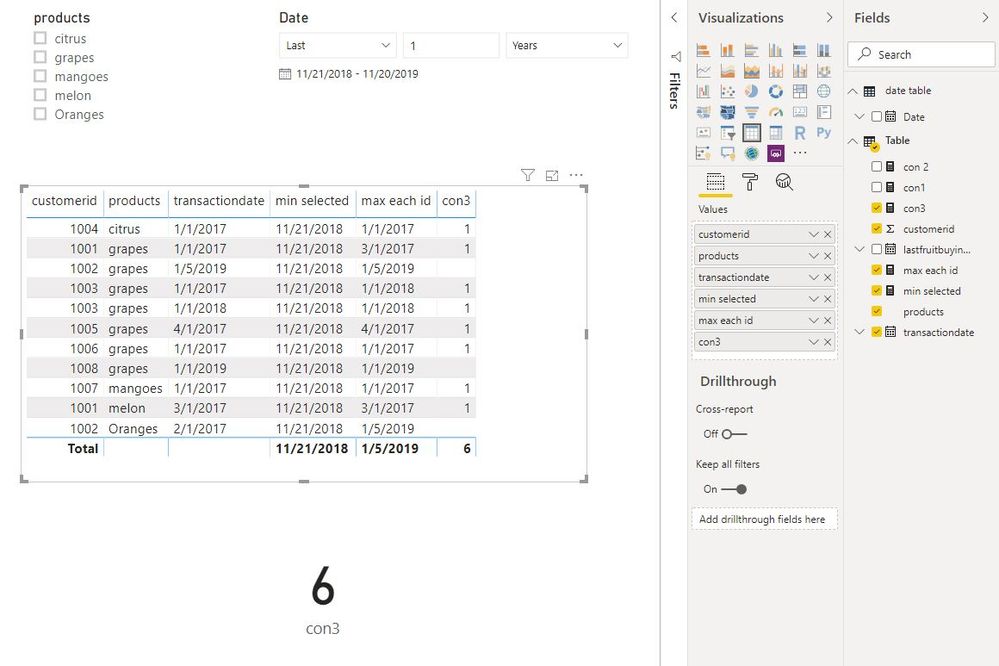
result 2
result 3
Hi @Dee
Based on my understanding,
1. select a date range in which a customer hasn't made a purchase albeit two years, 6 months etc.(reading from the transaction date column)
eg, select a date period from slicer: last 2 years and 6 months(2017/5~2019/11),
we need to find the customers who' transactiondate aren't in this period (transactiondate<2017/5).
2. select if the customer bought grapes and any other fruit or any combination in the last two years(last fruit buying date column)
eg, select "grapes" from "product" slicer,
find the customers who bought grapes last fruit buying date column are in the last two years(2017/11~2019/11).
(it is to say the last fruit buying date of customers who bought grapes is >=2017/11 and <=today)
3. select customers who haven't made any purchase in the last year.
all the transactiondate for one customer aren't in the period of 2018/11~2019/11.
Is my understanding correct?
Best Regards
Maggie
Yes, but now I want it in a filter dropdown to allow me to select the options based on the data.
Hi @Dee
Leave two tables no relationship
Create measures
min selected = MIN('date table'[Date])
max each id = CALCULATE(MAX('Table'[transactiondate]),ALLEXCEPT('Table','Table'[customerid]))
con1 = CALCULATE(DISTINCTCOUNT('Table'[customerid]),FILTER('Table',[max each id]<[min selected]))
con 2 = CALCULATE(DISTINCTCOUNT('Table'[customerid]),FILTER('Table','Table'[lastfruitbuyingdate]>=[min selected]&&'Table'[lastfruitbuyingdate]<=TODAY()))
con3 = CALCULATE(DISTINCTCOUNT('Table'[customerid]),FILTER('Table',[max each id]<[min selected]))
result 1
result 2
result 3
The Power BI Data Visualization World Championships is back! Get ahead of the game and start preparing now!
| User | Count |
|---|---|
| 38 | |
| 38 | |
| 36 | |
| 28 | |
| 28 |
| User | Count |
|---|---|
| 124 | |
| 88 | |
| 74 | |
| 66 | |
| 65 |