I need to create the column "ValueCalculated" and the column "TotalValueCalculated" for the next example:
| MonthYear | Value | Percent | ValueCalculated | TotalValueCalculated |
| jan/13 | 15000 | 1,20 | 0 | 15000 |
| feb/13 | 8500 | 0,80 | 120 | 23620 |
| mar/13 | -2500 | 0,05 | 12 | 21132 |
| apr/13 | 0 | -0,03 | -6 | 21125 |
| may/13 | 0 | 0,38 | 80 | 21206 |
| jun/13 | 0 | 0,11 | 23 | 21229 |
| jul/13 | 0 | 0,35 | 74 | 21303 |
| aug/13 | 0 | 0,43 | 92 | 21395 |
| sep/13 | 0 | 0,74 | 158 | 21553 |
| oct/13 | 0 | 0,00 | 0 | 21553 |
| nov/13 | 0 | 0,81 | 175 | 21728 |
| dec/13 | 0 | 0,39 | 85 | 21813 |
| jan/14 | 0 | 0,10 | 22 | 21834 |
| feb/14 | 0 | 1,20 | 262 | 22096 |
| mar/14 | 0 | 0,52 | 115 | 22211 |
| apr/14 | 0 | 0,52 | 115 | 22327 |
| may/14 | 0 | 0,14 | 31 | 22358 |
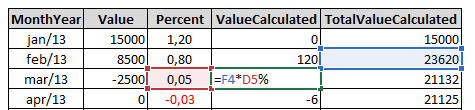
I have created the previous table on Excel, using the following formulas:
ValueCalculated: PreviousLine of TotalValueCalculated * Percent
TotalValueCalculated: PreviousLine of TotalValueCalculated + Value + ValueCalculated
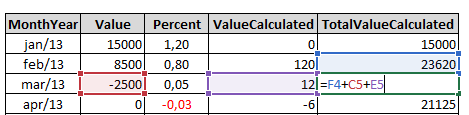
For the line 1 (jan/13), the Previous Row is 0, for the line 2 onwards use the Previous Line.
The values from MonthYear, Value and Percent I have on my database.
I started this 2 columns with this:
Table =
VAR __table1 = ALL(Calendar[MonthYear]; Calendar[NumberMonthYear])
VAR __table2 =
    ADDCOLUMNS(
        __table1;
        "Value"; ROUND(CALCULATE([Values]; BI_Sales[ID] = 12345); 0);
        "Percent"; CALCULATE([Percent]; FILTER(BI_Percents; BI_Percents[NumberMonthYear] = [NumberMonthYear]))
    )
VAR __table3 = FILTER(__table2; Calendar[NumberMonthYear] >= MINX(FILTER(__table2; [Value] > 0); [NumberMonthYear]))
VAR __table4 = ADDCOLUMNS(__table3; "Index"; RANKX(__table3; [NumberMonthYear]; ; ASC))
RETURN
__table4
The previous DAX returns me this:
| MonthYear | NumberMonthYear | Value | Percent | Index |
| jan/13 | 201301 | 15000 | 1,20 | 1 |
| feb/13 | 201302 | 8500 | 0,80 | 2 |
| mar/13 | 201303 | -2500 | 0,05 | 3 |
| apr/13 | 201304 | 0 | -0,03 | 4 |
| may/13 | 201305 | 0 | 0,38 | 5 |
| jun/13 | 201306 | 0 | 0,11 | 6 |
| jul/13 | 201307 | 0 | 0,35 | 7 |
| aug/13 | 201308 | 0 | 0,43 | 8 |
| sep/13 | 201309 | 0 | 0,74 | 9 |
| oct/13 | 201310 | 0 | 0,00 | 10 |
| nov/13 | 201311 | 0 | 0,81 | 11 |
| dec/13 | 201312 | 0 | 0,39 | 12 |
| jan/14 | 201401 | 0 | 0,10 | 13 |
| feb/14 | 201402 | 0 | 1,20 | 14 |
| mar/14 | 201403 | 0 | 0,52 | 15 |
| apr/14 | 201404 | 0 | 0,52 | 16 |
| may/14 | 201405 | 0 | 0,14 | 17 |
Is there any way to create these two colums that I need?
For you can try, you can select the previous table and paste it on Power BI and start to use the magical DAX functions.
Just for remember, I canno't use Power Query functions to achieve this, just DAX functions.


