cancel
Showing results for 
Search instead for 
Did you mean: 

The Power BI Data Visualization World Championships is back! It's time to submit your entry. Live now!

Reply
hbirdie
New Member

How to create Custom Columns

Hello,


I hav


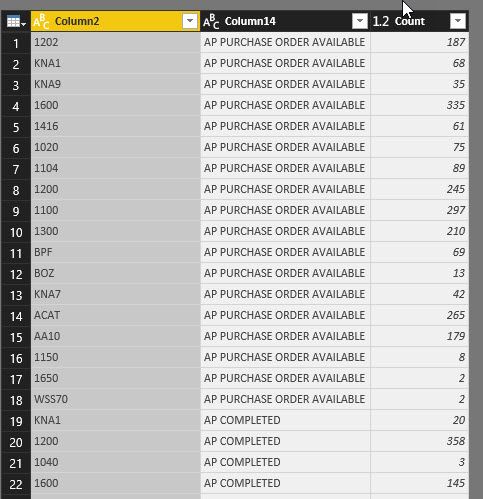
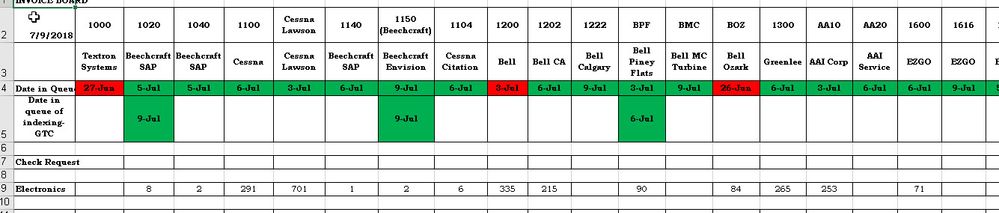
 OriginalData.jpgCrossTab-jpg.jpg


Hello,


I need my report to look like the 2nd screen shot from the 1st screen shot. Basically, column 2 should be listed horizontally and column14 vertically only in the 1st column along with its counts. Has anyone created a report like this?


Thanks in advance.


Hormuzd

6 REPLIES 6
rajulshah
Resident Rockstar
Resident Rockstar

Hello @hbirdie,


Can you please share sample data?

Anonymous
Not applicable

Hi @hbirdie


Use Matrix visual to get this.


Thanks

Raj

Hi @Anonymous,


I tried but no luck. Is there a step by step tutorial?


Thanks


HB

Anonymous
Not applicable

A simple google search will bring you hundreds of guides 🙂 here is the one for ex:


https://docs.microsoft.com/en-us/power-bi/desktop-matrix-visual


Thanks

Raj

Yes. I saw this earlier. It is not exactly what I need.

Hi @hbirdie,


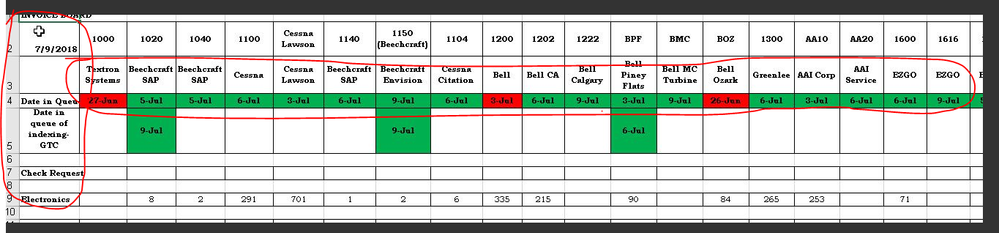
It is not possible to get the expected result completely. As there are only three columns in 1st screenshot, while the highlighted data does not exist in sample data.

1.PNG


So, what is your desired output with the provided sample table? Is any calculation needed to get required result?


Regards,

Yuliana Gu

Community Support Team _ Yuliana Gu
If this post helps, then please consider Accept it as the solution to help the other members find it more quickly.

Helpful resources

Announcements
FabCon Atlanta 2026 carousel

FabCon Atlanta 2026

Join us at FabCon Atlanta, March 16-20, for the ultimate Fabric, Power BI, AI and SQL community-led event. Save $200 with code FABCOMM.